Minecraft just got a real-world crossover that actually matters in-game. Mojang and Herschel Supply teamed up to bring physical backpacks to life with an exclusive add-on that does something genuinely useful: it expands your inventory and adds features that make managing your stuff way less painful. This isn't just cosmetic fluff.
The Collaboration Nobody Expected
When luxury backpack companies partner with video games, you usually get t-shirts and coffee mugs nobody buys. Herschel went different. PCGamesN reported that the brand redesigned several of its classic bags to feature Minecraft themes, and then made them playable. On the real-world side, you've got a bright green Creeper-themed backpack, an Enderman version with those iconic purple eyes, and a limited-edition dirt block design that's already sold out. But here's the good part: you don't need to spend real money to enjoy this in Minecraft. The digital version is free on the Marketplace.
The Herschel Backpack Trials Add-On is available right now, and if you've ever felt like your inventory is suffocating you halfway through a mining run, this is worth your time.
What You're Getting
When you download and equip the backpack, it's not just a skin swap. The add-on comes with progression built in through Minecraft's Trials system. You'll complete challenges to upgrade the bag itself, unlocking better features as you go. The visual design mirrors the real Herschel bags pretty closely, which is nice if you're into that sort of cross-media consistency.
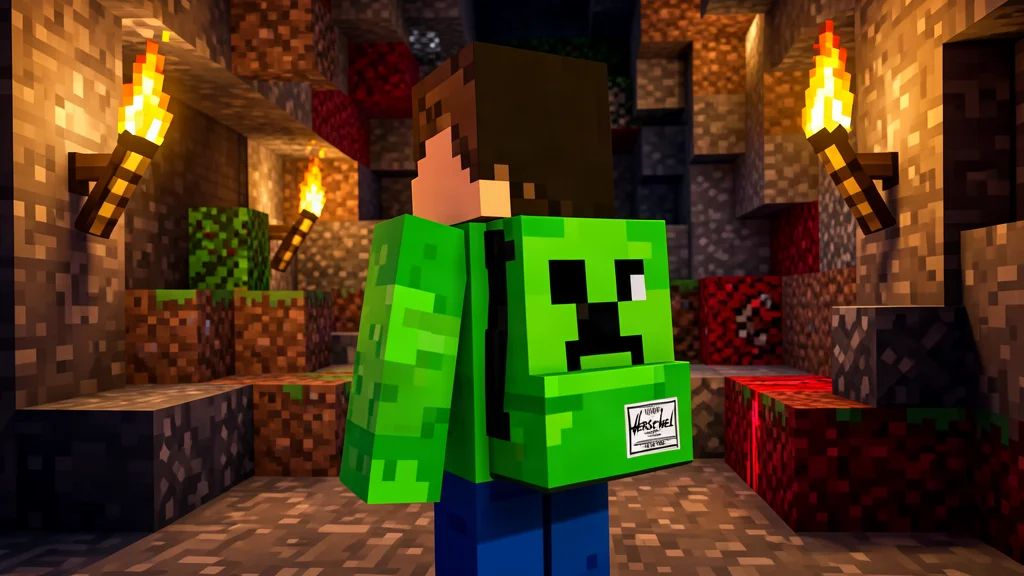
The dirt block backpack (limited edition in real life, available digitally) is the rarest version. Herschel kept the one with the most Minecraft DNA as the rare drop, which feels right.
Auto Sort: The Feature That Saves You
Here's where this stops being just a collaboration item. When you upgrade your backpack through Trials challenges, you unlock Auto Sort. This feature automatically organizes your inventory when you place items in it, grouping similar items together without you having to manually shuffle everything around.
Think about it. You've been caving for an hour. Your inventory is a disaster: tools scattered everywhere, random ore samples, half a dozen cobblestone stacks, seeds you didn't mean to collect. You place it all in your backpack, and it sorts itself. That's quality of life most vanilla players never get.
The expansion also lets you hold more items overall. The base backpack gives you more space, but Auto Sort is unlocked as you progress through Trials. So you're not getting the full benefit on day one, which is fair. It keeps there being a reason to actually play with the thing rather than just equip it and forget it.
Auto Restock and Tool Repair
Auto Restock is another upgrade that refills your hand with matching items from your bag when building. Running out of cobblestone mid-build? No problem. The backpack automatically pulls from your stored supplies.
With certain upgrades, the backpack can even repair your tools as you travel. If you've got one of these on your back, the Mending enchantment becomes redundant. That's a huge quality-of-life improvement for long mining trips or exploration runs.
How Trials Progression Works
The Minecraft Marketplace has been pushing Trials content heavily in 26.2, and this add-on slots right into that. You'll need to complete Trials challenges to upgrade your backpack. If you haven't done Trials before, they're mini-dungeons with combat and puzzle elements scattered throughout the world.
The progression is sensible. Earlier upgrades come quick. Later ones require real effort. Nothing feels like busywork, which is more than I can say for some Marketplace content. After you've unlocked all the features, the backpack stays upgraded permanently on your copy of the world.
The Numbers Are Wild
Completing challenges lets you unlock another page of space with another 24 slots, with a total size of 16 pages. That makes it the biggest and easiest way to carry items in the game, as it has 384 total slots compared to your normal inventory, which has 40 in total. To put that into perspective, you can carry 442,368 items when fully stacked.
I'm not sure I've ever had that many items in any of my Minecraft saves, to be honest. But if you're the type who hoards blocks you'll never use just in case you need them in the future, this backpack could be a good fix to the massive storage rooms you have to build every time.
Getting It Set Up (And It's Free)
Download the Herschel Backpack Trials Add-On from the Marketplace at no cost. Once it's in your world, you'll find the backpack through the add-on content. Equip it, find some Trials chambers, and start playing. That's it.
One thing worth noting: this is an add-on, so it works best on servers or worlds where everyone has it loaded. If you're playing on a multiplayer server, check if the admin has it enabled. Most servers running newer content will have it already, but it's worth asking.
The backpack is also cosmetic in multiplayer, meaning everyone else sees you wearing it even if they don't have the add-on, which is a nice touch.
Why This Matters
Most game collaborations feel tacked on. This one isn't. The inventory expansion is genuinely useful. Auto Sort saves real frustration. The design is solid. And it's free. You're not paying for cosmetics you don't need; you're getting a functional upgrade that makes the game less tedious.
That said, it's not revolutionary. You can live without Auto Sort. Real talk, inventory management is part of Minecraft's loop. But if you've ever felt bogged down by logistics, this makes the game feel slightly more forgiving. And if you just like looking cool while you play, the backpack designs are worth wearing.
The coolest part? This shows that collaborations can actually add something to the game instead of just slapping a brand logo on a skin. Herschel didn't just license the Minecraft name; they worked with Mojang to make something that fits into how the game actually works. If more partnerships looked like this, I wouldn't roll my eyes at Marketplace announcements.
My Take
Download it. It's free, it works, and the Auto Sort feature alone is worth five minutes of your time. If you're running a small server like I do, your players will appreciate having cleaner inventory management. And honestly, the backpack designs are sharp enough that you won't feel silly wearing them.
Just remember it's an add-on, so it only works when it's activated on your world. It won't carry over to vanilla worlds without the content. That's not a knock against it; it's just how Marketplace add-ons work. If inventory frustration is killing your vibe, this is an easy quality-of-life fix that costs you nothing but a download and a few minutes to set up.