Minecraft Redstone Repeater: Complete 2026 Guide
Redstone repeaters delay and repeat redstone signals from one to four ticks, making them absolutely essential for any contraption beyond a simple door. They're one of the most fundamental building blocks in redstone, and once you understand how they work, you'll start seeing them everywhere. If you've ever wondered why your redstone contraptions weren't firing quite right, or why some intricate doors take longer to open than others, timing delay is probably the answer.
What's Inside a Redstone Repeater?
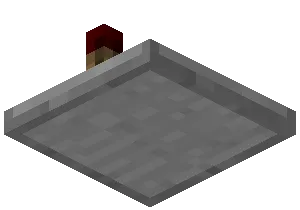
A redstone repeater is basically a block with two redstone torches inside it, positioned to act as a comparator for signals. Visually, it looks like a little stone brick with those torch nubs sticking up, and it always faces a specific direction. The pointed end shows where the signal goes out, and the flat end is where it comes in. You can rotate them however you need by right-clicking, which is handy.
The torches inside don't actually illuminate anything, obviously. They're part of a circuit mechanism that handles the timing and repetition. The repeater essentially "remembers" that it received a signal and outputs it after a delay.
How to Craft One (And Why It's Absurdly Cheap)
You need three stones, two redstone torches, and one redstone dust. Stone (the smooth kind or regular), torch, dust, torch, stone - arranged in that specific shape in your crafting table. That's genuinely it. No diamonds, no obsidian, nothing rare. A single stack of redstone can get you dozens of repeaters if you're patient enough to farm the stone and torches.
This is actually part of what makes redstone accessible to newer players.
Since repeaters are so cheap, I usually craft like ten of them at once whenever I'm gearing up for a bigger redstone project. It saves the constant back-and-forth to the crafting table. Plus, half the time you'll realize mid-build that you underestimated how many you needed (yeah, you'll do this more than once).
Understanding Delay: The Core Mechanic
Here's where it gets interesting. A redstone repeater adds a delay between receiving a signal and outputting it. By default, it's one redstone tick (which is 0.1 seconds in real time, or one tenth of a second if you prefer to think about it that way). You can increase this delay by right-clicking the repeater to cycle through 1, 2, 3, or 4 ticks.

- 1 tick delay: basically no perceptible delay, but it still "restarts" the signal
- 2 tick delay: obvious pause, useful for timing mechanisms
- 3 tick delay: commonly used in farms and sorters
- 4 tick delay: maximum delay, needed for some sorting systems and automated builds
The thing people often miss is that repeaters don't just add delay. They also "lock" the signal state when powered, which prevents signal degradation over long distances. This is why redstone wire alone isn't reliable for long runs - the signal fades after 15 blocks. Repeaters refresh it, allowing you to transmit signals across entire massive buildings without losing power.
Where You'll Use Them
Almost everywhere once you start building. Hidden door mechanisms? Repeaters. Piston doors? Repeaters. Automatic chicken farms, mob grinders, the sorting system in your storage room, redstone clocks - repeaters show up in all of it.
If you're curious about how top players design their builds, checking out community creators is worthwhile. Players like SlimyRedstone and redstonened are known for their technical expertise, and you'll find their work incorporates timing delays constantly. Even just observing how they space their repeaters teaches you a lot about signal flow.
The most common beginner use case is actually just making things work at the right time. You want a door to open, a piston to extend, and something else to happen a moment later - not all at once. Repeaters make that possible.
Practical Techniques That Solve Problems
Stacking repeaters gets mentioned a lot, but it's genuinely useful. Put two repeaters in a line facing the same direction, and you get a 2-tick minimum delay. This is how you avoid rapid pulse trains that cause farms to glitch out.

Locking (actually called "being locked") happens when you power the side of a repeater with a signal. This freezes it in its current state and prevents signal output until you remove the locking signal. It's more advanced, but once you understand it, you can build edge detectors and more sophisticated timing circuits.
One thing that trips people up: repeaters can only handle one signal direction at a time. If you try feeding input from two different sides, it'll just pick one and ignore the other. You need to combine signals properly using other components if you want multiple inputs.
Building an automatic farm? Redstoneboss is someone whose farm designs are worth studying if you want to see repeaters in a farming context. The timing spacing they use prevents item loss and keeps hopper systems running smoothly.
Getting Advanced (Without Losing Your Mind)
Comparators and repeaters together create powerful signal processing. Actually, that's not quite right for what we're discussing here - let me stick to repeaters specifically. When you combine multiple repeaters with different delays, you can create timing sequences. A 1-tick repeater followed by a 4-tick repeater gives you a 5-tick total delay, for instance.
Redstone clocks use repeaters as their core component. Four repeaters in a loop with the right configuration will pulse indefinitely, creating a clock signal that triggers other mechanisms. It's the backbone of most automated systems.
More exotic uses include signal inverters, edge detectors, and all kinds of logic gates. But honestly, if you just understand basic delay and signal refreshing, you can build 95% of what most players ever need.
If you're diving into advanced contraptions, checking out players like theredstoneprofi gives you insight into how professionals approach complex systems. Their builds showcase repeater placement patterns that are worth mimicking.
Common Mistakes and How to Avoid Them
The biggest one? Not placing repeaters frequently enough when running long redstone lines. You'll build something, test it, and it doesn't work. Then you realize the signal just faded out. Repeaters every 15 blocks solve this entirely.

Another is forgetting which way a repeater points. If the pointy end doesn't face the direction you want the signal to go, it won't do anything. Right-click to rotate them until they're aimed the right way.
People also sometimes max out the delay when they only need a 1 or 2-tick delay, which just slows everything down unnecessarily. Use the minimum delay that actually makes your build work.
And here's something specific: observers and repeaters work together, but they're not interchangeable. An observer detects block changes; a repeater just delays signals. If your automatic farm isn't triggering properly, you might be using the wrong component entirely.
For learning from examples, RedstoneFireLord has created designs worth reverse-engineering. Watch how they position repeaters in their builds and it'll improve your own instincts about placement and spacing.
The Practical Reality
Redstone repeaters aren't flashy. They don't look cool, and your friends won't be impressed that you understand them. But they're genuinely the difference between a contraption that works smoothly and one that's finicky or frustrating. Master this one component and you'll build better farms, better doors, better everything.
The good news is they're cheap, plentiful, and straightforward. Start experimenting. Build something with them, break it, rebuild it differently. That's how you develop the intuition for timing and signal flow that separates a functional builder from someone constantly troubleshooting broken redstone.

Lead writer at minecraft.how. Long-time Minecraft player running a small SMP server, testing every build, mod, and seed before writing about it.
Frequently Asked Questions
What does a redstone repeater actually do?
How do you change the delay on a redstone repeater?
Can redstone repeaters accept multiple signals at once?
What's the difference between repeaters and comparators in Minecraft?
How often should you place repeaters in long redstone lines?
Have a Question or Tip about this Guide?Community Q&A
Ask a question or help other players below. Join the discussion and share your Minecraft tips!