WebCraft: A Web-Based Minecraft Clone Written in Pure JavaScript
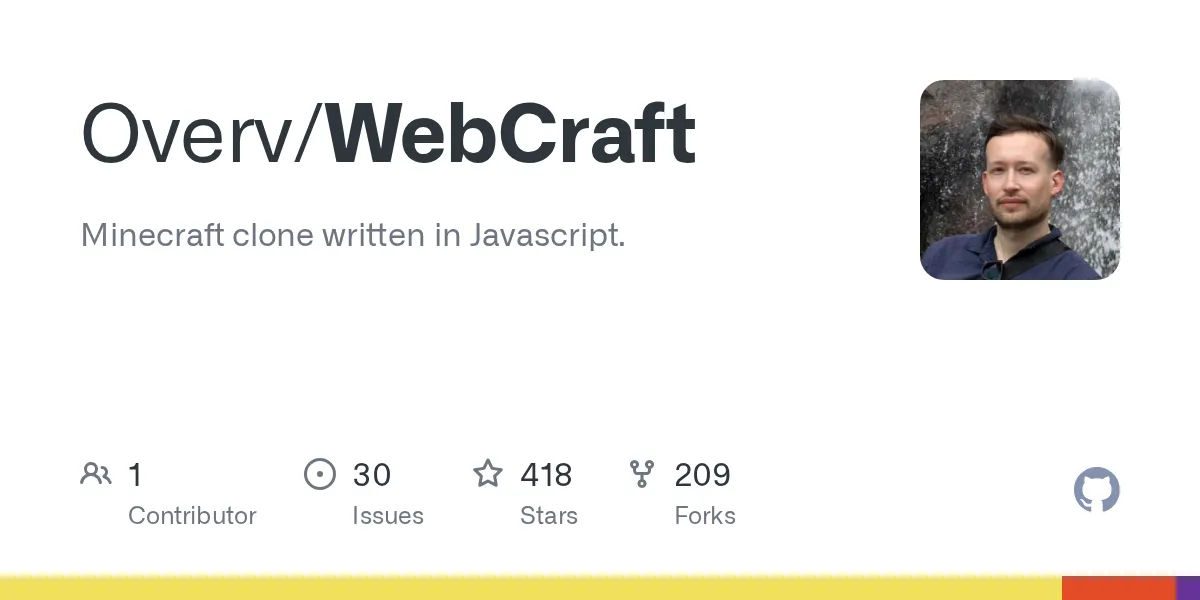
"Minecraft clone written in Javascript."
Overv/WebCraft · github.com
Ever thought about what it'd take to build a Minecraft experience entirely in your browser? WebCraft is exactly that: a JavaScript-based Minecraft clone that runs via WebGL and WebSockets, requiring nothing but a modern web browser. It's not the full survival experience you know from the official game, but if you're curious how block-based voxel worlds actually work under the hood, this project is genuinely eye-opening.
What WebCraft Is
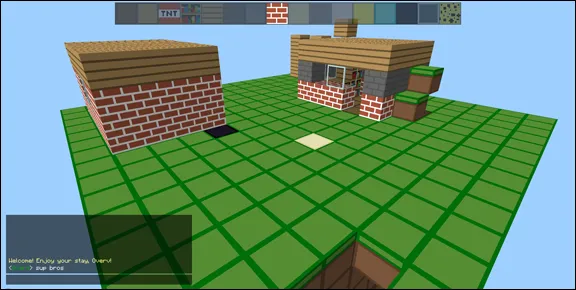
WebCraft is a Minecraft Classic recreation built from scratch using vanilla JavaScript. No Three.js, no Babylon.js, no heavy 3D frameworks. Real talk, the developer built the rendering pipeline directly on top of WebGL, which sounds hardcore until you realize it's way more efficient for rendering thousands of static cubes than dragging a full game engine along for the ride.
The project includes both singleplayer and multiplayer modes. Multiplayer uses Node.js on the backend with WebSockets to sync player actions across connected clients. What I found most interesting is how minimal the dependencies are. You're looking at glmatrix for math operations and socket.io for networking, and that's it. Everything else is custom code.
One crucial thing to mention upfront: this project is no longer actively maintained. The repository exists and the code is there, but don't expect regular updates or active support. For educational purposes or tinkering? It's invaluable. For a production multiplayer server? Look elsewhere.
Why You Might Care
There are a few solid reasons to look at WebCraft, depending on what you're after. If you're learning game development or graphics programming, this is gold. You get to see how someone structured a voxel-based world, managed rendering performance, handled physics (gravity, fluid flow), and synced game state across clients. None of it's hidden behind a proprietary engine.
If you just want to play Minecraft in your browser without installing anything? Sure, the experience is there. You can create worlds, place and remove blocks, and if you set up a server, play with friends. But I'll be straight with you: it's a Classic clone, not modern Minecraft. No survival mechanics, no mobs, no progression. It's closer to creative mode in a stripped-down form.
Students building capstone projects around game development or anyone prototyping a voxel-based game concept could learn a lot by reading through the codebase. The architecture is clean enough that you can trace how a block gets placed in the world all the way through to rendering on screen.
How the Architecture Works
The project is organized into modular JavaScript files, each handling a specific layer of the game. This World module holds the block data for your entire map. Think of it as a 3D array that tracks what's at each coordinate. The Render module takes that data and converts it into chunks (basically groups of blocks), then feeds those to WebGL for drawing.
Physics simulation runs separately. Gravity pulls falling blocks down, water and lava flow according to simple rules, and collision detection keeps you from falling through terrain. It's not complex physics, but it works for a block-based world.
Player input gets handled by the Player module, which tracks your inventory, currently selected block type, and movement. On the multiplayer side, the Network module compares your local world state with what the server knows, syncing changes across all connected players so everyone sees the same thing.
Blocks themselves are customizable through the Blocks module, where you'd define material properties like color, whether light passes through, and how it renders. If you wanted to add new block types or change existing ones, that's where you'd start.
Setting It Up (If You Want To Try It)
The singleplayer version is straightforward. You clone the repository, then open singleplayer.html in any modern browser. No build step, no node_modules nightmare. Done.
For multiplayer, you need Node.js installed (the project targets older versions, but any recent LTS should work). Install dependencies with npm, then start the server:
npm install
node server.js
Once the server's running, open multiplayer.html in your browser and it'll connect. You can then open multiple browser windows on the same server to test multiplayer, or share the connection URL with others on your local network. Remote play over the internet would need a bit of networking setup (port forwarding or ngrok), which is beyond what the project documents but definitely possible.
If something breaks or you want to go back to vanilla Minecraft, just close the browser tab. WebCraft runs entirely in memory and the browser's WebGL context, so nothing persists or modifies your system. Zero footprint to clean up.
What Makes It Stand Out
Building a voxel renderer from scratch isn't trivial. The fact that this does it without a graphics library is the highlight. WebGL is low-level enough that you see exactly how chunk geometry is generated, how faces are culled (not drawn if they're hidden), and how lighting calculations work.
The multiplayer setup is lean. Socket.io handles the messy parts of bidirectional communication, but you still see how game state gets serialized, sent over the wire, and reconciled on the client side. That's a real-world networking problem that most game tutorials gloss over.
Another detail I appreciated: the project doesn't bloat itself with features. It stays focused on the core loop of placing blocks, rendering the world, and syncing players. No GUI framework, no animation library, no package bloat. You're reading someone's pragmatic implementation decisions, not a framework showcase.
Limitations You Should Know About
Performance is the big one. Depending on your hardware and browser, you might start to stutter if you build really large structures or generate massive worlds. Rendering thousands of cubes is doable, but not infinitely scalable. Expect this to run smoothly on modern machines with smaller play areas, and maybe hitch a bit as you push it.
There's no persistence built in. Reload the page or restart the server, and your world is gone. If you wanted permanent worlds, you'd need to add database logic yourself. Same goes for any kind of server configuration, admin tools, or user authentication. It's a skeleton, not a complete server product.
The Classic mode restriction means no survival elements, no mob AI, no dungeons or loot. If you're comparing it to modern Minecraft, it's missing almost everything except the core building mechanic. That's not a flaw, just a realistic scope boundary the project set and stuck to.
Oh, and browser compatibility. This was built for the WebGL era, so very old browsers won't work. Anything from the last decade should be fine, but don't expect it to run on Internet Explorer or ancient Android devices.
If You Want Similar Projects
There are a few alternatives worth knowing about. Minecraft itself offers a free version called Minecraft Classic through their website if you just want the official experience. It's browser-based too, officially maintained, and feels more polished.
If you're specifically interested in learning voxel game development, there are cleaner starter projects. Some people recommend looking at Voxel.js or even starting with a Python library like Panda3D if you prefer a different language. These tend to have more active communities and current documentation.
For Minecraft mods and tools, our community maintains lists of tested servers and skins if you're curious about extending vanilla Minecraft instead. Our Votifier Tester and Text Generator tools can help you manage servers and create custom content without getting into JavaScript.
My Take
WebCraft scratches a very specific itch. If you want to understand how a block-based game actually works, or you're learning web graphics and game loops, it's worth a few hours of exploration. The code is readable, the architecture is sound, and you'll walk away knowing more than you started with.
For casual play? Stick with the official Minecraft. For learning? This is solid. The fact that it's no longer maintained doesn't really matter for educational purposes. A code isn't going anywhere, and what's there's well-thought-out.
It's one of those projects that proves a capable developer doesn't need a framework to build something interesting. Just skill, clear thinking, and a solid understanding of the problem. That alone makes it worth knowing exists.
Overv/WebCraft - Zlib, ★418
Lead writer at minecraft.how. Long-time Minecraft player running a small SMP server, testing every build, mod, and seed before writing about it.
Frequently Asked Questions
Is WebCraft safe to download and use?
Can I play WebCraft with my friends online?
What's the difference between WebCraft and regular Minecraft?
Do I need to install anything to play singleplayer?
Why is WebCraft no longer maintained, and does that matter?
Have a Question or Tip about this Guide?Community Q&A
Ask a question or help other players below. Join the discussion and share your Minecraft tips!