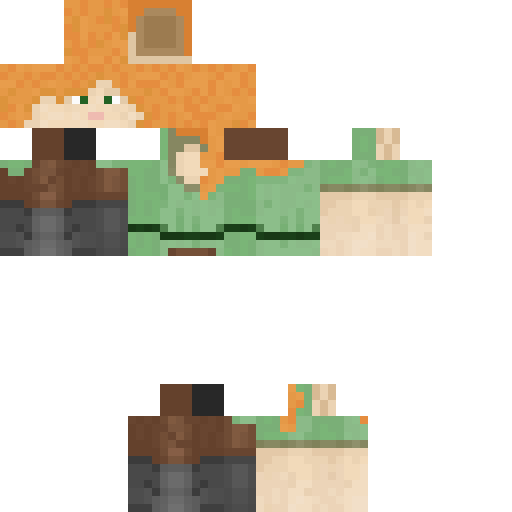
Ronaldo Minecraft Skin
✓ Approved
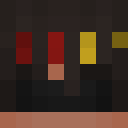
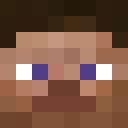
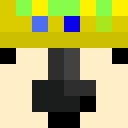
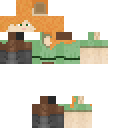
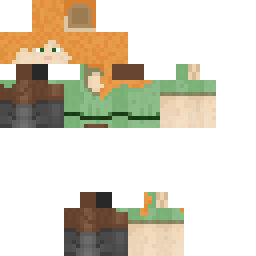
This skin gives your character the look of a well-known football player. The face has short dark hair, brown eyes, and an olive skin tone. The body wears a crisp football jersey, mostly white with blue trim on the shoulders and a visible team crest on the chest. Shorts are blue and socks are white with a blue stripe at the top. The number 7 sits on the back, just above the waist. It's a simple, clean kit that fits right in on a pitch build or any server where you want to run around as a legendary striker. The pixel work on the face is straightforward and readable, even from a distance. The jersey details are sharp without being cluttered. Use it for sports maps, team roleplay, or just to bring a bit of football energy to your world.
0
Downloads
69
Views
Minecraft profile
ba8e2a26-0a18-48a3-a76d-ba917f1ebcd8Model
classic
Views / 30 days
52
Observed names
Dates show when minecraft.how first observed each name.
Ronaldo—
Skin history
History grows as minecraft.how observes profile changes.

Head command
/give @p minecraft:player_head[profile={name:"Ronaldo"}]Users with Same Texture (30 total)
30
Total Users
40.2K
Combined Views
0
Combined Downloads
 MCjaemyung
37.5K views0 downloads
 Bananaman567
182 views0 downloads
 DABURAG32
161 views0 downloads
 iTrapped
161 views0 downloads
 Demogorgon80456
149 views0 downloads
 clairofan13
146 views0 downloads
 cobretti
137 views0 downloads
 Herobine
113 views0 downloads
 boxeador_crystal
107 views0 downloads
 2147483648
105 views0 downloads
 vitornms
100 views0 downloads
 Einstienium
95 views0 downloads
 Armand
90 views0 downloads
 DIRIM
DIRIM89 views0 downloads
 MelzinhaGamer
88 views0 downloads
 DanyMc93
86 views0 downloads
 Punjabi_MC_37
83 views0 downloads
 ArmadusLB
77 views0 downloads
 Paupau26
74 views0 downloads
 AngelAndDemon
74 views0 downloads
 chictree
74 views0 downloads
 Grilse
73 views0 downloads
 FeminalPanda
68 views0 downloads
 MyAmmoCrate
68 views0 downloads
 Sezer
Sezer64 views0 downloads
 DoreAmonzz
61 views0 downloads
 Danoms
61 views0 downloads
 2builders
59 views0 downloads
 etizenryouma141
56 views0 downloads
PNG · 64×64
Share this skin
Scan with your phone to share this skin
Tags
MinecraftSkinsRonaldo
Frequently Asked Questions
To download the Ronaldo Minecraft skin:
- Click the "Download" button to get this free Ronaldo skin
- The skin file
.pngwill be saved to your device - Works with both Java Edition and Bedrock Edition
- See below for complete installation instructions
To apply the Ronaldo skin:
- Log in to your Mojang or Microsoft account on the official Minecraft website.
- Navigate to the "Skins" section in your profile.
- Upload the downloaded
.pngfile. - Launch Minecraft, and your character will now use the Ronaldo skin.
Note: The process may vary slightly between Minecraft Java Edition and Minecraft Bedrock Edition.
Yes, the Ronaldo skin is compatible with both Minecraft Java Edition and Minecraft Bedrock Edition. However, the method of applying the skin may differ slightly between the two versions. Follow the instructions provided on this page for your specific edition.
Absolutely! You can edit the Ronaldo skin using a Minecraft skin editor. Simply open the downloaded
.png file in the editor, make your changes, and save the file. Then, upload the edited skin to your Minecraft profile.If the Ronaldo skin isn't working, try the following:
- Ensure you downloaded the correct file format
.png. - Make sure you're using the correct version of Minecraft Java Edition or Bedrock Edition.
- Check that the skin file is not corrupted. Re-download the skin if necessary.
- Log out and back into your Mojang or Microsoft account to refresh your profile.
Create your own skin
Draw a pixel-perfect Minecraft skin in the browser with our free 3D skin editor.
→ Skin Creator