A Good Place Mod: Stylish Block Placement Animations
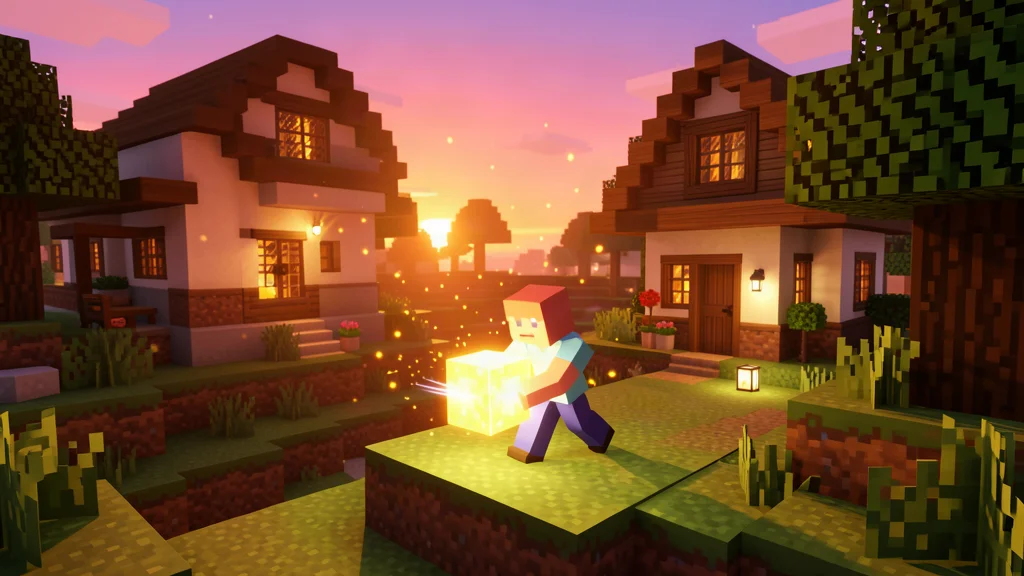
Tired of the same old block placement in Minecraft? The A Good Place Mod brings smooth, stylish animations every time you place a block, transforming the building experience into something visually captivating. Whether you are a creative builder or a survival enthusiast, this mod adds a layer of polish that makes every placement feel satisfying and deliberate.
What Is the A Good Place Mod?
The A Good Place Mod is a client side Minecraft modification that introduces smooth and fancy animations each time you place a block. Created by enjarai and MehVahdJukaar, this mod focuses on one simple but impactful improvement: making block placement look and feel better. Instead of blocks appearing instantly with no visual feedback, the mod adds appealing effects that make every placement feel more deliberate and satisfying.
This is a quality of life mod that does not change gameplay mechanics, add new blocks, or alter game balance in any way. It purely enhances the visual feedback of building, making it a perfect addition for players who spend hours constructing in creative mode or survival mode alike. The philosophy behind the mod is simple: if you are going to place thousands of blocks during your Minecraft journey, each one should feel rewarding.
The mod has gained popularity among builders who care about the aesthetic experience of construction. With over 15,000 views on its download page and a solid 4.2 out of 5 star rating, it has proven to be a beloved addition to many players' mod collections. The fact that it supports multiple loaders and a wide range of Minecraft versions has also contributed to its widespread adoption.
Key Features
The A Good Place Mod keeps things simple and focused. Here is what it brings to the table:
- Smooth block placement animations: Every block you place triggers a smooth, stylish animation instead of appearing instantly. The effect is subtle but noticeable, making building feel more polished and professional. The animations are designed to be visually appealing without being distracting or slowing down your building pace.
- Enhanced building experience: The visually appealing effects add a layer of satisfaction to construction, whether you are building a small cottage, a medieval castle, or a modern skyscraper. The mod makes the act of placing blocks feel more tactile and responsive.
- Client side only: The mod runs entirely on your client, meaning it does not affect server performance or require server side installation. You can use it on any server without worrying about compatibility issues or server rules.
- Multiple loader support: Available for Forge, Fabric, and NeoForge, so you can use it regardless of which mod loader you prefer. This broad support ensures that almost any modded Minecraft player can enjoy the mod.
- Lightweight design: The mod is small in file size (under 100 KB for most versions) and does not add significant overhead to your game. It will not cause frame rate drops or memory issues.
- Wide version coverage: Supporting Minecraft versions from 1.20.1 all the way through 1.21.11, the mod covers most modern Minecraft releases. Whether you are on the latest snapshot or a stable release, there is likely a version available for you.
How Does It Work?
The A Good Place Mod hooks into the block placement event in Minecraft's rendering system. When you right click to place a block, the mod intercepts the rendering and applies a smooth animation effect. This can include scaling transitions, fading effects, or other visual transitions that make the block appear to settle into place rather than popping in instantly.
The technical implementation is elegant. The mod listens for the block placement packet and then applies a custom render layer that animates the block from a slightly transparent or scaled down state to its full opacity and size. The animation is quick enough that it does not slow down your building, but noticeable enough that it adds a satisfying visual feedback loop.
One of the best aspects of the mod is that it is completely automatic. There are no configuration options to tweak, no keybinds to learn, and no settings to adjust. Once you install the mod, it just works. Every block you place will have the smooth animation effect applied, and you can forget about it and enjoy the improved building experience.
The result is a building experience that feels more tactile and responsive. It is a small change, but once you have tried it, going back to vanilla block placement feels jarring and abrupt. Many players report that they did not realize how unsatisfying vanilla block placement was until they experienced the difference with this mod.
Supported Versions and Loaders
The A Good Place Mod is available across multiple Minecraft versions and mod loaders. Here is a detailed breakdown of the supported configurations:
| Minecraft Version | Loader | Mod Version | File Size |
|---|---|---|---|
| 1.20.1 | Forge, NeoForge | 26.3 | 254 KB |
| 1.20.1 | Fabric | 26.3 | 249 KB |
| 1.21.1 | Fabric, NeoForge | 26.3 | 97 KB |
| 1.21.4 | Fabric, NeoForge | 26.3 | 98 KB |
| 1.21.11 | Fabric, NeoForge | 26.3 | 90 KB |
As you can see, the mod covers a wide range of modern Minecraft versions. Whether you are playing on the latest release or a slightly older version, there is a good chance the A Good Place Mod has you covered. The file sizes are remarkably small, which speaks to the lightweight nature of the mod.
It is worth noting that the mod version number (26.3) is independent of the Minecraft version. This means the same mod version can work across multiple Minecraft releases, which is a testament to the mod's stable and well designed codebase.
Requirements
Before installing the A Good Place Mod, make sure you have the following dependencies set up:
- Minecraft Forge or NeoForge (depending on your chosen version and Minecraft release)
- Fabric Loader and Fabric API (if using the Fabric version of the mod)
These are standard requirements for most Minecraft mods. If you have ever installed a mod before, you likely already have these in place. Forge and NeoForge are the most popular mod loaders for Minecraft Java Edition, and Fabric is a lightweight alternative that is preferred by many players for its performance and simplicity.
If you are new to modding, do not worry. Installing a mod loader is a straightforward process. You download the installer from the official website, run it, and select your Minecraft version. Once the loader is installed, you simply place mod files in the mods folder and launch the game. For a more detailed walkthrough, check out our guide on how to install Minecraft mods for a step by step guide.
How to Install the A Good Place Mod
Installing the A Good Place Mod is straightforward and takes only a few minutes. Follow these steps:
- Download the mod file: Head to the official download page and grab the correct version for your Minecraft version and mod loader. Make sure you select the right file for Forge, Fabric, or NeoForge as needed.
- Install the mod loader: Make sure you have Forge, Fabric, or NeoForge installed for your Minecraft version. If you do not have a loader yet, download the installer from the official website and run it.
- Place the mod in your mods folder: Move the downloaded .jar file into the
modsfolder inside your Minecraft directory. On Windows, this is typically located at%appdata%/.minecraft/mods. On Mac, it is~/Library/Application Support/minecraft/mods. - Launch Minecraft: Start the game with your mod loader profile. The mod should load automatically, and you will see it listed in the mods menu.
- Start building: Enter a world and start placing blocks. You should immediately notice the smooth animation effect when you place any block.
That is it. No configuration files to edit, no complex setup, no compatibility patches to install. Just drop it in and start building with style. The mod works out of the box with no additional steps required.
Why Use the A Good Place Mod?
You might be wondering: is a block placement animation mod really worth installing? Here are several compelling reasons why builders love it:
- It makes building more enjoyable: The smooth animations add a satisfying feedback loop that makes placing blocks feel rewarding. Instead of the repetitive and instant placement of vanilla Minecraft, each block feels like it has weight and presence.
- It is purely visual: No gameplay changes, no new items, no balance shifts. Just better looking block placement. This means it fits seamlessly into any playstyle or modpack without disrupting the intended experience.
- It works everywhere: Whether you are in single player, on a server, or in a modpack, the mod works seamlessly. Since it is client side only, there are no server compatibility concerns.
- It is lightweight: The mod is tiny (under 100 KB) and does not impact performance, so you can use it even on lower end systems. You will not notice any frame rate drop or increased memory usage.
- It improves content creation: If you record videos or take screenshots of your builds, the smooth animations make everything look more professional and polished. Timelapses look smoother, and cinematic shots have more visual interest.
- It is easy to install and use: No configuration, no learning curve, no compatibility issues. Just install and play. This makes it accessible even for players who are new to modding.
If you are someone who values the aesthetic side of Minecraft building, the A Good Place Mod is an easy recommendation. It is one of those small mods that, once you have it, you do not want to play without. The improvement to the building experience is subtle but meaningful, and it enhances every single block you place.
Compatibility with Other Mods
Since the A Good Place Mod is client side only and does not add new blocks or items, it is highly compatible with other mods. You can use it alongside building mods, decoration mods, and even large modpacks without issues. The mod only changes how block placement looks on your screen, so it does not conflict with anything that adds new content or changes game mechanics.
Here are some categories of mods that work well alongside the A Good Place Mod:
- Building and decoration mods: Mods like Chisel, Macaw's mods, and Supplementaries add new blocks and decoration options. The A Good Place Mod makes placing these new blocks just as satisfying as placing vanilla ones.
- Shader packs: Shaders add realistic lighting and shadows to Minecraft. The smooth block placement animations look even more impressive when combined with shader effects, as the lighting interacts with the animation.
- Performance mods: Mods like Sodium, Lithium, and Starlight optimize Minecraft's performance. The A Good Place Mod is lightweight enough that it does not negate these optimizations.
- Large modpacks: Whether you are playing a kitchen sink pack like All the Mods or a themed pack like Sky Factory, the A Good Place Mod fits right in without causing conflicts.
That said, if you are using another mod that also modifies block placement rendering, you might want to test them together to ensure the animations do not clash. In most cases, though, the A Good Place Mod plays nicely with others. The mod's narrow scope (only affecting block placement animation) means it has very few opportunities for conflicts.
Tips for Getting the Most Out of the Mod
Here are some tips to enhance your experience with the A Good Place Mod:
- Combine with shaders: The smooth block placement animations look even better when paired with a shader pack. The lighting and shadows add depth to the animation effects, making each placement feel more dramatic and satisfying. Popular shader packs like Complementary Shaders or BSL Shaders work wonderfully with this mod.
- Use in creative mode: Creative mode is where building shines, and the A Good Place Mod makes it even more enjoyable. Place blocks quickly and watch the animations flow. The rapid placement combined with smooth animations creates a mesmerizing building experience.
- Try it with decoration mods: If you use mods like Chisel, Macaw's mods, or Supplementaries, the placement animations add an extra layer of polish to your detailed builds. Every small decoration piece you place will have the same satisfying animation as large structural blocks.
- Record your builds: The smooth animations make timelapses and build videos look more professional. If you create content for YouTube, TikTok, or Instagram, this mod is a must have. The visual appeal of the animations will make your content stand out.
- Experiment with different block types: The animation works with every block type in the game. Try placing different materials (stone, wood, glass, etc.) to see how the animation looks with each one. You might find that certain blocks look particularly good with the effect.
- Use it in multiplayer: While other players will not see your animations unless they also have the mod, using it in multiplayer can still enhance your personal building experience. Building on a server with friends is more fun when your own placements look and feel better.
Where to Download
You can download the A Good Place Mod from the official source. The mod is available on popular mod hosting platforms, and you can find the correct version for your setup. Always download from trusted sources to ensure you get the latest and safest version of the mod.
The mod is hosted on 9Minecraft, which provides download links for all supported versions and loaders. You can find the download page by searching for "A Good Place Mod" on the site. The page includes screenshots, a video showcase, and a wiki with additional technical information for modders and developers.
For more Minecraft mod recommendations, check out our guide to the best Minecraft mods to discover more ways to enhance your game. Whether you are looking for performance improvements, new content, or visual enhancements, there is a mod out there for you.
Frequently Asked Questions
Is the A Good Place Mod safe to use?
Yes. The A Good Place Mod is a client side quality of life mod that only changes how block placement looks on your screen. It does not modify game files, server logic, or add any malicious code. It is safe to use in single player and on servers. The mod is created by reputable developers (enjarai and MehVahdJukaar) who have a track record of creating high quality Minecraft mods.
Does the A Good Place Mod work on servers?
Yes, it works on servers. Since the mod is client side only, you can install it and use it on any server without issues. Other players will not see the animations unless they also have the mod installed, but it does not affect gameplay for anyone. The mod does not send any special packets to the server or modify server side behavior in any way.
What loaders does the A Good Place Mod support?
The A Good Place Mod is available for Forge, Fabric, and NeoForge. You will need to install the appropriate mod loader and, for Fabric, the Fabric API. Make sure to download the version that matches your Minecraft version and loader. The mod supports Minecraft versions 1.20.1 through 1.21.11 across these loaders.
Can I use the A Good Place Mod in a modpack?
Absolutely. The A Good Place Mod is lightweight and compatible with most other mods. It can be included in modpacks without causing conflicts. Just make sure the mod loader and Minecraft version match the other mods in the pack. The mod's narrow scope (only affecting block placement animation) means it has very few opportunities for conflicts with other mods.
Does the A Good Place Mod affect performance?
No, the mod is very lightweight. It only adds a visual animation effect when placing blocks and does not add any significant processing overhead. The mod file is under 100 KB for most versions, and the animation effect is rendered efficiently. You should not notice any FPS drop or increased memory usage from using this mod.
Do I need to configure anything after installing?
No, the mod works automatically once installed. There are no configuration files, no in game settings, and no keybinds to set up. Just install the mod, launch Minecraft, and start placing blocks. The smooth animation effect will be applied to every block placement automatically.

Lead writer at minecraft.how. Long-time Minecraft player running a small SMP server, testing every build, mod, and seed before writing about it.
Frequently Asked Questions
What Is the A Good Place Mod?
Key Features
How Does It Work?
Supported Versions and Loaders
Requirements
How to Install the A Good Place Mod
Have a Question or Tip about this Guide?Community Q&A
Ask a question or help other players below. Join the discussion and share your Minecraft tips!
Comments
No comments yet. Be the first to share your thoughts!