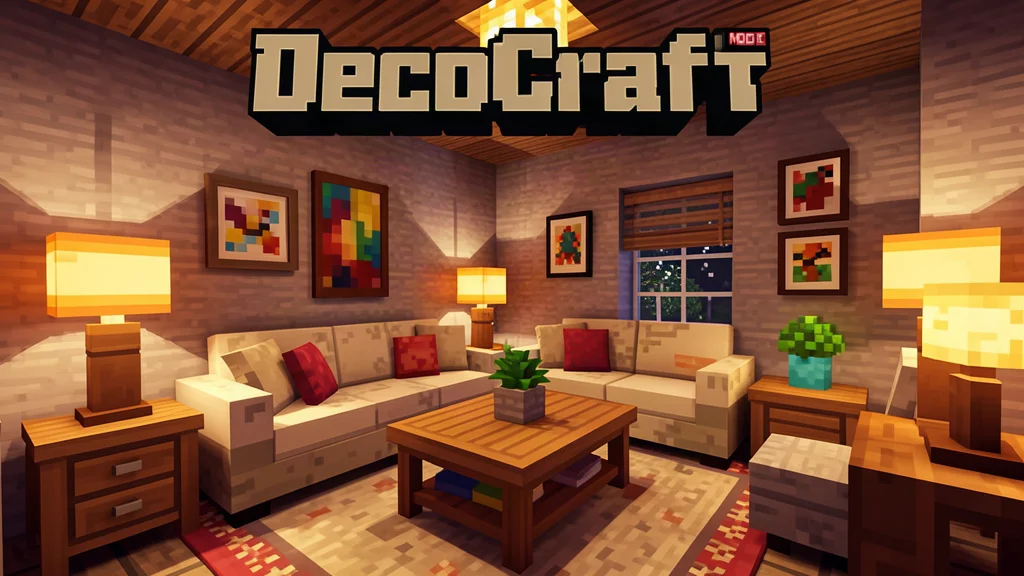

DecoCraft is one of the most popular decoration mods for Minecraft, adding over 3,000 new furniture pieces, lights, kitchenware, and themed props to your world. Whether you are building a cozy cottage, a bustling town square, or a spooky graveyard, DecoCraft gives you the tools to make every build feel alive and personal. This guide covers everything you need to know about installing, crafting, and using DecoCraft on Forge, Fabric, and NeoForge.
What is DecoCraft?
DecoCraft is a decoration mod created by RazzleberryFox, ProfMobius, Taelnia, and Momo. It adds a massive collection of over 3,000 decorative items to Minecraft, ranging from simple chairs and tables to elaborate kitchen appliances, lamps, tombstones, and seasonal decorations. Many of these items are fully functional. You can sit on chairs, turn on lights, and place food on dining tables.
The mod has been around since Minecraft 1.6.4 and continues to receive updates for modern versions. It is available for Forge, Fabric, and NeoForge, making it accessible regardless of which mod loader you prefer. The latest versions support Minecraft 1.20.1, 1.21.1, and 1.21.11.
DecoCraft is purely a decoration mod. It does not add new ores, dimensions, or combat mechanics. Its sole purpose is to give builders more creative freedom.
What sets DecoCraft apart from other decoration mods is the sheer volume of items it adds. With over 3,000 decorations available, you can furnish every room in your build with unique items that match your exact vision. The mod also includes a color customization system that lets you adjust the appearance of many decorations without crafting multiple versions.
The mod has a dedicated community of builders who create amazing structures using DecoCraft items. From realistic modern homes to fantasy castles, the possibilities are virtually endless. The mod's flexibility and massive item catalog make it a must-have for any serious Minecraft builder.
How to Install DecoCraft
Installing DecoCraft requires a mod loader and one library dependency. Follow these steps to get started.
Requirements
- Minecraft Java Edition (any version from 1.6.4 to 1.21.11)
- Mod loader: Forge, Fabric, or NeoForge
- PTRLib: A rendering library required by DecoCraft. Download it from 9Minecraft.
Installation Steps
- Install your chosen mod loader (Forge, Fabric, or NeoForge) for your Minecraft version.
- Download the correct DecoCraft mod file for your Minecraft version and loader.
- Download PTRLib and place it in your mods folder.
- Place the DecoCraft JAR file in your
modsfolder. - Launch Minecraft with the mod loader profile.
If you are new to modding, check out our guide on how to install Minecraft mods for a detailed walkthrough.
Make sure you download the correct version of DecoCraft for your Minecraft version. Using the wrong version will cause the mod to crash or not load at all. The 9Minecraft download page lists all available versions clearly, so you can find the right one for your setup.
For Fabric users, you will also need to install Fabric API. This is a separate mod that many Fabric mods depend on. You can download it from the official Fabric website or from mod hosting sites like CurseForge or Modrinth.
Main Features: 3,000+ Decorations
DecoCraft adds an enormous variety of decorative items. Here is a breakdown of the main categories you will find in the mod.
Furniture
The furniture collection includes chairs, sofas, tables, desks, bookshelves, beds, and kitchen counters. Many chairs are functional, allowing you to sit on them. Tables come in various sizes and styles, from small coffee tables to large dining tables that can seat multiple players.
You will find armchairs in multiple colors, office chairs with wheels, wooden stools, and elegant sofas. The desk collection includes writing desks, computer desks, and standing desks. Bookshelves come in different wood types and can be filled with books for a realistic library look.
The bed collection includes single beds, double beds, bunk beds, and canopy beds. You can find beds in different styles to match any bedroom decor. The sofa collection includes loveseats, sectionals, and recliners in various colors and materials.
Lighting
DecoCraft adds numerous light sources including lamps, lanterns, chandeliers, and string lights. These are not just decorative. They actually emit light, making them practical for illuminating your builds at night. The mod also adds colored lights that can match your build's color scheme.
Table lamps, floor lamps, wall sconces, and ceiling lights are all available. You can find modern LED-style lights, vintage oil lamps, and festive string lights for outdoor decorations. The light emitted by these items is fully functional, so you can use them to light up dark areas in your world.
Chandeliers come in various sizes and styles, from small single-tier designs to elaborate multi-tier pieces. String lights can be draped across outdoor spaces to create a festive atmosphere. Colored lights allow you to set the mood for any room or outdoor area.
Kitchen and Dining
The kitchen collection is one of the most detailed aspects of DecoCraft. You can find plates, cups, utensils, pots, pans, ovens, refrigerators, and even a roasted turkey centerpiece. These items are perfect for creating realistic kitchen and dining room builds.
The dining collection includes plates, bowls, cups, wine glasses, and serving platters. You can set a complete table with food items including roasted turkey, cakes, fruits, and vegetables. Kitchen appliances include refrigerators, ovens, microwaves, toasters, and coffee makers.
The kitchen collection also includes sinks, cabinets, countertops, and kitchen islands. You can create a complete kitchen with all the appliances and storage you need. The dining collection includes tables of various sizes, from small breakfast nooks to large formal dining tables.
Outdoor Decorations
Outdoor decorations include benches, fences, mailboxes, bird baths, garden gnomes, and seasonal items like carved pumpkins and tombstones. These props are ideal for decorating town squares, gardens, and graveyards.
The seasonal collection is particularly impressive. You can find Halloween decorations including carved pumpkins, tombstones, cobwebs, and spooky lighting. Christmas decorations include trees, wreaths, presents, and festive lights. These items are perfect for creating holiday-themed builds.
The garden collection includes flower pots, garden gnomes, bird baths, bird feeders, and garden benches. You can create a beautiful garden with paths, flower beds, and seating areas. The outdoor lighting collection includes street lamps, pathway lights, and decorative lanterns.
Toys and Miscellaneous
DecoCraft also adds toys such as rocking horses, toy boats, and dolls. You can find musical instruments, trophies, radios, and paintings. These smaller items add personality to any room.
The toy collection includes rocking horses, toy cars, dolls, teddy bears, and building blocks. Musical instruments include guitars, pianos, drums, and radios. You can also find trophies, medals, and awards to display in your trophy room or hallway.
The miscellaneous collection includes paintings, clocks, mirrors, vases, and candles. These items are perfect for adding finishing touches to any room. You can find paintings in various styles, from abstract art to landscapes. Clocks come in different designs, including wall clocks, grandfather clocks, and alarm clocks.
How to Use DecoCraft
DecoCraft uses a unique crafting system with three main blocks. Understanding how these work is essential to getting the most out of the mod.
The Decobench
The Decobench is the primary crafting station for all DecoCraft items. Place it in the world and right-click to open the crafting interface. The Decobench shows all available decorations and their required materials. You can browse through categories and craft items directly from this interface.
The Decobench interface is organized into categories, making it easy to find the item you are looking for. Each item shows its required materials, so you can see at a glance what you need to gather. The interface also includes a search function for quickly finding specific items.
You can craft multiple Decobenches and place them in different locations. This is useful if you have multiple building projects in different areas of your world. Each Decobench works independently, so you can craft items at any of them.
The Decomposer
The Decomposer is a processing block that converts raw materials into crafting components. Place dirt, logs, or cobblestone in the Decomposer and add coal or charcoal as fuel. The Decomposer will break these materials down into the raw resources needed for DecoCraft recipes.
The Decomposer works similarly to a furnace but produces different materials. You can use it to create plastic, metal parts, fabric, and other crafting components. Having multiple Decomposers running simultaneously will speed up your material production significantly.
The Decomposer has a fuel slot and an input slot. You can use coal, charcoal, or other fuel sources to power it. The processing time varies depending on the material being decomposed, but most items process relatively quickly.
The Decobrush
The Decobrush is a tool that lets you change the color of many decorations. Simply hold the Decobrush and right-click on a placed decoration to cycle through different color options. This allows you to match any decoration to your build's color palette without crafting multiple versions.
The Decobrush works on most DecoCraft items including furniture, lamps, and decorations. Each right-click cycles to the next color in the palette. This is incredibly useful for matching decorations to your build's color scheme without having to craft separate items for each color.
The Decobrush is durable and will last for a long time before needing to be replaced. You can craft multiple Decobushes and keep them in your inventory for quick access. The tool works on both placed decorations and items in your inventory.
Basic Workflow
- Craft the Decobench, Decomposer, and Decobrush using the recipes shown in the mod's crafting guide.
- Place the Decomposer and feed it dirt, logs, or cobblestone with coal or charcoal as fuel.
- Collect the raw materials produced by the Decomposer.
- Open the Decobench and craft your desired decorations.
- Place decorations in your world and use the Decobrush to adjust their colors.
Once you have the basic setup running, you can expand your operation by crafting additional Decomposers and Decobenches. This will allow you to produce materials and craft items more efficiently, especially if you are working on a large build with many decorations.
It is also a good idea to set up a storage system for your DecoCraft materials. With so many different items to craft, you will accumulate a lot of raw materials quickly. Chests, barrels, and other storage solutions will help you keep your materials organized and easily accessible.
Compatibility
DecoCraft is compatible with most other mods since it only adds decorative items and does not modify core game mechanics. However, there are a few things to keep in mind.
| Loader | Supported Versions | Notes |
|---|---|---|
| Forge | 1.6.4 through 1.20.1 | Most stable option |
| Fabric | 1.20.1, 1.21.1, 1.21.11 | Requires Fabric API |
| NeoForge | 1.21.1, 1.21.11 | Successor to Forge |
DecoCraft requires PTRLib to function. Without this library, the mod will not load correctly. Make sure you download the correct version of PTRLib for your Minecraft version.
The mod works well with shader packs and texture packs. Some players report minor visual glitches when using certain shader combinations, but these are usually resolved by updating your shader pack or adjusting render settings.
DecoCraft is also compatible with popular mods like OptiFine and Sodium. If you experience performance issues, try reducing your render distance or using a performance mod to improve frame rates.
The mod is compatible with most other decoration and furniture mods. You can use DecoCraft alongside other mods to create even more diverse and detailed builds. Just be aware that some mods may have conflicting item IDs or rendering issues.
Tips and Tricks
Here are some helpful tips to get the most out of DecoCraft.
- Start with the Decomposer: Before crafting decorations, set up a Decomposer and stock up on raw materials. This will save you time later.
- Use the Decobrush liberally: Do not be afraid to experiment with different colors. The Decobrush makes it easy to change your mind.
- Mix and match: Combine DecoCraft items with vanilla Minecraft blocks for unique looks. A DecoCraft lamp on a vanilla fence post can create a custom street light.
- Plan your builds: With over 3,000 items available, it helps to plan your build before crafting. Make a list of the decorations you need.
- Check the wiki: The DecoCraft wiki has a complete list of all items and their crafting recipes.
- Create a dedicated crafting room: Set up multiple Decomposers and Decobenches in a dedicated room to streamline your decoration production.
- Use creative mode for planning: If you are planning a large build, switch to creative mode to test different decoration combinations before committing to survival mode crafting.
- Organize your materials: With so many different crafting components, it is easy to get overwhelmed. Use chests and labels to keep your materials organized.
- Experiment with color combinations: The Decobrush allows you to change colors easily, so do not be afraid to try different combinations until you find the perfect look.
- Take inspiration from real life: Look at real furniture and home decor for inspiration. Many DecoCraft items are based on real-world objects, so you can recreate your favorite styles in Minecraft.
Download DecoCraft
You can download DecoCraft from the links below. Make sure to select the correct version for your Minecraft version and mod loader.
Frequently Asked Questions
Is DecoCraft free?
Yes, DecoCraft is a free mod. You can download it from 9Minecraft or other mod hosting sites.
Does DecoCraft work on servers?
Yes, DecoCraft works on both single-player and multiplayer servers. All players who want to see the decorations need to have the mod installed.
Can I use DecoCraft in modpacks?
Yes, DecoCraft can be included in modpacks. Check the mod's license terms for any redistribution requirements.
Why are my decorations white or missing textures?
This usually means PTRLib is not installed or is the wrong version. Make sure you have the correct PTRLib version for your Minecraft version in your mods folder.
Does DecoCraft affect performance?
With over 3,000 items, DecoCraft can use more memory than vanilla Minecraft. If you experience lag, try reducing your render distance or using a performance mod like OptiFine or Sodium.
Can I craft DecoCraft items in survival mode?
Yes, all DecoCraft items can be crafted in survival mode. You will need to gather the required materials and use the Decobench to craft them.
Does DecoCraft add new mobs or dimensions?
No, DecoCraft is purely a decoration mod. It does not add any new mobs, dimensions, or gameplay mechanics. It only adds decorative items and the blocks needed to craft them.
How do I find specific DecoCraft items?
The Decobench interface includes a search function that lets you quickly find specific items. You can also browse through categories to discover new items. The DecoCraft wiki has a complete list of all items and their locations in the crafting interface.
Can I use DecoCraft with other decoration mods?
Yes, DecoCraft is compatible with most other decoration and furniture mods. You can use multiple decoration mods together to create even more diverse and detailed builds.