
Getting kicked from Hypixel SkyBlock can have several causes: a connection problem, an outdated mod, a client feature that changes inventory interactions, or a server-side restriction. The safest fix depends on the exact message shown. Start by recording that message instead of assuming every kick means a ban.
First, identify what kind of kick it is
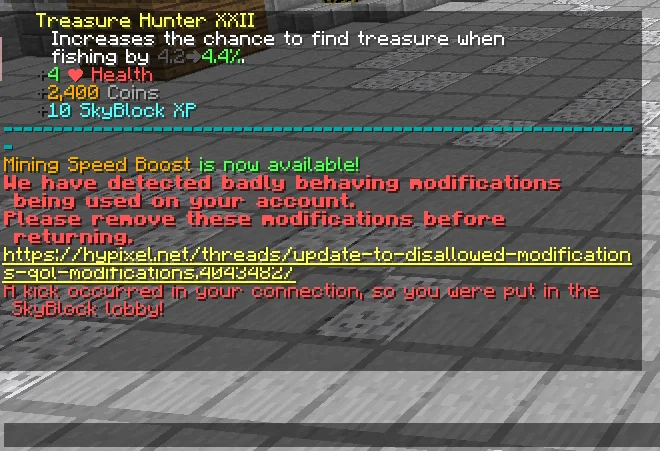
Read the full message displayed when you are disconnected. A kick returns you to a lobby or disconnects the session; a ban is a separate account restriction. A network timeout, a server restart, and a message about “badly behaving modifications” require different troubleshooting.
If the message mentions modifications, do not immediately assume that a particular mod is malicious. Older community reports describe kicks associated with outdated SkyBlock mods and features that change menu or inventory GUIs. These reports are useful clues, not a guarantee about the cause of a current incident.
Fix 1: test with a clean client
- Exit Minecraft completely.
- Keep a backup of your current instance and configuration.
- Launch a clean, supported Minecraft profile without third-party mods.
- Join Hypixel and reproduce the same action, if possible.
- If the clean profile works, re-enable your mods gradually to isolate the cause.
A clean-client test is more useful than deleting your entire mods folder at random because it helps separate client configuration from network or server problems. Never download a “kick fixer” executable or give your Minecraft session token to a third-party tool.
Fix 2: update and isolate mods
Check the official release page or the maintainer’s trusted distribution channel for each mod you use. Update supported mods and their dependencies. If the problem started after an update, test the previous known-good configuration only if it remains compatible and permitted by Hypixel’s current rules.
Change one variable at a time. Disable a mod or feature, restart the client, and test again. If you disable several things at once and the kick disappears, you still will not know which change mattered.
Fix 3: check inventory and menu modifications
Some historical Hypixel forum reports associate “badly behaving modifications” kicks with features that restyle SkyBlock menus, alter inventory GUIs, or change how clicks are handled. Examples mentioned in older community discussions include improved menu features in NotEnoughUpdates and certain menu interactions in other SkyBlock mods. Mod behaviour changes over time, so treat these as troubleshooting leads rather than a current official list of offending features.
- Temporarily disable menu-restyling or inventory-interaction features.
- Turn off click macros, automated actions, or features that redirect clicks.
- Use the default SkyBlock menus while testing.
- Update the affected mod and read its current documentation before turning features back on.
Do not use macros, autoclickers, scripts, or other automation to bypass server checks. Hypixel’s official rules prohibit disallowed modifications and automated gameplay methods.
Fix 4: rule out connection and server issues
If the message is a timeout or connection error rather than a modification warning, check whether other Hypixel modes also disconnect. Restart Minecraft and your network connection, temporarily remove unusual network routing or VPN configurations if safe to do so, and check official Hypixel status or announcements. Avoid repeatedly changing unrelated settings without evidence.
What if you are still getting kicked?
- Copy the exact error text or take a screenshot.
- Record the Minecraft version, mod loader, and versions of the mods you use.
- Note what you were doing immediately before the kick, such as opening the SkyBlock menu or clicking a specific interface.
- Compare the behaviour on a clean client.
- Search current official Hypixel support and forum guidance, or ask for help using the appropriate official channel.
When asking for help, share a mod list and relevant error details, but remove account credentials, session tokens, private files, and other secrets. Do not assume that an old forum post describes the current server implementation.
Can a kick turn into a ban?
A kick and a ban are not the same thing. A kick message alone does not prove that your account has been banned. However, do not attempt to bypass a restriction or continue using a modification that violates the current rules. Read the official Hypixel SkyBlock rules and follow any account-specific instructions from Hypixel staff.
Sources and further help
- Official Hypixel SkyBlock Rules — use this as the primary source for current restrictions.
- Hypixel forum discussion about random kicks — an older community report that may help identify menu-related symptoms.
- Hypixel forum discussion about badly behaving modifications — community troubleshooting context, not an official current list.
The best diagnosis starts with the exact error. “Kicked from SkyBlock” is a symptom, not a single technical cause.