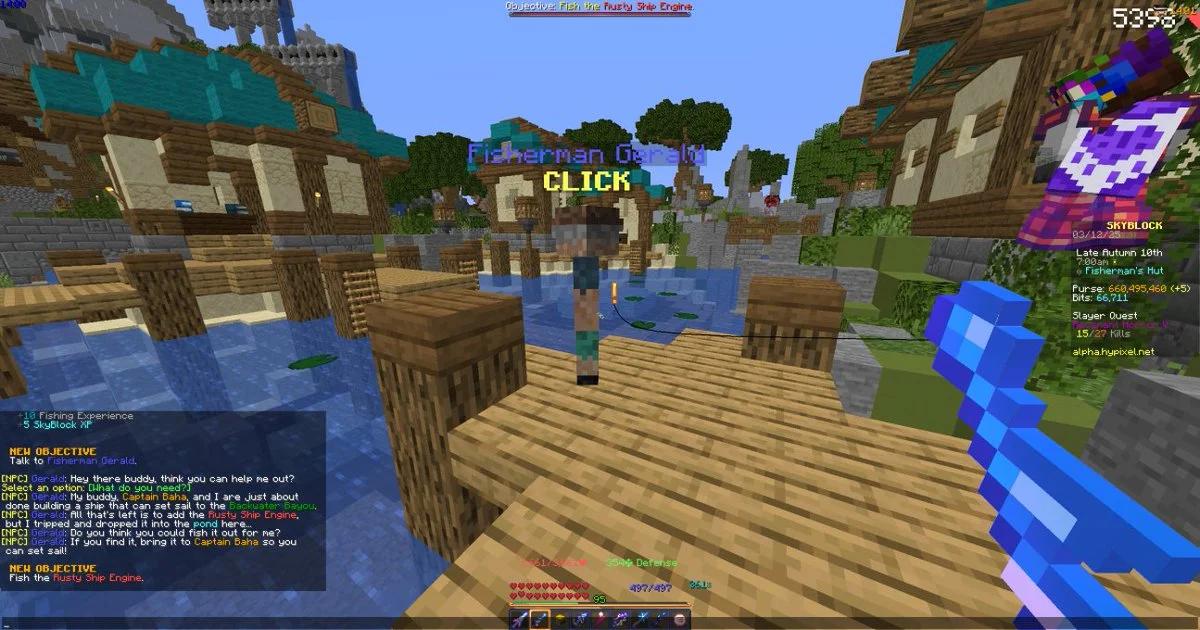

The Rusty Ship Engine is a special item in Hypixel SkyBlock that unlocks access to the ship and its travel routes. You obtain it by fishing during Fisherman Gerald’s quest at the Fisherman’s Hut in the Fishing Outpost, then bring it to Captain Baha.
Quest dialogue and requirements can change with updates. Follow the current in-game quest text if an interaction differs from these steps.
Where is the Rusty Ship Engine?
The item is not a normal shop purchase or a random drop from any fishing spot. It is tied to Fisherman Gerald’s quest at the Fisherman’s Hut in the Fishing Outpost. Gerald explains that the ship is missing its engine and asks you to fish it out of the nearby pond.
If Gerald tells you that you are not ready, check your Fishing level and make sure you have completed the introductory fishing step with Fisherwoman Enid. Talk to the Fish Merchant and get basic fishing gear if you have not progressed through the Fishing Outpost introduction.
Step-by-step quest walkthrough
1. Unlock the conversation
Speak with the relevant Fishing Outpost NPCs rather than repeatedly clicking Gerald. The quest dialogue is progression-gated: the game may direct you to the Fish Merchant or Fisherwoman Enid before Gerald offers the engine task. Follow those prompts and return to Gerald afterward.
2. Fish in the pond at Fisherman’s Hut
Once Gerald asks you to recover the engine, fish in the pond he identifies. The Rusty Ship Engine is the quest item you are looking for. Stay in the correct location and continue fishing until the item is obtained; fishing elsewhere is not a substitute for this quest step.
If it does not appear immediately, verify that the quest was accepted and that you are fishing in the correct pond. Check your inventory after each catch and read any updated dialogue from Gerald.
3. Return the engine to Captain Baha
Captain Baha is near the ship. Speak to him and hand over the Rusty Ship Engine when prompted. The conversation explains that the engine must be installed through the Ship Upgrades menu; simply carrying the item is not enough to activate the ship’s navigation.
4. Apply the engine and use the Ship Navigator
Open the Ship Upgrades interface with Captain Baha and place the Rusty Ship Engine into the engine slot. After it is applied, interact with the Ship Navigator hologram at the front of the ship to open the travel menu. The ship connects Fishing-related islands, including Backwater Bayou and Lotus Atoll, subject to their own unlock requirements.
Common problems and fixes
- Gerald will not give the quest: check Fishing V, speak with Fisherwoman Enid, and complete any introductory dialogue the game requests.
- The engine is not appearing: confirm you accepted the quest and are fishing in the pond at the Fisherman’s Hut.
- Captain Baha does not unlock travel: use the Ship Upgrades menu and install the engine in the correct slot.
- The destination is unavailable: check that island’s own requirements. Unlocking the ship does not necessarily complete every island chapter.
- NPC dialogue differs: use the live in-game prompts as the final authority because Hypixel SkyBlock can change through updates.
Why the Rusty Ship Engine matters
The engine is a progression item, not just a collectible. Installing it activates the ship’s travel feature, which gives you access to additional Fishing-related areas and their own sea creatures, chapters, and rewards. If you are working through Fishing content, completing this quest is an important step toward exploring those islands.
How to check the quest if you get stuck
Talk to Gerald again and read his current dialogue, then speak to Captain Baha to see whether the game recognizes the engine. Make sure you have not left the item in a storage location and that you are interacting with the ship upgrade interface rather than only the travel hologram. If you already completed the quest but the interface still appears locked, review current community documentation and check whether the game has changed the ship system in a recent update.
Keep in mind that access to the ship and access to every destination are not identical. Backwater Bayou and Lotus Atoll have their own progression requirements. If one destination is missing from the navigator, confirm its current requirements instead of repeating the engine quest unnecessarily.
Related guides
For the best next step, look for current Minecraft.How guides about Hypixel SkyBlock Fishing progression, Fishing Outpost NPCs, sea creatures, and Backwater Bayou. Internal links should only be added when a matching guide is available and genuinely helps with the next task.