Soup API Mod: Custom Visual Effects for Minecraft PvP
The Soup API Mod transforms how Minecraft PvP looks and feels by adding a suite of visual effects, HUD enhancements, and audio tweaks. Whether you want cleaner hit particles, a custom target HUD, or stylized cape rendering, this mod gives you granular control over every on-screen element during combat.
If you have ever felt that vanilla Minecraft PvP lacks visual feedback or that the default hit particles are too subtle, the Soup API Mod is built for you. It focuses on the cosmetic and HUD side of PvP without changing game mechanics, making it a popular choice for competitive players who want a polished, readable combat experience.
What Is the Soup API Mod?
The Soup API Mod is a Fabric mod that adds a variety of visual effects and customizations designed to improve the look and feel of PvP. It adds target HUDs, particle effects, sound tweaks, and stylish rendering. Everything from hit particles to cape visuals can be adjusted through an in-game configuration menu.
Unlike combat mods that alter damage values or add new weapons, Soup API is purely visual. It sits on top of the vanilla combat system and changes how information is displayed, not how combat actually works. This makes it compatible with most servers and safe to use in environments that allow client-side cosmetic mods.
The mod requires Fabric API, Cloth Config API, and Mod Menu to function. Once installed, you can access all settings through the Mod Menu interface, where Cloth Config provides a clean and organized options screen.
The name "Soup API" comes from the developer's naming convention, and the mod has grown steadily in popularity since its release. It is frequently updated to support new Minecraft versions and to add new visual customization options based on community feedback. The developer maintains an active presence in the Minecraft modding community, which means bugs are typically addressed quickly and new features are added regularly.
One of the key design philosophies behind Soup API is that visual clarity should not come at the cost of performance. The mod is optimized to run smoothly even on lower-end systems, ensuring that adding visual enhancements does not introduce lag or frame rate drops during intense PvP moments.
Target HUD: Track Enemies at a Glance
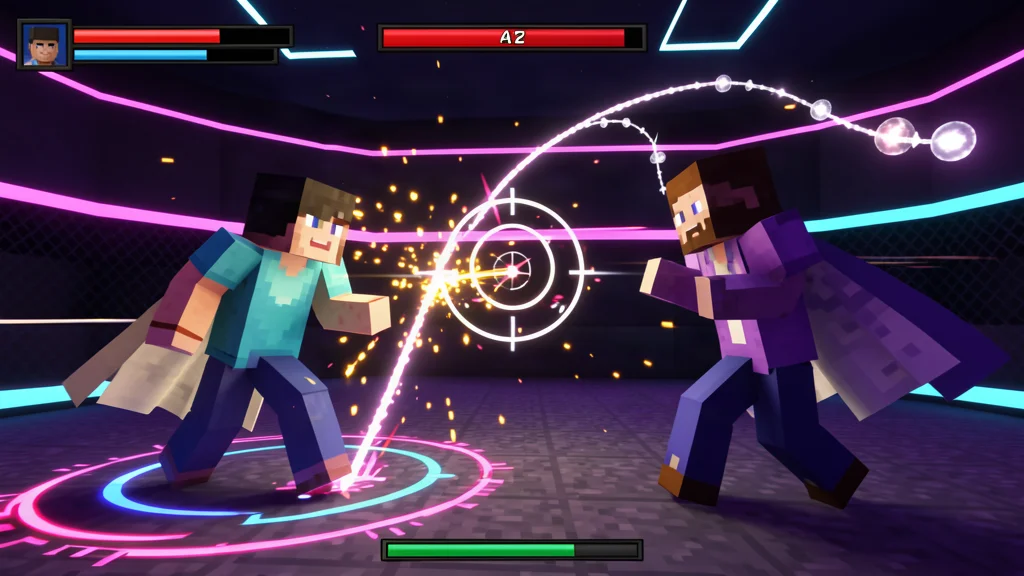
One of the standout features of the Soup API Mod is its Target HUD. When you look at another player during PvP, the mod displays a customizable heads-up display that shows relevant information about that player. This can include health, armor status, and other combat-relevant data rendered directly on your screen.
The Target HUD is fully configurable. You can adjust its position, size, and the information it displays. Some players prefer a minimal HUD that only shows health, while others want a more detailed overlay that includes armor durability and active potion effects. The choice is entirely up to you.
For competitive PvP players, having a reliable target HUD means you can make faster decisions during combat. Instead of glancing away to check an opponent's status, everything you need is right in your line of sight. This can be the difference between winning and losing a close fight, especially when you need to decide whether to continue attacking, retreat, or use a healing item.
The HUD also helps with target tracking during chaotic multiplayer fights. When multiple players are engaged in combat, it can be difficult to keep track of who you are actually hitting. The target HUD ensures that you always know which player you are targeting, reducing the chance of accidentally hitting the wrong opponent or losing track of your primary target in the confusion of battle.
Hit Particles: Customize Every Impact
Hit particles are one of the most noticeable visual elements in Minecraft PvP. The Soup API Mod gives you full control over how these particles appear when you land a hit on another player.
- Count: Adjust how many particles spawn per hit. More particles create a more dramatic effect, while fewer keep the screen clean.
- Style: Choose from different particle styles to match your personal preference or server theme.
- Size: Scale particles up or down. Larger particles are easier to see during fast-paced combat.
- Transparency (Alpha): Control how opaque or transparent the particles appear. Lower alpha values create a subtle, ghostly effect.
- Pearl Particles: Enable special particles for Ender Pearl throws, making it easier to track where your pearls land.
These options let you dial in the exact look you want. If you prefer a minimalist aesthetic with tiny, faint particles, you can set it up in seconds. If you want big, bold particle effects that make every hit feel impactful, that is just as easy to configure.
The ability to adjust transparency is particularly useful for players who want visible hit feedback without the particles obscuring their view. By lowering the alpha value, you get the confirmation that you have landed a hit while still being able to see your opponent clearly through the particle effect.
Render Options: Jump Circles, Trails, and More
Beyond hit particles, the Soup API Mod offers a range of render options that add visual flair to your PvP sessions.
Target Render Style
The Target Render Style option lets you change how the target is visually highlighted when you are in combat. Different styles can make it easier to keep track of your opponent during chaotic fights, especially when multiple players are involved.
Jump Circles
Jump Circles are visual effects that appear on the ground when you jump. The Soup API Mod allows you to select from different styles of jump circles, adding a subtle but stylish touch to your movement. This is purely cosmetic and does not affect jump height or distance.
Pearl Trajectory
When you throw an Ender Pearl, the mod can render a trajectory line that shows the path the pearl will take. This is incredibly useful for precise pearl throws, especially in situations where accuracy matters, such as escaping from an opponent or reaching a specific ledge.
Trail Effects
Trail Effects add visual flair to your movement. Whether you are sprinting, flying, or just walking, you can enable custom trails that follow your character. These are purely cosmetic and can be adjusted or disabled entirely.
China Hat Visuals
The mod also includes China Hat visuals, which render a traditional conical hat above your character's head. This is a fun cosmetic option that adds personality to your in-game appearance.
Sound Customizations
Audio feedback is a crucial part of PvP, and the Soup API Mod gives you control over several sound-related settings.
- Volume Control: Adjust the overall volume of combat-related sounds. If default sounds are too loud or too quiet, you can set them to a level that feels right.
- Critical Hit Sound: Change the sound that plays when you land a critical hit. You can also adjust the pitch randomness to keep the sound fresh and less repetitive.
- Ring Crosshair: Enable a ring-style crosshair that provides visual feedback when you land hits. This can help with timing and rhythm during combat.
- Swing Hand Animation: Customize the animation that plays when you swing your weapon. Different animations can make combat feel more responsive or more relaxed, depending on your preference.
The volume control is especially useful for players who find the default critical hit sound too jarring or too quiet. By fine-tuning the volume, you can ensure that combat sounds enhance your experience without becoming distracting or annoying over long play sessions.
Theme Colors and Custom Capes
The Soup API Mod includes two theme color options that let you define the primary and secondary colors used across all mod visuals. This means your HUD, particles, and other effects can all match a consistent color scheme that you choose.
You can also set Custom Capes through the mod. While vanilla Minecraft capes are typically tied to special events or purchases, Soup API lets you apply your own cape design without needing to modify game files or use external tools. This is a great way to stand out on servers that support the mod.
Combining custom capes with matching theme colors creates a cohesive personal brand. Whether you want a sleek monochrome look or a vibrant rainbow effect, the mod gives you the tools to achieve it.
The theme color system is designed to be intuitive. You pick a primary color for main elements and a secondary color for accents and highlights. This two-color approach keeps your visuals consistent without requiring you to manually set colors for every individual element.
How to Install the Soup API Mod
Installing the Soup API Mod is straightforward, but it does require a few dependencies. Here is what you need to do:
- Install Fabric Loader: Download and install the Fabric loader for your Minecraft version from the official Fabric website.
- Install Fabric API: Download the Fabric API mod and place it in your
modsfolder. This is required for most Fabric mods to function. - Install Cloth Config API: Download Cloth Config API and place it in your
modsfolder. Soup API uses this mod for its configuration interface. - Install Mod Menu: Download the Mod Menu mod and place it in your
modsfolder. This gives you an in-game interface to access mod settings. - Download Soup API: Download the Soup API Mod for your specific Minecraft version and place it in your
modsfolder. - Launch Minecraft: Start the game using the Fabric profile. Open Mod Menu from the main menu, find Soup API, and configure your settings.
Make sure all mods are downloaded for the correct Minecraft version. Using mismatched versions is the most common cause of crashes or missing features.
If you are new to modding, the installation process might seem intimidating at first, but it becomes second nature after doing it once or twice. The key is to ensure all dependencies are present and that every mod matches your Minecraft version exactly.
Supported Minecraft Versions
The Soup API Mod supports multiple Minecraft versions on Fabric. As of the latest update, the following versions are available:
- Minecraft 1.21.4
- Minecraft 1.21.1
- Minecraft 1.21
- Minecraft 1.20.6
- Minecraft 1.20.4
- Minecraft 1.20.1
Always check the download page to confirm the latest supported versions, as the developer may add or remove support with new Minecraft updates.
Compatibility with Other Mods
The Soup API Mod is designed to play nicely with other Fabric mods. Since it only modifies visual and HUD elements, it rarely conflicts with content mods that add new blocks, items, or mechanics. However, if you are using other HUD or visual mods, you may need to adjust settings to avoid overlapping elements.
Mods that modify the same visual elements as Soup API, such as other particle or HUD mods, can sometimes conflict. If you experience issues, try disabling other visual mods one at a time to identify the source of the conflict. In most cases, you can resolve conflicts by adjusting the render or HUD settings in either mod.
The mod is also compatible with most shader packs. If you use shaders, you may notice that some Soup API visual effects interact with shader lighting in unexpected ways. This is usually a minor aesthetic issue rather than a functional problem, and many players find that the combination of shaders and Soup API creates a visually stunning result.
Common Issues and Troubleshooting
While the Soup API Mod is generally stable, you may encounter occasional issues. Here are some common problems and how to resolve them:
- Mod not appearing in Mod Menu: Ensure all dependencies are installed and that you are using the correct Minecraft version. Also verify that you are launching the game with the Fabric profile, not Forge or vanilla.
- Settings not saving: Some users have reported that settings reset after restarting the game. This is usually caused by file permission issues. Make sure your Minecraft folder is writable and that no other programs are locking the config files.
- Visual glitches or missing effects: If certain visual effects are not appearing, check that they are enabled in the config menu. Also ensure that you do not have other mods that might be overriding or conflicting with Soup API visuals.
- Game crashes on startup: This is typically caused by version mismatches or missing dependencies. Double-check that every mod in your mods folder matches your Minecraft version and that all required libraries are present.
If you continue to experience issues after trying these solutions, consider reaching out to the mod's community or checking the issue tracker on the mod's repository. The developer and community are usually helpful in resolving problems.
Why Use Soup API Over Other Visual Mods?
There are several visual enhancement mods available for Minecraft, but Soup API stands out for a few reasons. First, it is laser-focused on PvP. Rather than trying to overhaul the entire game's visuals, it concentrates on the elements that matter most during combat: hit feedback, target information, and audio cues.
Second, the level of customization is impressive. Almost every visual element can be adjusted, from particle count to theme colors. This means you can create a setup that feels personal and tailored to your preferences, rather than being locked into a one-size-fits-all approach.
Third, the mod is lightweight. Because it only handles visual and HUD elements, it has minimal impact on performance. You will not notice a drop in frame rate compared to vanilla Minecraft, which is important for competitive players who need every frame they can get.
Finally, Soup API is designed to be server-friendly. Since it does not alter gameplay mechanics, it is generally allowed on servers that permit client-side cosmetic mods. This means you can enjoy enhanced visuals without worrying about being kicked or banned.
Tips for Getting the Most Out of Soup API
Here are some practical tips to help you configure Soup API for the best experience:
- Start with defaults: Before changing any settings, try the mod with its default configuration. This gives you a baseline to compare against and helps you understand what each option does.
- Adjust particles gradually: If you are tweaking hit particles, change one setting at a time. For example, adjust the count first, then move on to size and transparency. This makes it easier to pinpoint what works best for you.
- Use contrasting theme colors: Pick theme colors that contrast well with the environments you play in most often. Bright colors work well in dark environments, while darker colors can be easier to see in bright, open areas.
- Test on a practice server: Before taking your configured setup into serious PvP, test it on a practice server or against friends. This lets you make adjustments without the pressure of a competitive match.
- Share your config: If you find a setup you like, consider sharing it with friends or the community. Many players appreciate pre-configured setups that they can try out and modify.
Remember that the best configuration is the one that feels right to you. Do not be afraid to experiment with different settings until you find the combination that works best for your playstyle. What looks good to one player might not work for another, so trust your own judgment and preferences.

Lead writer at minecraft.how. Long-time Minecraft player running a small SMP server, testing every build, mod, and seed before writing about it.
Frequently Asked Questions
What is the Soup API Mod?
Is the Soup API Mod available for Forge?
What Minecraft versions does Soup API support?
Can I use Soup API on multiplayer servers?
How do I configure Soup API settings?
Have a Question or Tip about this Guide?Community Q&A
Ask a question or help other players below. Join the discussion and share your Minecraft tips!
Comments
No comments yet. Be the first to share your thoughts!