Yes Steve Model Mod: Custom Player Models for Minecraft
The Yes Steve Model Mod lets you replace the default Steve and Alex player models with fully custom 3D models, complete with unique animations. Unlike simple skins that only change textures, this mod transforms your entire character model, giving you a completely new look and feel in the game. This guide covers everything you need to know about the Yes Steve Model Mod, from installation to features and frequently asked questions.
What Is the Yes Steve Model Mod?
The Yes Steve Model Mod is a Minecraft modification that allows you to change your character's model and animations directly in the game. Developed by TartaricAcid, this mod goes far beyond what a simple skin can do. Instead of just swapping textures on the default Steve or Alex model, the Yes Steve Model Mod lets you load entirely custom 3D models with their own animations, proportions, and visual style.
The mod has gained significant popularity in the Minecraft community, with over 208,000 views on 9Minecraft and an average rating of 4.2 out of 5 stars from 67 votes. It is available for Forge, Fabric, and NeoForge mod loaders, supporting Minecraft versions from 1.16.5 all the way up to 26.1.2. The mod requires GeckoLib as a dependency, which handles the advanced animation rendering for custom models.
What makes the Yes Steve Model Mod stand out is its focus on server-friendly features. The mod was designed with multiplayer servers in mind, offering automatic model synchronization, encrypted model files to prevent theft, and a permission system that lets server administrators control which models players can use. Whether you want to play as an anime character, a fantasy creature, or any other custom model, this mod makes it possible without requiring any configuration files or complex setup.
Yes Steve Model Mod Features
The Yes Steve Model Mod includes a robust set of features that make it one of the most popular player model mods available. Here is a detailed look at what the mod offers:
Automatic Client Model Synchronization
When vanilla players join a server with the Yes Steve Model Mod installed, the server automatically synchronizes custom models to the player's computer. This means server owners can ensure all players see the correct models without requiring manual downloads or configuration. The synchronization process takes about ten seconds on first join, after which the models are cached locally for faster loading on subsequent sessions.
Encrypted Model Files
All models sent to player clients are encrypted binary files, which effectively prevents model theft. This is a critical feature for server owners and model creators who want to protect their work from being stolen or redistributed without permission. The encryption ensures that only authorized clients can decode and display the custom models.
Model Permission System
The mod includes a built-in permission function that allows server administrators to control which models each player can use. Models can be individually authorized, and only after an OP inputs the appropriate command can a specific model be activated for a player. This gives server owners full control over the visual experience on their server and prevents players from using inappropriate or unauthorized models.
Vanilla Player Model Modification
The mod adds default Steve and Alex models that can automatically call the player's skin display. This means even players who do not install the mod can see custom models when joining a server, as long as the server has the mod installed. The vanilla player model modification ensures compatibility between modded and unmodded clients, making it easier for servers to adopt the mod without requiring all players to install it.
Simple Customization
Adding new models to the mod is extremely straightforward. You only need to place the model, textures, and animation files in a specific folder, then input the reload command in the game to automatically load and synchronize. No configuration files need to be written, making the mod accessible even to users who are new to Minecraft modding. The simplicity of the customization system has contributed to the mod's widespread adoption on servers of all sizes.
Alt + Y GUI
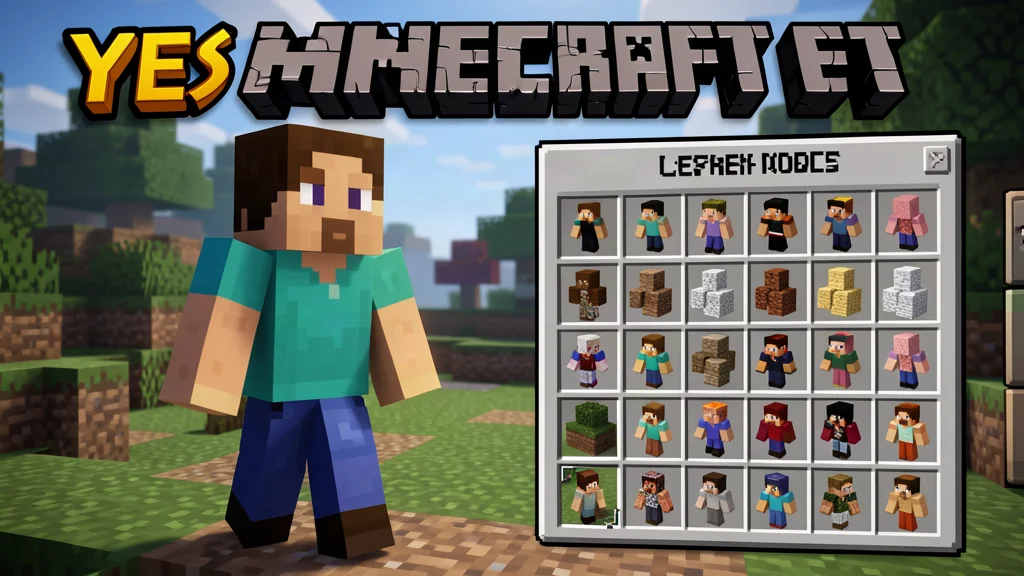
Once you have joined a server with the Yes Steve Model Mod installed, you can press Alt + Y to open the model selection GUI. The interface includes model switching buttons, texture switching buttons for models with multiple texture variants, and category switching buttons to filter between all models, authorized models, and vanilla models. The GUI is intuitive and easy to navigate, with clear visual indicators showing which models are authorized and how many texture variants each model supports.
How to Install the Yes Steve Model Mod
Installing the Yes Steve Model Mod requires a few steps, but the process is straightforward if you have experience with Minecraft mods. Follow these steps to get the mod up and running:
Step 1: Install the Required Mod Loader
The Yes Steve Model Mod is available for three mod loaders: Forge, Fabric, and NeoForge. You need to install the appropriate loader for your Minecraft version:
- Forge: Download the Forge installer from the official Forge website and run it. Select "Install Client" and click OK. Forge is available for Minecraft 1.16.5, 1.18.2, 1.19.2, 1.19.4, 1.20, 1.20.1, 1.21, and 1.21.1.
- Fabric: Download the Fabric installer from the official Fabric website and run it. You also need to install Fabric API, which is required for the mod to function. Fabric is available for Minecraft 1.16.5, 1.18.2, 1.19.2, 1.20, 1.20.1, 1.21, and 1.21.1.
- NeoForge: Download the NeoForge installer from the official NeoForge website and run it. NeoForge is available for Minecraft 26.1, 26.1.1, and 26.1.2.
Make sure you download the correct version of the mod loader that matches your Minecraft version exactly. Mismatched versions will cause the game to crash on startup.
Step 2: Install GeckoLib
The Yes Steve Model Mod requires GeckoLib as a dependency. GeckoLib is a library mod that provides advanced animation and rendering capabilities for custom models. Download the correct version of GeckoLib for your Minecraft version and mod loader, then place the JAR file in your mods folder. Without GeckoLib, the Yes Steve Model Mod will not function properly.
Step 3: Download the Yes Steve Model Mod
Download the Yes Steve Model Mod JAR file from a trusted source. Make sure to select the version that matches your Minecraft version and mod loader:
- Minecraft 26.1.2, 26.1.1, 26.1: NeoForge version
- Minecraft 1.21.1, 1.21: Fabric and NeoForge versions
- Minecraft 1.20.1, 1.20: Fabric and Forge versions
- Minecraft 1.19.4: Forge version
- Minecraft 1.19.2: Fabric and Forge versions
- Minecraft 1.18.2: Fabric and Forge versions
- Minecraft 1.16.5: Fabric and Forge versions
Always download mods from reputable sources to avoid malware or corrupted files. The official 9Minecraft page for the Yes Steve Model Mod provides verified download links that are safe to use.
Step 4: Place the Mod in Your Mods Folder
Move the downloaded Yes Steve Model Mod JAR file into your Minecraft mods folder. The default location is:
- Windows: %appdata%\.minecraft\mods
- macOS: ~/Library/Application Support/minecraft/mods
- Linux: ~/.minecraft/mods
If the mods folder does not exist, create it manually. Make sure both the Yes Steve Model Mod JAR file and the GeckoLib JAR file are placed in this folder. Do not extract the JAR files, as Minecraft reads them directly in their compressed format.
Step 5: Launch Minecraft
Open the Minecraft Launcher and select the appropriate mod loader profile from the dropdown menu. Click Play to launch Minecraft with your installed mods. Once the game loads, you can start a new world or load an existing one. If you are joining a server with the Yes Steve Model Mod, wait about ten seconds after entering for the model synchronization to complete, then press Alt + Y to open the model selection GUI.
If you are new to modding, check out our guide on how to install Minecraft mods for a more detailed walkthrough.
Yes Steve Model Mod Commands
All commands for the Yes Steve Model Mod start with /ysm and require OP level 2 authority to use. The mod includes in-game prompts for all commands, with intelligent suggestions for model IDs and player IDs. Here are the available commands:
- /ysm model reload: Reloads all model files and synchronizes them to all connected client players. Use this command after adding new models to the server.
- /ysm auth: Authorizes all models to the specified player. This gives the player access to every model available on the server.
- /ysm auth clear: Clears all authorized models for the specified player, resetting their access to only the default models.
- /ysm auth add: Authorizes a specific model to the specified player. Only the named model is added to the player's authorized list.
- /ysm auth remove: Removes authorization for a specific model from the specified player, preventing them from using that model.
These commands give server administrators fine-grained control over which models each player can use. The permission system is particularly useful for servers that want to restrict certain models to donors, staff members, or specific player groups.
Yes Steve Model Mod Characters and Models
The Yes Steve Model Mod does not add specific characters in the way that mob mods do. Instead, it provides a framework for loading any custom 3D model as a player character. The mod comes with default Steve and Alex models that respect the player's skin, but the real power comes from the community-created models available for download.
Players have created thousands of custom models for the Yes Steve Model Mod, ranging from anime characters and video game icons to original fantasy creatures and realistic human figures. Popular model packs include the 750 Models Addon, which adds over 750 pre-made models to choose from. The mod's simple file structure makes it easy for anyone to create and share their own models, contributing to a vast and growing library of player characters.
Because the mod uses GeckoLib for animation, custom models can include smooth, lifelike animations that go far beyond the default walking and idle animations. This means your custom character can have unique attack animations, emotes, sitting poses, and more, depending on how the model was created. The animation system is one of the key features that sets the Yes Steve Model Mod apart from simpler skin or model replacement mods.
Tips for Using the Yes Steve Model Mod
Here are some tips to help you get the most out of the Yes Steve Model Mod:
- Wait for synchronization: After joining a server, wait at least ten seconds for the model synchronization to complete before opening the GUI. This ensures all models are downloaded and cached locally.
- Check model authorization: If a model appears with a red icon in the GUI, it means the model is not authorized for your player. Ask a server administrator to authorize it using the /ysm auth add command.
- Experiment with texture variants: Many models support multiple texture variants. Use the left and right buttons in the GUI to switch between different looks for the same model.
- Combine with other mods: The Yes Steve Model Mod is compatible with most other Forge, Fabric, and NeoForge mods. Consider pairing it with enchantment mods or redstone mods for a richer gameplay experience.
- Back up your world: As with any mod installation, it is wise to back up your Minecraft world before adding new mods. This protects your progress in case of conflicts or issues.
- Check version compatibility: Always verify that the mod version, GeckoLib version, and mod loader version all match your Minecraft version. Mismatched versions are the most common cause of crashes.
Frequently Asked Questions
What Minecraft versions does the Yes Steve Model Mod support?
The Yes Steve Model Mod supports a wide range of Minecraft versions, including 1.16.5, 1.18.2, 1.19.2, 1.19.4, 1.20, 1.20.1, 1.21, 1.21.1, 26.1, 26.1.1, and 26.1.2. Make sure to download the correct version of the mod for your Minecraft installation. Using the wrong version will cause the mod to fail to load or crash the game.
Do I need GeckoLib for the Yes Steve Model Mod?
Yes, GeckoLib is a required dependency for the Yes Steve Model Mod. Without it, the mod will not function properly. Download the correct version of GeckoLib for your Minecraft version and mod loader, then place it in your mods folder alongside the Yes Steve Model Mod. GeckoLib is a safe and widely used library mod that is required by many popular Minecraft mods.
Can I use the Yes Steve Model Mod on a server?
Yes, the Yes Steve Model Mod is designed with servers in mind. The server needs to have the mod installed, and it will automatically synchronize custom models to all connected players. Players do not need to install the mod themselves to see custom models on the server, though they will need it if they want to use the Alt + Y GUI to switch models. The mod's permission system lets server administrators control which models each player can use.
Is the Yes Steve Model Mod available for Fabric?
Yes, the Yes Steve Model Mod is available for Fabric for Minecraft versions 1.16.5, 1.18.2, 1.19.2, 1.20, 1.20.1, 1.21, and 1.21.1. When using Fabric, you also need to install Fabric API in addition to GeckoLib. The Fabric version has the same features as the Forge version, including model synchronization, encryption, and the permission system.
How do I add custom models to the Yes Steve Model Mod?
Adding custom models is simple. Place the model file, texture files, and animation files in the appropriate folder within your Minecraft directory, then use the /ysm model reload command in the game to load and synchronize the new models. No configuration files need to be written. The mod automatically detects and loads any valid model files placed in the correct directory.
Is the Yes Steve Model Mod compatible with other mods?
The Yes Steve Model Mod is generally compatible with other Forge, Fabric, and NeoForge mods. However, as with any mod combination, conflicts can occur. It is recommended to test the mod with your existing modpack before committing to a long-term playthrough. If you experience crashes or glitches, try removing other mods one by one to identify the source of the conflict.

Lead writer at minecraft.how. Long-time Minecraft player running a small SMP server, testing every build, mod, and seed before writing about it.
Frequently Asked Questions
What Is the Yes Steve Model Mod?
Yes Steve Model Mod Features
Automatic Client Model Synchronization
Encrypted Model Files
Model Permission System
Vanilla Player Model Modification
Have a Question or Tip about this Guide?Community Q&A
Ask a question or help other players below. Join the discussion and share your Minecraft tips!
Comments
No comments yet. Be the first to share your thoughts!