Skip to content
ブログに戻る

Minecraft Command Maker: A Complete 2026 Guide

ice
ice
@ice
858 閲覧

A Minecraft command maker is either a tool that generates commands for you or a player using command blocks to automate builds, effects, and game mechanics. Whether you're using an online generator or placing command blocks yourself, commands let you bypass vanilla limitations and create stuff that'd take hours to build manually.

What's a Command Maker and Why Should You Care?

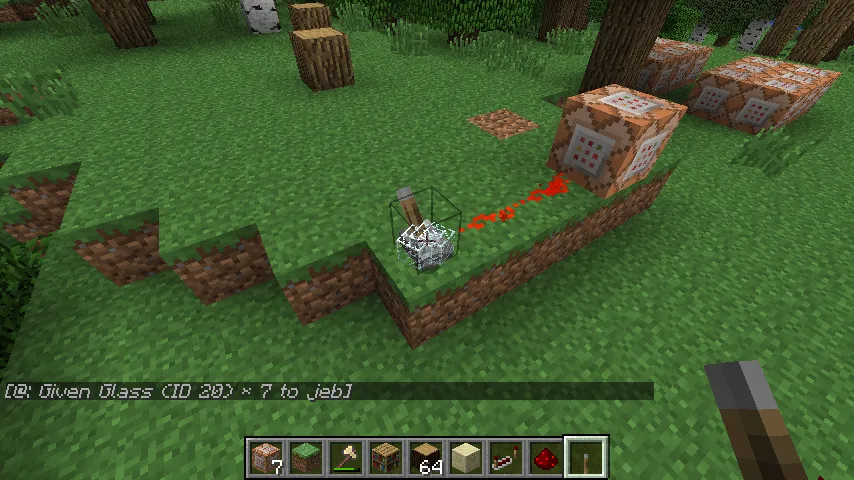
Command blocks are the foundation of command-based creation. They're blocks that execute commands when powered by redstone, and they're the bridge between vanilla survival and custom game mechanics. You place one, type a command, and it runs. That's it.

But here's the thing: most players never touch them because command syntax is nightmarish. The alternatives are command generators - websites that build commands for you through a visual interface. You check some boxes, adjust some values, and get a command you can paste directly into your game.

Think of it this way. Building a custom dimension with worldborder commands by hand? Possible but painful. Using a generator to create that same border in thirty seconds? Way better.

Popular Command Generator Tools

Several sites have become go-to resources for command generation. Minecraft Tools (tools.snazzy.es) generates structure blocks, command blocks, and complex fills. It's the most reliable for precise terrain manipulation. Rebuses's Command Generator handles give commands, enchantments, and equipment setups quickly. If you need summon commands with specific attributes (health, armor, weapons), That's where things get fiddly.

Online generators aren't perfect. They sometimes have version compatibility issues, especially when Minecraft updates the command syntax. Test any generated command in a test world first, not on your main survival server.

The beauty of these tools is speed.

You also don't need to remember whether it's /summon minecraft:zombie or just /summon zombie. The generator handles syntax while you focus on what you actually want to create. Want to summon a zombie with enchanted diamond armor and a custom name? Most generators let you customize that in a few clicks instead of hand-typing:

  • Giving items with specific enchantments
  • Teleporting players to exact coordinates
  • Filling areas with blocks (useful for terraforming)
  • Summon creatures with custom equipment and effects
  • Setting up boss fights with triggered events

Building with Command Blocks and Commands

The real power of command makers shows up when you're building adventure maps, custom game modes, or decorative structures that react to players. Imagine a door that opens when you walk near it, without any redstone visible. That's a command block with a proximity trigger.

Or picture this: you want a trapdoor mechanism that looks like magic. Place a command block behind the scenes, set it to loop, and run /execute as @a at @s if block ~ ~ ~ polished_diorite run <your command here>. Now the game responds to player position and block type without messy redstone. It's cleaner, faster, and honestly more satisfying than traditional redstone contraptions.

A lot of creative servers and map makers use commands to manage player progression, teleportation hubs, and custom items. Check out marblemaker25 Minecraft Skin - players like this are building intricate custom game modes using command chains.

Command blocks come in three flavors: impulse (runs once when powered), chain (runs when the previous block succeeds), and repeat (runs every tick while powered). Chain blocks are where it gets interesting because you can string together multiple commands that execute in sequence. One command kills mobs, the next drops loot, the third plays a sound. No timing headaches.

Setting Up Your First Command Block

Place a command block by typing /give @s command_block. This only works in creative or if you've cheats enabled.

Right-click it. You'll see a text field. Type your command. Save it. Now you need redstone to trigger it (unless it's a repeat block, which runs automatically).

For a simple example, try /give @p diamond_sword. Place the command block, power it with a redstone torch, and watch. Any player nearby gets a diamond sword. Useful for game shows, adventure maps, or chaos.

The conditional toggle matters here. If you enable it, the command only runs if the previous command succeeded. This prevents accidental chain breaks and makes multi-command sequences reliable.

Conditional chains are how you build logic.

Chain a /say command after /summon and your creature announces itself. Chain a /teleport after /execute and you can create teleport hubs that send players to specific coordinates only if they're holding a specific item. That's not just automation, that's creativity with purpose. Players like techmakerdb Minecraft Skin typically have this kind of technical setup running on their servers.

Advanced Commands and Techniques

/execute is honestly the most powerful command in Minecraft, and it's also the most confusing. It filters who or what runs a command based on conditions. /execute as @a at @s if block ~ ~ ~ grass_block run particle happy_villager ~ ~1 ~ 0.5 0.5 0.5 0.1 10 tells the game: for every player, at their location, if there's grass beneath them, spawn happy villager particles. That one line creates an effect that'd need hundreds of command blocks if done manually.

Scoreboards let you track custom data. Create a scoreboard with /scoreboard objectives add kills playerKillCount. Now you can run commands based on how many kills a player has. Combined with /execute, you can trigger special events when someone reaches a milestone. Imagine a player killing their 100th mob and getting teleported to a secret arena. That's entirely command-based.

NBT (Named Binary Tag) data is where commands become absurd.

You can store complex data in items, blocks, and entities. /give @s diamond_sword{display:{Name:'"Epic Blade"'},Enchantments:[{id:"minecraft:sharpness",lvl:5}]} creates a diamond sword with a custom name and max sharpness in one line. For really advanced stuff, players chain commands that read and write NBT data, essentially programming within Minecraft's command system.

Datapacks take this further. They're folders of files that run commands automatically when the server loads or when specific conditions trigger. A datapack can run custom commands every tick without needing visible command blocks. It's invisible automation, and once you understand them, you realize commands aren't just tools - they're a full scripting language. Players working on massive custom game modes (think Deathmaker9000 Minecraft Skin territory) often layer datapacks with command blocks for unimaginably complex mechanics.

Common Mistakes and How to Avoid Them

Syntax errors are your biggest enemy. A missing colon or typo breaks the whole command. Test in creative first. Always.

Never assume coordinates are the same across updates. Minecraft changes block positions and properties. A command that worked in 1.19 might fail in 1.20.4 because a block got renamed. Check the wiki before deploying commands to survival servers.

Command blocks can tank server performance if you're not careful. Repeat blocks running heavy /execute filters every tick across multiple blocks will cause lag. Use command blocks sparingly and test on a test server if you're building something massive.

Nesting /execute commands is tempting but gets unreadable fast. A line with five nested conditions is technically valid but impossible to debug. Write commands that are actually understandable to future-you.

Using Command Makers for Specific Goals

Want to create a custom quest system? Use scoreboards to track progress and /execute to check if conditions are met. Reward completion with /give commands that trigger custom item effects through datapacks. Or teleport players through arena sequences using /teleport chains. BFDIMaker Minecraft Skin belongs to someone probably running exactly this kind of system on their server.

Economic systems with commands are surprisingly viable. Track player money with scoreboards, validate transactions with /execute checks on NBT data, and you've got a working economy without plugins. Moneymaker Minecraft Skin probably did something like this for their server's currency system.

If you're building a parkour map, commands can teleport players back to checkpoints, track best times, and reward winners - all without touching a plugin.

The limit is your patience for testing.

Resources and Next Steps

The Minecraft Wiki (minecraft.wiki) has the authoritative command documentation. When in doubt, go there. Reddit's r/MinecraftCommands is honest about what's possible and what's a waste of time. The community there will tell you if your idea is overcomplicated and suggest easier approaches.

Datapacks.net hosts premade datapacks you can study to see how experienced creators structure complex commands. Reverse-engineering good datapacks is how most advanced players learn. YouTube tutorials on command chains and /execute are helpful if text explanations aren't clicking.

And honestly, the fastest way to get good is to set a specific goal - a door that opens when you approach it, a mob grinder that sorts loot automatically, a player detection system - and fumble through it. You'll break things, restart, and figure it out. That's how it works.

Frequently Asked Questions

What's the difference between a command block and a command generator?
A command block is an in-game block that executes commands when powered. A command generator is a website tool that builds command syntax for you automatically. You use the generator to create the command, then paste it into a command block to run it in-game.
Can I use commands in survival mode?
Only if cheats are enabled on your world. Type /give @s command_block to place one if you have permission. On multiplayer servers, permissions depend on your role. Creative mode and adventure maps designed with commands typically have cheats enabled by the creator.
What does /execute do?
/execute filters commands based on conditions. It lets you run a command for specific players, at specific locations, or if specific blocks are present. It's the most powerful command in Minecraft because it adds logic to your commands, making them conditional rather than unconditional.
How do I create a command that triggers on proximity?
Use /execute combined with /execute as @a at @s if block to detect when a player walks near a specific block. Pair it with /teleport or other action commands to trigger effects when the condition is met. The whole setup goes in a repeat command block powered by redstone.
What's a datapack and how do I use it?
A datapack is a folder of JSON and command files that run automatically without visible command blocks. They execute on server load and during gameplay based on triggers. Create one by making a folder structure in your world's datapacks folder, then add function files with commands inside. They're advanced but invisible, making them perfect for complex automation.