How to Play Classic Minecraft Pi Edition on Modern Systems
"Official Mirror Of @TheBrokenRail's Minecraft: Pi Edition: Reborn."
MCPI-Revival/minecraft-pi-reborn · github.com
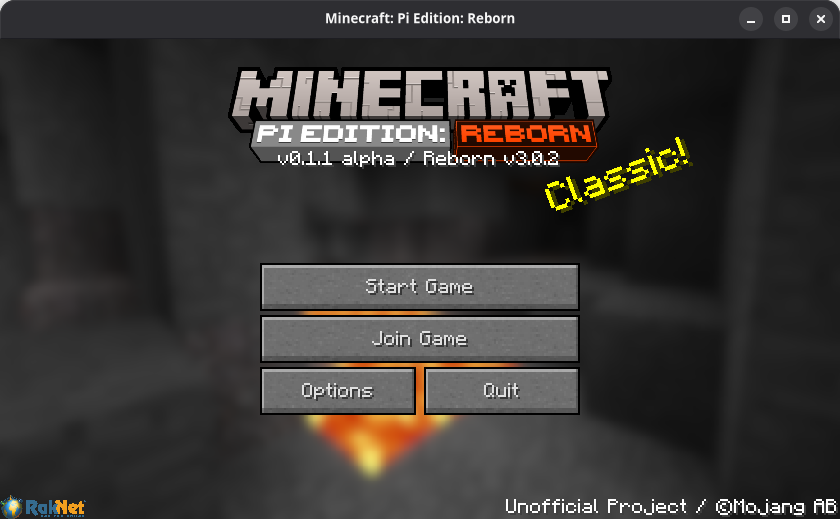
The original Minecraft: Pi Edition was a stripped-down version of Minecraft released exclusively for Raspberry Pi back in 2012. It's long been abandoned by Mojang, but there's a reason people still talk about it: that early, raw version of Minecraft hits different. Minecraft Pi Reborn revives it, runs it on modern hardware, and actually improves it along the way. If you've got nostalgia for those early days or want to explore what Minecraft looked like before a decade of updates, this project makes it possible.
What's Minecraft Pi Edition, Really?
The original Pi Edition was incredibly minimal. No creative mode. No survival sprawl. No redstone circuits or nether dimensions. Just pure, bare-bones block-breaking on a Raspberry Pi. It was educational, lightweight, and honestly kind of beautiful in how focused it was. Then Mojang abandoned it, source code and all. For years, if you wanted to play it, you had to dig through decade-old installers or keep an ancient Pi running.
Minecraft Pi Reborn changes that. Instead of waiting for official support that'll never come, the community forked it, modernized the code, and ported it to basically any system that runs Linux or Windows. It's C++-based (not Java), which means it's lean and actually runs smooth on modest hardware. You get that nostalgic Pi Edition experience, but without being tethered to a Raspberry Pi from 2012.
Why You'd Want This
Three reasons this matters:
- Nostalgia with purpose. If you grew up with Minecraft Pi, this is a genuine trip. The interface, the blocky textures, the simplicity. It's not the Java edition with filters, it's actually the original thing running.
- Educational value. Schools and Raspberry Pi clubs still use Pi Edition for teaching. Having it work on modern systems means you're not restricted to ancient hardware.
- Lightweight by design. This isn't a mod requiring you to own a NASA computer. A basic laptop or even an older Chromebook can run it. It's maybe 50 MB and runs on OpenGL 1.5 or higher, which basically every system has.
And honestly, there's something refreshing about a version of Minecraft where you can pick it up and just play without worrying about updates breaking your world or chunk loading lag or whatever the latest meta is. It's just... Minecraft.
Getting It Installed
You've got three main paths, and the choice depends on what system you're on:
AppImage (Most Flexible)
If you're on Linux and want the most straightforward install, grab the latest AppImage from the official releases. Download it, mark it executable, and run it. Done.
chmod +x MCPI-Reborn*.AppImage./MCPI-Reborn*.AppImageAppImages are self-contained binaries that work on basically any Linux distro. No dependency hunting. No weird library conflicts. Just download, run, play. The launcher will even offer to create a desktop entry so you can launch it from your menu like any normal app.
Flathub (If You Use Flatpak)
If your system supports Flatpak (and most modern Linux distros do), you can install it directly:
flatpak install flathub com.thebrokenrail.MCPIReborn
flatpak run com.thebrokenrail.MCPIReborn
Flatpak handles all the sandbox stuff automatically, keeps things isolated from your system, and updates itself. Less friction than tracking manual downloads.
Pi-Apps
If you're actually on a Raspberry Pi, Pi-Apps (the community app store) has it integrated. One click and it handles the install. So this is probably the path of least resistance for Pi users since it manages dependencies for your specific hardware.
Windows users: The project supports Windows 10/11, but Windows distribution is a bit less streamlined. Look, check the releases page for the latest Windows build. You might need to manually place it somewhere sensible and create a shortcut, but it'll run.
System Requirements (Reasonable)
This isn't demanding. The original Pi Edition was made for a $35 computer from a decade ago. Here's what you need:
- Linux or Windows 10/11
- 32-bit ARM, 64-bit ARM, or 64-bit x86 processor (basically everything modern)
- OpenGL 1.5 or better (integrated graphics fine)
- Around 50 MB of disk space
Seriously, if your laptop can load YouTube, it'll run this. The graphics requirements are from 2006. This RAM footprint is minimal. This isn't a stress test.
What's Different From the Original
Minecraft Pi Reborn didn't just copy-paste the old code. The team added actual improvements while keeping the spirit intact.
The most obvious: it works on non-Pi hardware. But also, they've modernized the codebase, fixed rendering bugs, added better performance, and updated it for systems that don't run ancient Linux kernels. You get the Pi Edition you remember, but without the decades of accumulated bitrot.
One thing to remember though: this isn't Pi Edition with Java Edition features bolted on. It's still the minimal version. No Nether. No proper creative mode with infinite blocks. If you're expecting 1.20-level Minecraft, you'll be disappointed. But if you want what Pi Edition actually was, it's exactly that.
Tips and Common Gotchas
First time launching? It might take a moment to compile shaders or set up the graphics pipeline. Don't panic if the window stays black for 10 seconds. That's normal on first run.
If you get rendering issues or crashes, check your OpenGL version. Run `glxinfo | grep "OpenGL version"` on Linux and see what you get. Anything 1.5 or higher works, but ancient integrated graphics might struggle. Actually, scratch that - they probably still work, they just might be slow. Pi Edition doesn't demand much, but it does demand proper OpenGL support.
The launcher has an About menu with an option to create a desktop entry. Do this if you're planning to actually use it regularly. Saves you digging through downloads every time.
If you grab it via AppImage and permissions get weird, make sure the binary is actually marked executable. Sometimes downloads lose permissions. One chmod and you're good.
Similar Projects Worth Knowing About
If you're into retro Minecraft experiences, there are a few directions to explore:
- Minecraft Java Snapshot Archives: If you want to play a specific older version of actual Java Minecraft (like Beta 1.7.3), there are launchers that manage those. Different beast entirely, but satisfies similar nostalgia.
- Minecraft Classic (In-Browser): Mojang released the original Classic version as a free in-browser game. No download needed, but it's even more primitive than Pi Edition.
- Minetest: An open-source Minecraft-like engine. Not the same game, but similar vibe and runs on basically anything.
But if you specifically want Minecraft Pi Edition as it was made, Minecraft Pi Reborn is the only realistic path. It's the canonical version now.
Before You Jump In
Minecraft Pi Reborn is perfectly playable, but it's community-maintained. Updates are steady, but don't expect the support pipeline of official Minecraft. That said, the project has nearly 1,300 commits and 284 stars, which signals active development and community interest.
Your worlds are saved locally, performance is solid, and the whole thing is MIT licensed. If something breaks, you've got source code and a community that cares. For a nostalgic project, that's actually impressive.
Worth playing? If you have even a passing interest in how Minecraft used to be, yeah. It takes five minutes to install, runs on basically anything, and scratches a very specific itch. You can also dress up your server with a cool Minecraft MOTD Creator if you set up a server, or browse Minecraft skins to customize your character once you're in.
MCPI-Revival/minecraft-pi-reborn - MIT, ★284
Lead writer at minecraft.how. Long-time Minecraft player running a small SMP server, testing every build, mod, and seed before writing about it.