Lazymc: How to Auto-Wake Your Minecraft Server
timvisee/lazymc
💤 Put your Minecraft server to rest when idle.
View on GitHub ↗If you run a Minecraft server that sits empty most of the day, lazymc might be the solution you didn't know you needed. It automatically puts your server to sleep when no one's playing and wakes it the moment a player shows up - all without them noticing a thing.
What Lazymc Does (and Who It's For)
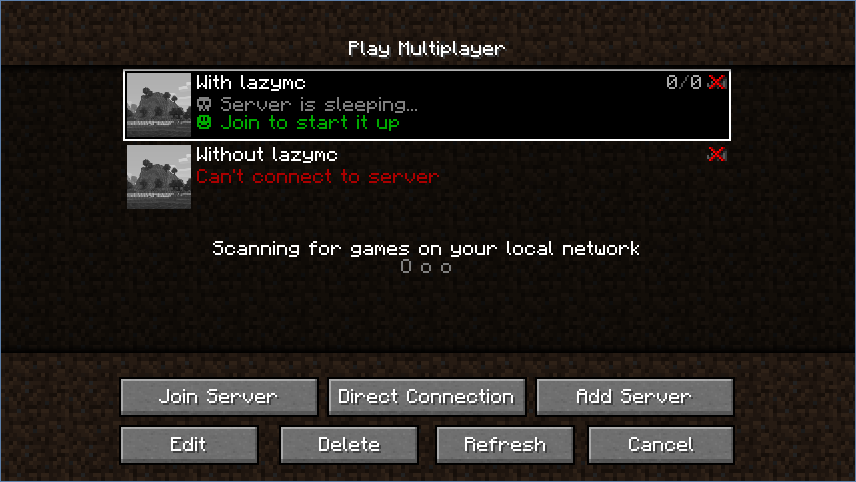
Lazymc is a proxy that sits between your players and your actual Minecraft server. Think of it as a bouncer at the door. When the real server is running, lazymc just gets out of the way and lets traffic through. But when you tell it to, lazymc can respond to connection attempts on its own, holding or kicking players with a custom message while it spins up the actual server in the background.
The genius part? Once the real server is ready, lazymc transparently relays everything. Players don't know they were talking to a proxy the whole time.
This is built in Rust and weighs about 3KB of RAM. For a self-hosted server running on limited hardware - a Raspberry Pi, an old laptop, a VPS with tight resource limits - this changes the economics completely.
You're looking at lazymc if you run a modded server (which devour resources), a semi-public server where friends drop in unpredictably, or anything where "always on" costs more than you'd like to pay.
Why Your Server Needs This
Most Minecraft servers, especially modded ones, burn resources even when empty. A heavily modded setup can sit at 2-4GB of RAM usage just waiting. If you're paying per hour or month on a host, that's wasted money. If you're running it at home, that's your electricity bill and hardware wear.
Lazymc solves this by actually stopping the server process when it's idle. Not suspending it - actually stopping it. Your RAM drops to nearly nothing. Your CPU load vanishes. Then the second someone tries to join, lazymc wakes the server back up and gets out of the way.
The catch? There's a startup delay. If your server takes 30 seconds to boot, players will wait 30 seconds before they can join. Lazymc can tell them what's happening (with a custom MOTD showing "Server is starting..."), or it can kick them with a friendly message. For casual servers or friend groups, that's fine.
Getting Started: Installation and Setup
On Linux or macOS, grab the binary from the latest release. Download the right build for your system - aarch64 for ARM, x64 for standard Intel/AMD. On Windows, there's a pre-built.exe.
# Download for Linux x64
wget https://github.com/timvisee/lazymc/releases/download/v0.2.11/lazymc-v0.2.11-linux-x64

# Make it executable
chmod a+x lazymc-v0.2.11-linux-x64

# Rename for convenience (optional)
mv lazymc-v0.2.11-linux-x64 lazymc
Put the binary in your server directory. Test it works:
./lazymc --helpNow generate the config file:
./lazymc config generateThis creates a `lazymc.toml` file. You'll need to edit it - mainly pointing lazymc at your actual server's address and telling it how to start the server. If your server starts with `java -jar server.jar nogui`, you'll put that in the config.
Then start lazymc:
./lazymc startUpdate your server's DNS or your launcher's server IP to point to the lazymc proxy instead of the real server. From now on, lazymc is the front door.
How the Join Methods Work
Lazymc gives you choices for how to handle players joining while the server starts. Each has trade-offs.

Hold is transparent but requires patience. Players connect to lazymc, and lazymc holds them in a queue. Once the real server boots, lazymc relays them in without them losing connection. They don't see a disconnect. Best for players who don't mind a delay.
Kick is simpler but less elegant. When a player tries to join and the server's booting, lazymc kicks them with a custom message like "Server is starting, try again in 30 seconds!" Players have to manually rejoin. Works fine for small groups.
Forward is clever if you run a lobby. It redirects players to a different IP (like a lobby server) while the main server boots. They play mini-games or hang out until it's ready, then you teleport them over.
Lobby mode (still experimental) creates an emulated Minecraft server world while the real one starts. Players can move around in a small sandbox. When the real server's ready, they teleport over automatically.
Features That Matter
Beyond the core sleep-and-wake idea, lazymc handles the admin stuff you'd do manually. It automatically manages your `server.properties` file - keeping the right host and port settings, configuring RCON if you need it. You don't have to fiddle with those by hand.
If your server crashes, lazymc can restart it automatically. And it respects ban lists from your server, blocking banned IPs before they even reach the server process.
One useful feature: you can send a `SIGTERM` to lazymc or hit it with RCON to gracefully shut down the server. Useful for updates or maintenance without yanking the power cord.
There's also a proxy header option if you want the real server to know the actual player IP instead of seeing lazymc's IP as the client. That's essential if you use IP-based authentication or logging.
Tips, Gotchas, and What to Watch For
First: lazymc requires you to have direct system access. If you're on a shared hosting provider with a control panel dashboard, you probably can't run it. You need SSH or shell access to start the binary.
Second: startup times matter. If your server takes two minutes to boot (looking at you, heavily modded setups with 200+ mods), players will wait. Plan accordingly and make sure your MOTD is clear. Nobody likes silent loading screens.
Version support goes back to Java Edition 1.6, which is ancient. Recent versions like 26.1.2 work fine. But it's worth double-checking the GitHub if you're running something truly latest.
One surprising thing: lazymc config can be finicky if you're on Windows because of how RCON works. The project has separate Windows docs covering this. Read them.
If you're running a voting system (maybe you want people testing your server on sites like that), just make sure your lazymc MOTD is accurate. If you've used the Minecraft Votifier Tester to verify voting, be aware that lazymc's proxy response might differ from your live server's.
When Lazymc Isn't the Right Fit
Lazymc works great for modded servers or low-traffic setups. But if you're running a bustling community server that's online 12 hours a day, the boot delays become annoying. And if you need real-time uptime guarantees, the sleep/wake cycle isn't reliable enough - someone will join, wait for startup, and get frustrated.
Also: plugins that hook into server lifecycle events (startup, shutdown) might behave oddly if you're constantly cycling the server on and off. Test thoroughly before running this on a production server with delicate plugin chains.
If you're just trying to reduce your server cost a little and don't want to manage a proxy, consider asking your host if they offer auto-shutdown features. Some do. But most hosts don't, and that's where lazymc shines.
Open the lazymc repo ↗

Lead writer at minecraft.how. Long-time Minecraft player running a small SMP server, testing every build, mod, and seed before writing about it.