Скачивание текстур Minecraft: Что важно в 2026
Лучшие варианты скачивания текстур Minecraft в 2026 году - это безопасные пакеты от надежных сайтов сообщества, подходящие по версии, а не случайные загрузчики файлов. Выберите правильный формат для Java или Bedrock, обратите внимание на разрешение, и вы получите улучшенный вид игры примерно за пять минут.
Где найти безопасное скачивание текстур Minecraft
В 2026 году самый безопасный способ - это скучный способ, и это хорошо. Используйте проверенные страницы пакетов сообщества для Java, официальные страницы создателей, если они существуют, и Bedrock Marketplace для консолей и большинства мобильных игроков. Если сайт скрывает файл за тремя поддельными зелеными кнопками и всплывающим окном обновления драйвера, закройте его. Это не очарование текстур, это просто замаскированный вредонос.
Я всегда проверяю четыре вещи перед скачиванием: поддерживаемую версию Minecraft, тип файла, недавнюю активность обновлений и совпадение скриншотов с фактическим интерфейсом игры. Красивый превью ничего не значит, если инвентарь превращается в нечитаемую кашу.
- Пакеты Java обычно скачиваются как файл.zip и должны оставаться в архиве.
- Пакеты Bedrock часто поставляются как.mcpack или через Marketplace.
- Дата обновления важнее красивого маркетинга, особенно после крупных обновлений.
- Комментарии и заметки создателя часто раскрывают отсутствующие текстуры, проблемы с FPS или необходимые моды.
И да, бесплатные ультрареалистичные RTX-пакеты 1024x для любого устройства - это обычно вымысел. На ноутбуке среднего уровня это выглядит не как реализм, а как попытка вашего охлаждения покинуть здание.
Загрузки Java и Bedrock, и почему это до сих пор путает людей
Java - это просто. Скачайте пакет, перетащите его в папку Resource Packs, включите его, готово. Bedrock проще на бумаге, но строже на практике, особенно на консолях.
Java дает вам больше свободы
Если вы играете на Java Edition на ПК или Mac, большинство пакетов сообщества работают, если версия совпадает. Пакеты более высокого разрешения, пользовательские модели предметов, соединенные текстуры и причудливые детали излучения - это в основном развлечение только для Java. Некоторые из этих функций по-прежнему требуют OptiFine или совместимых модов, поэтому прочитайте заметки создателя перед тем, как винить пакет.
Я тестировал несколько настроек на клиенте Fabric, чистой ванильной установке и небольшом Paper SMP, где мы восстанавливали средневековые ворота без особой причины. Один и тот же пакет, три разных результата. Vanilla справилась с базовыми текстурами хорошо. Fabric требовал правильных визуальных модов для дополнительных функций. Сервер сам по себе не был проблемой, это был клиент.
Bedrock чище, но более ограничен
Загрузки Bedrock обычно проще на Windows, Android и iPhone, потому что файлы.mcpack можно импортировать прямо в игру. Консоли - это неудобный родственник за обеденным столом. Они выглядят красиво, но у них есть правила.
Вообще, это не совсем правильно для Bedrock в целом. Windows Bedrock может быть довольно гибким, а Bedrock для консолей по-прежнему подталкивает большинство игроков к официальному Marketplace. Вот почему многие жалобы о том, что текстуры не работают на PS5, на самом деле просто люди, скачивающие пакет Java и ожидающие чуда.
The Loadout сообщил в июне 2024 года, что Mojang начала тестировать нативную версию PS5. Это имеет значение здесь, потому что игроки PlayStation по-прежнему зависят от официальной поддержки, а не только от сырой производительности. Нативное приложение помогает игре работать лучше, конечно, но оно не превращает PS5 в открытый Java-подобный файловый браузер. Если вы играете на консоли, в первую очередь предполагайте официальные каналы.
Лучшие стили текстур Minecraft для скачивания в 2026
Большинству игроков не нужен гигантский реалистичный пакет. Им нужен пакет, который исправляет некрасивые края, улучшает видимость руды и не делает хлеб похожим на ламинированный картон.
Мой выбор для большинства людей - это всё еще ванильный плюс текстурный пакет в 16x или 32x. Вы сохраняете личность Minecraft, меню остаются читаемыми, и ваш мир выживания не выглядит как перенесенный в другую игру. Для строительства этот баланс имеет значение. Когда-нибудь пробовали строить полную кухню с ванильными блоками, а потом перейти на более чистый декоративный пакет? Внезапно кварц действительно ведет себя.
Средневековые и фэнтези пакеты отлично подходят для замков, RPG-серверов и драматических скриншотов. Они также печально известны тем, что делают простые комнаты красного камня похожими на старый трактирный подвал, что смешно только один раз. Если ваш мир в основном еловый, каменный и фонарики, этот стиль супер. Если вы строите киберпанк город, может быть, не надо.
PvP пакеты постоянно выигрывают по одной причине: ясность. Короткие мечи, чистые частицы, более яркие руды, меньше визуального беспорядка. Даже если вы никогда не трогаете BedWars, эти выборы могут сделать добычу полезных ископаемых и лут более быстрыми. Некоторые немного слишком агрессивны. Когда каждый предмет светится так, как будто он проходит прослушивание для миниатюры, я отказываюсь.
Реалистичные HD пакеты могут выглядеть невероятно на скриншотах, особенно с шейдерами. Они также могут сплющить ваш FPS в маленький грустный блин. Используйте их, если у вас есть оборудование и причина, а не потому что изображение продвижения убедило вас, что каждая корова должна иметь поры.
Если вы хотите, чтобы ваш персонаж соответствовал новому внешнему виду, сочетайте пакет со скином, который подходит к стилю. Мне понравилось просматривать профиль скина Packson742 для чистого стилизованного вида, дизайн скина TexturedWall для чего-то более смелого и страницу скина PackSlash7 Minecraft когда я хотел более резкого, более графического ощущения. Есть также текстурированные опции, такие как список скинов TexturePackscom и скромный скин Minecraft niltexture. Крошечная деталь, большая разница.
Как установить текстуры Minecraft без обычных головных болей
Половина проблемы - это не скачивание пакета. Это установка правильного файла в правильное место и не распаковка того, что было предназначено для остатков в архиве.
- Сначала проверьте издание. Пакеты Java не подходят для Bedrock, и пакеты Bedrock не превращаются в магию сами по себе.
- Сопоставьте версию игры. Если пакет говорит 1.21.5, а вы на более новом обновлении, протестируйте его в резервном мире перед тем, как доверять ему.
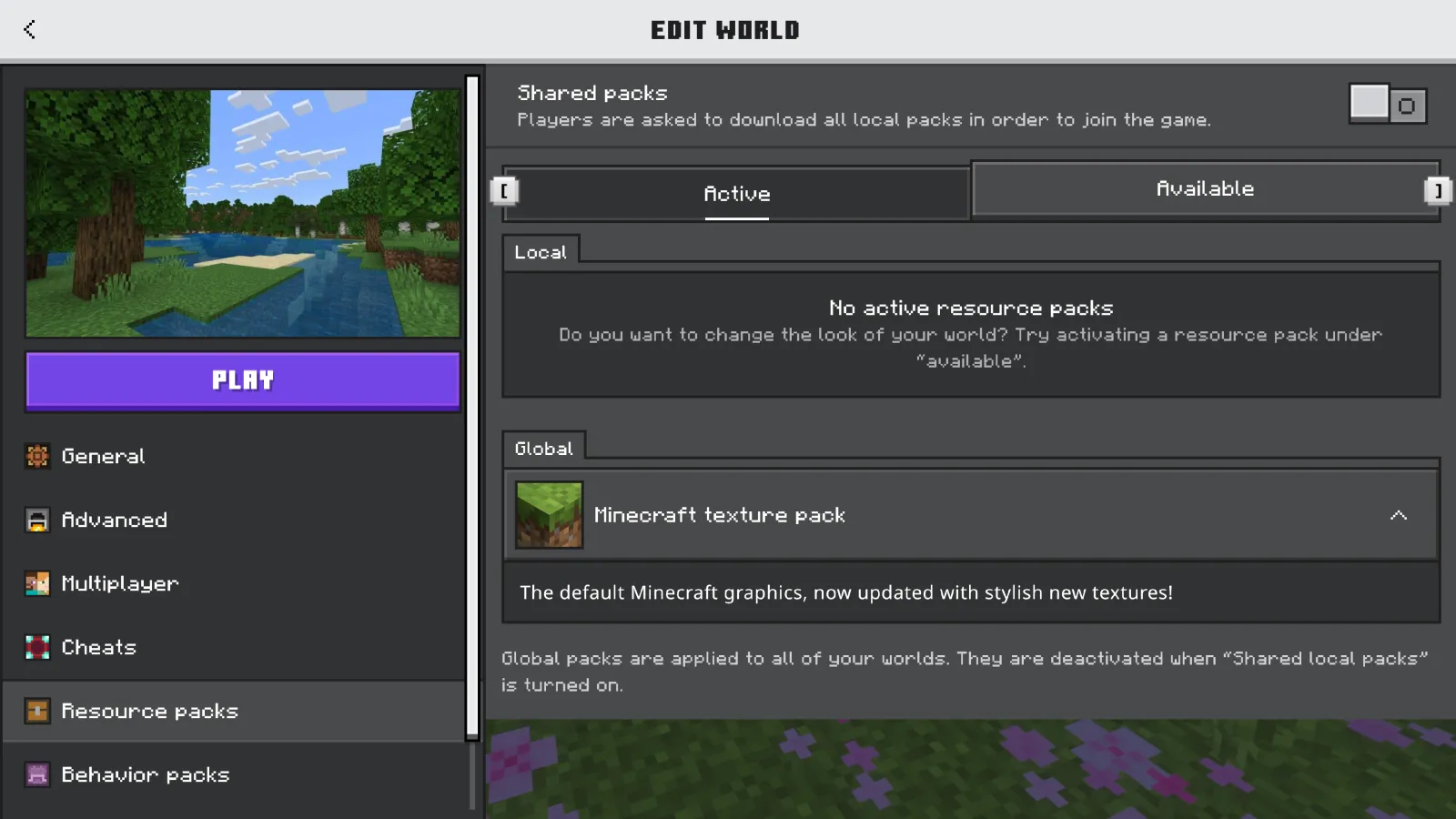
- Держите пакеты Java в архиве. Поместите файл.zip в папку Resource Packs, затем включите его из меню.
- Правильно импортируйте пакеты Bedrock. Откройте файл.mcpack или установите его через Marketplace, затем активируйте его для мира или глобально.
- Установите порядок пакетов осторожно. На Java верхний пакет переопределяет те, что под ним. Это имеет большое значение, если вы смешиваете UI, мобов и пакеты предметов.
- Перезагрузитесь, если что-то выглядит неправильно. Отсутствующие значки, черно-фиолетовые блоки или пустые меню часто очищаются после чистой перезагрузки.
Я также держу обычный профиль по умолчанию для тестирования. Скучно? Да. Полезно? Очень. Когда пакет ломается, вы хотите знать, является ли файл плохим, версия неправильной или другой мод борется с ним в темном переулке за экраном заголовка.
Еще одно: создайте резервную копию своих миров перед большими визуальными изменениями, если пакет включает пользовательские модели или поведение дополнений. Текстурные пакеты обычно не портят сохранения, но плохие комбинации могут сделать мир неиспользуемым до очистки стека.
Коротко, если вы новичок: начните с одного пакета, не пять. Меню Minecraft не награждают самоуверенность.
Совместимость версий в 2026 году, включая 1.26.1
Эта часть имеет большее значение, чем люди признают. Много плохих результатов скачивания текстур Minecraft - это не плохие пакеты, а устаревшие пакеты на старых страницах со свежими миниатюрами.
PCGamesN сообщил, что текущий график выпуска Mojang приземляется примерно каждые три месяца, и его оценка от 4 марта 2026 года предполагала Minecraft 1.26.1, 'Tiny Takeover', на март 2026 года. Этот стабильный темп выпусков хорош для игры. Это немного раздражает для текстурных пакетов, потому что создатели должны исправлять форматы, переименовывать активы и исправлять небольшие визуальные перерывы каждые несколько месяцев.
Так что вы должны сделать? Проверьте дату последнего обновления пакета, затем сравните его с вашей точной версией игры. Не 1.26-ish, точная версия. Пакет, созданный для более ранней сборки, может все еще загружаться, но меню, частицы, картины или более новые мобы могут ломаться странным образом. У меня был один пакет, оставляющий каждого малыша идеально, пока медные блоки превращались в загадочные кирпичи. Смешно, но не идеально.
Снимки и превью - это их собственный беспорядок. Если вы играете экспериментальные сборки, ожидайте, что текстурные пакеты будут отставать. Это нормально. Держите отдельный профиль для тестирования и не перемещайте свою повседневную установку выживания в территорию предварительного просмотра, если вы не любите поиск неисправностей больше, чем фактическую добычу полезных ископаемых.
И если вы на консоли, совпадение версий еще более обязательно, потому что официальная поддержка пакетов более плотная. Это еще одна причина, по которой Bedrock Marketplace остается безопаснее, даже если это менее захватывающе, чем охота за сокровищами сообщества на Java.
Что я бы скачал в первую очередь, если вы просто хотите хорошую установку
Если вы хотите наименее рискованный путь в 2026 году, скачайте пакет 16x или 32x ванили, верный вашей точной версии, протестируйте его в одноразовом мире и остановитесь на день или два. Серьезно. Вам не нужен полный кризис визуальной идентичности при первой попытке.
После этого разветвляйтесь в зависимости от того, что вы действительно делаете в игре:
- Строители: ванильные плюс или средневековые пакеты с чистым контрастом блоков.
- Игроки на выживание: читаемые руды, аккуратный интерфейс, низкий удар по производительности.
- Игроки PvP: легкие пакеты с уменьшенным беспорядком и более четкими формами предметов.
- Игроки консолей: сначала официальные опции Marketplace, потому что совместимость - это меньший риск.
Вот и все. Найдите безопасное скачивание текстур Minecraft, сопоставьте издание, уважайте номер версии и не путайте высокое разрешение с лучшим. Лучший пакет - это тот, который вы держите включенным после того, как новизна уходит.

Lead writer at minecraft.how. Long-time Minecraft player running a small SMP server, testing every build, mod, and seed before writing about it.
Часто задаваемые вопросы
Где безопасно скачать текстуры Minecraft в 2026 году?
В каком формате скачиваются текстуры для Java и Bedrock?
Что проверить перед скачиванием текстурного пакета?
Почему текстуры не работают на PS5?
Какое разрешение текстур выбрать для Minecraft?
Стоит ли скачивать реалистичные HD текстуры?
Комментарии
Пока нет комментариев. Станьте первым, кто поделится своим мнением!