Scythe Anticheat: Complete Setup Guide for Bedrock Servers
Scythe-Anticheat/Scythe-Anticheat
Scythe Anticheat - The best Minecraft Bedrock anticheat designed for realms, worlds, and servers
View on GitHub ↗If you're running a Minecraft Bedrock realm or server, you know the nightmare: someone discovers an auto-clicker mod, builds a house in five minutes, and suddenly the fun is ruined for everyone else. Scythe Anticheat is a free behavior pack that automatically detects cheating exploits and lets you catch rule-breakers before they tank your world's integrity.
What Scythe Anticheat Does
Scythe is an anti-cheat system purpose-built for Minecraft Bedrock realms and servers. Instead of relying on player reports, it runs passive checks in the background using Minecraft's Scripting API, watching for behavior patterns that shouldn't be possible in vanilla survival. A player suddenly mining stone with a wooden pickaxe at superhuman speed? Flagged. Someone equipping an item with their offhand while mid-action? Detected. It handles the boring surveillance work so you don't have to manually review footage or constantly watch chat.
The system is intentionally designed to be low-friction. Install the pack, enable Beta APIs, and you're done.
No config files to tinker with, no complicated setup rituals (well, except you do need to put Scythe at the top of your behavior pack list, which is easy to forget). It just works out of the box. The latest version, v4.0.0, is actually a huge modernization - the developers refactored everything from a massive single 700-line file into modular check files. That means it's cleaner, easier to maintain, and more stable.
Why Your Realm Needs This
Here's the thing about Bedrock servers: they're more vulnerable than Java Edition. The mod ecosystem is wild, detection tools are way behind Java, and anyone with $5 can grab a mod menu. If you've got friends or strangers joining your realm, you're basically playing with your eyes closed without something like Scythe watching.
Even if your group is small and "chill," one person finding a free auto-clicker changes everything. The progression that took weeks becomes trivial. And this player who grinds legitimately starts to resent the person mining diamonds in minutes. And you're stuck between kicking a friend or letting fairness die. Scythe prevents that whole conflict.
It's especially useful for realms where progression matters.
Survival-focused worlds, SMPs, competitive tournaments, anything where you want mining, building, and PvP to feel earned. When everyone knows the checks are running, cheaters either don't even try or get caught immediately. That's the psychological win right there.
If you're also maintaining a Minecraft server list entry or tracking server health with a server status checker, anti-cheat becomes even more important - players research whether servers are fair before joining, and a cheat-free reputation is a selling point.
Installation: Step by Step
Download the `.mcpack` file from the GitHub releases page. Head to the latest release (currently v4.0.0) and grab the Scythe-Anticheat.mcpack file.
On your device (phone, console, PC), open the `.mcpack` file. Minecraft will automatically import it into your behavior pack library. This is the easiest part.
Now open your realm or server world settings. Navigate to the behavior packs section and find Scythe in your pack list. Drag it to the very top - pack order matters because Scythe needs to intercept actions before other packs run their logic. If Scythe is third or fourth in the list, it might miss detection windows.
Then in the same settings area, find and enable "Beta APIs" (sometimes called "Experimental Features" depending on your Minecraft version). This is non-negotiable. Scythe can't run without access to the Scripting API, and Beta APIs is where that lives. The reason it's not on by default is stability - experimental features can cause crashes in edge cases.
Launch your world. You should see a system message in chat confirming Scythe loaded successfully. If you don't see anything, go back and double-check that Beta APIs is actually enabled.
One important note: if you're upgrading from Scythe v2.24.0 or earlier, your saved config will reset to defaults. v4.0.0 changed how configurations are stored, so older data gets wiped. It's annoying if you had custom checks tweaked, but the defaults are solid for most use cases.
Key Features and How They Work
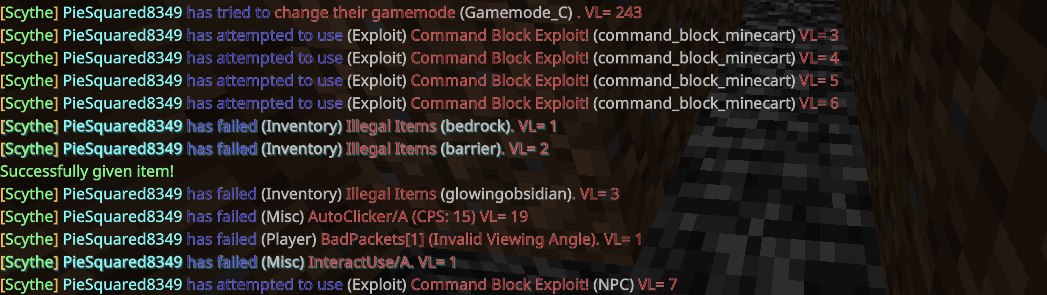
Scythe detects a range of common cheats through multiple layered checks. Think of each check as a separate detective watching a different crime.
AutoClicker detection looks for impossibly high clicks-per-second. The threshold is tuned to catch actual bots while ignoring legitimate fast clickers. You won't get flagged for a brief spam-click - the system looks for sustained, inhuman CPS rates.
AutoTool watches for suspicious slot switching. In vanilla Minecraft, you don't instantly swap tools between blocks - there's lag, animation delay, all that. If someone's pickaxe switches the exact frame they stop mining stone and start mining ore, that's suspicious. The check catches it.
AutoOffhand flags players equipping items to their offhand while performing other actions simultaneously. In vanilla, you can't reliably equip a shield while swinging a sword without a server tick or two of delay. Cheaters automate it. Scythe sees the pattern.
BadPackets is actually three checks combined. One detects invalid head rotations (players spinning their head in ways game physics doesn't allow). Another flags chat messages with abnormal lengths (sometimes payload attacks). A third looks for malformed packets in general. Scythe v4.0.0 merged similar checks like this together for efficiency.
There are also checks for Flight, Reach (attacking from too far), Speed, NoKnockback, and others. Some are more aggressive than others. You might see a legitimate player get flagged for briefly hitting a strange angle during PvP, then get cleared. That's the system working - flagging suspicious behavior without auto-banning.
Commands and Moderation Tools
Once Scythe is loaded, you get access to moderation commands.
`!help` outputs a categorized list of every command. You can also run `!help ` for technical details on a specific check or command.
`!notify` toggles whether you see cheat alerts. By default, notifications are hidden. You need to run this to start receiving pings when someone gets flagged. This prevents chat spam when you're not actively moderating.
`!stats ` shows a player's history: their device type, any flagged checks (and how many times), their Scythe-Op status. This is genuinely useful for spotting patterns. If the same person keeps getting flagged for the same checks across multiple sessions, they're probably cheating. If it's a one-off weird angle during PvP, probably just lag or a coincidence.
To access these commands, you need Scythe-Op status. Run `/function op` to grant yourself the proper permissions. Then you're locked in.
Common Issues That'll Burn You
Forgetting to enable Beta APIs is the most common problem. You'll install Scythe, load the world, watch for alerts that never come, then realize nothing initialized. The Scripting API silently fails without that toggle. Go back to world settings, enable it, restart the world.
Scythe is version-dependent.
When Minecraft updates, the Scripting API changes, and older Scythe packs stop working. v4.0.0 officially supports Minecraft 1.21.130, 1.21.131, 1.21.132, and 1.26.0 through 1.26.12. If you're on version 1.26.13 or newer and Scythe doesn't load, check the GitHub releases page - there's probably a newer build compatible with your version. The maintainers are pretty responsive about updates.
Behavior pack order matters more than you'd think. If Scythe is anywhere but the top of the list, it might not intercept the checks it needs to run. This has burned plenty of people who installed it and then installed other packs on top.
False positives do happen. A player with high ping might get flagged for reach they didn't actually achieve. A laggy combat moment triggers a BadPackets alert. The system's designed to flag suspicious behavior without auto-punishing, so you still have to manually review the stats and make judgment calls. It's more like a surveillance camera than an automated ban system.
What to Do Before You Install
Make sure you're running a recent Minecraft version. Scythe won't work on versions older than 1.20-something, and the Scripting API is still stabilizing. If you're on an old snapshot or beta build, upgrading to a stable release first is safer.
Backup your world before installing any behavior pack. This is good practice anyway, but it's especially important when adding something with the access level that Scythe needs. On the incredibly rare chance something breaks, you've got a rollback.
If you're running other behavior packs, enable them after Scythe in the pack list. This ensures Scythe's checks run first and don't get interfered with by other logic.
Alternatives and Comparisons
If Scythe doesn't fit, a couple other options exist for Bedrock, though they're limited.
Some server hosts offer built-in anti-cheat as a premium feature. These tend to be less granular, more expensive, and less frequently updated than Scythe. Real talk, worth checking if you're on a paid realm host, but most are behind Scythe's detection rate.
You could roll with pure manual moderation - watch closely, trust player reports, kick when obvious. This works if your realm is small and trusted, but it doesn't scale. One person can't watch 20 players simultaneously.
For Java Edition players, there are mature systems like AAC (Advanced AntiCheat) and Spartan, which are years ahead of Bedrock options. But they don't apply here - Bedrock and Java are totally separate codebases.
Given that Scythe is free, actively maintained, and designed specifically for Bedrock, it's the obvious choice for most realms. The 175 GitHub stars and active development confirm it's a real, tested tool.
Scythe-Anticheat/Scythe-Anticheat - GPL-3.0, ★175
Lead writer at minecraft.how. Long-time Minecraft player running a small SMP server, testing every build, mod, and seed before writing about it.