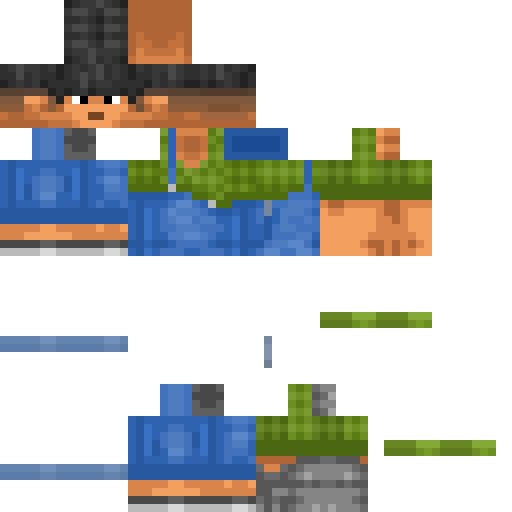
ItzYoyoboi Minecraft Skin
✓ Approved
Skin for ItzYoyoboi
1
Downloads
124
Views
0
Likes
Reactions
Log in to react.
Minecraft profile
aeacd039-c778-4c73-a6e1-3eac1500dcffModel
classic
Views / 30 days
9
Observed names
Dates show when minecraft.how first observed each name.
ItzYoyoboi—
Skin history
History grows as minecraft.how observes profile changes.

Head command
/give @p minecraft:player_head[profile={name:"ItzYoyoboi"}]Users with Same Texture (51 total)
51
Total Users
19.0K
Combined Views
51
Combined Downloads
 BaseBall_king77
7.1K views1 downloads
 hispann
303 views1 downloads
 Dukdo1
279 views1 downloads
 USMAN895
263 views1 downloads
 VasilisCy
260 views1 downloads
 Femb0yvibes
254 views1 downloads
 DiamondFancy9
252 views1 downloads
 N0tN0Wyet
252 views1 downloads
 yongicobay
250 views1 downloads
 Epica19
248 views1 downloads
 TheNeverMind1
247 views1 downloads
 TheGamersOfficeX
245 views1 downloads
 aybamc
245 views1 downloads
 Whitepanther145
244 views1 downloads
 TheDarkminePRO19
243 views1 downloads
 headsmalutki1991
242 views1 downloads
 wholg
242 views1 downloads
 csmithers934
241 views1 downloads
 Tia_Faunborn
241 views1 downloads
 Jihab_Destroyer
240 views1 downloads
 Cooldude068
240 views1 downloads
 KiritoXAusuna
239 views1 downloads
 happyperson2242
239 views1 downloads
 NTrump_24
239 views1 downloads
 Heroend123
238 views1 downloads
 DiscoHaddock0138
237 views1 downloads
 Burninhellu
236 views1 downloads
 crisppychicken79
236 views1 downloads
 Med1lc
236 views1 downloads
 BoxiestBike2005
236 views1 downloads
 PhoenixUltron
235 views1 downloads
 h72ken
235 views1 downloads
 Wr1st1e
235 views1 downloads
 Alextheguy1108
234 views1 downloads
 Actualee355
234 views1 downloads
 OrangeJu1ceTM
234 views1 downloads
 AdamAGPA
232 views1 downloads
 BigMuhammad
228 views1 downloads
 FullHD05
228 views1 downloads
 partisancord31
227 views1 downloads
 Seilanthn
225 views1 downloads
 DanyChick
223 views1 downloads
 ManiacalNingen
223 views1 downloads
 fargud1
223 views1 downloads
 jamalbob22
222 views1 downloads
 WowAndrew
219 views1 downloads
 MintPerfect__
217 views1 downloads
 Calebutt880
216 views1 downloads
 Jump_upbeat050
213 views1 downloads
 ScrewUp032
212 views1 downloads
PNG · 64×64
Share this skin
Scan with your phone to share this skin
Tags
MinecraftSkinsItzYoyoboi
Frequently Asked Questions
To download the ItzYoyoboi Minecraft skin:
- Click the "Download" button to get this free ItzYoyoboi skin
- The skin file
.pngwill be saved to your device - Works with both Java Edition and Bedrock Edition
- See below for complete installation instructions
To apply the ItzYoyoboi skin:
- Log in to your Mojang or Microsoft account on the official Minecraft website.
- Navigate to the "Skins" section in your profile.
- Upload the downloaded
.pngfile. - Launch Minecraft, and your character will now use the ItzYoyoboi skin.
Note: The process may vary slightly between Minecraft Java Edition and Minecraft Bedrock Edition.
Yes, the ItzYoyoboi skin is compatible with both Minecraft Java Edition and Minecraft Bedrock Edition. However, the method of applying the skin may differ slightly between the two versions. Follow the instructions provided on this page for your specific edition.
Absolutely! You can edit the ItzYoyoboi skin using a Minecraft skin editor. Simply open the downloaded
.png file in the editor, make your changes, and save the file. Then, upload the edited skin to your Minecraft profile.If the ItzYoyoboi skin isn't working, try the following:
- Ensure you downloaded the correct file format
.png. - Make sure you're using the correct version of Minecraft Java Edition or Bedrock Edition.
- Check that the skin file is not corrupted. Re-download the skin if necessary.
- Log out and back into your Mojang or Microsoft account to refresh your profile.
Create your own skin
Draw a pixel-perfect Minecraft skin in the browser with our free 3D skin editor.
→ Skin Creator