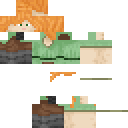
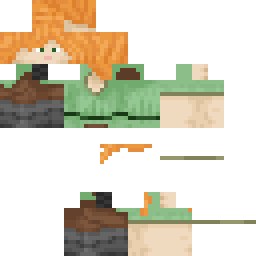
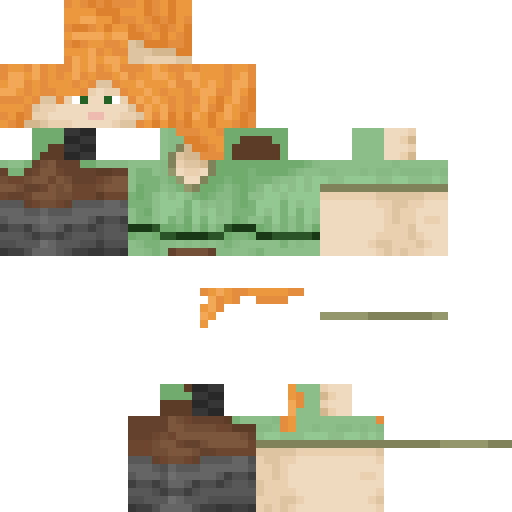
kosek1 Minecraft Skin
✓ Approved
Skin for kosek1
1
Downloads
132
Views
0
Likes
Reactions
Log in to react.
Minecraft profile
ebd2eecd-3bf5-493f-8968-0ef495a35d49Model
classic
Views / 30 days
17
Observed names
Dates show when minecraft.how first observed each name.
kosek1—
Skin history
History grows as minecraft.how observes profile changes.

Head command
/give @p minecraft:player_head[profile={name:"kosek1"}]Users with Same Texture (51 total)
51
Total Users
36.9K
Combined Views
51
Combined Downloads
 killer_am
7.3K views1 downloads
 chrisdl173
1.2K views1 downloads
 femboysarepeak3
1.1K views1 downloads
 ShadowNinja9943
1.0K views1 downloads
 Kane048
958 views1 downloads
 Bigtasty46
934 views1 downloads
 mangolover297
929 views1 downloads
 GameMaster3007
866 views1 downloads
 Edm0ney
858 views1 downloads
 UnderBuckl
848 views1 downloads
 Dragon7552
845 views1 downloads
 VIMithridates
835 views1 downloads
 Beef1784
821 views1 downloads
 CallMeAhnaf
789 views1 downloads
 AnnieAlso
754 views1 downloads
 princey204
741 views1 downloads
 Voldemorter
735 views1 downloads
 IateyourcookIe0
732 views1 downloads
 EVEraymox2
713 views1 downloads
 FriedPotato8517
671 views1 downloads
 JoelCot
622 views1 downloads
 femboyhuntress
593 views1 downloads
 Conner04v2
591 views1 downloads
 Dragonjrr
586 views1 downloads
 t4iy4ki2006
542 views1 downloads
 ChainalBeads
537 views1 downloads
 Hrishil
508 views1 downloads
 chiyueyao
492 views1 downloads
 matthewprague100
491 views1 downloads
 askasr
472 views1 downloads
 jtyq
467 views1 downloads
 67SkyKnight
459 views1 downloads
 SHREKS_FEET
456 views1 downloads
 IchHabDurst01
453 views1 downloads
 chillinglava
429 views1 downloads
 Finecuisine
416 views1 downloads
 enkecod12
414 views1 downloads
 DaatOfTheSity
411 views1 downloads
 MawpR
391 views1 downloads
 CEOofFembois
386 views1 downloads
 BeeNyx31
384 views1 downloads
 fromHollows
382 views1 downloads
 BowserJr1324
368 views1 downloads
 BTWgolf59
356 views1 downloads
 Ginjinjin
345 views1 downloads
 MovieMan145
341 views1 downloads
 0141purin
330 views1 downloads
 Maeuseburg
318 views1 downloads
 proguitarplayer
318 views1 downloads
 jorn5622
303 views1 downloads
PNG · 64×64
Share this skin
Scan with your phone to share this skin
Tags
MinecraftSkinskosek1
Frequently Asked Questions
To download the kosek1 Minecraft skin:
- Click the "Download" button to get this free kosek1 skin
- The skin file
.pngwill be saved to your device - Works with both Java Edition and Bedrock Edition
- See below for complete installation instructions
To apply the kosek1 skin:
- Log in to your Mojang or Microsoft account on the official Minecraft website.
- Navigate to the "Skins" section in your profile.
- Upload the downloaded
.pngfile. - Launch Minecraft, and your character will now use the kosek1 skin.
Note: The process may vary slightly between Minecraft Java Edition and Minecraft Bedrock Edition.
Yes, the kosek1 skin is compatible with both Minecraft Java Edition and Minecraft Bedrock Edition. However, the method of applying the skin may differ slightly between the two versions. Follow the instructions provided on this page for your specific edition.
Absolutely! You can edit the kosek1 skin using a Minecraft skin editor. Simply open the downloaded
.png file in the editor, make your changes, and save the file. Then, upload the edited skin to your Minecraft profile.If the kosek1 skin isn't working, try the following:
- Ensure you downloaded the correct file format
.png. - Make sure you're using the correct version of Minecraft Java Edition or Bedrock Edition.
- Check that the skin file is not corrupted. Re-download the skin if necessary.
- Log out and back into your Mojang or Microsoft account to refresh your profile.
Create your own skin
Draw a pixel-perfect Minecraft skin in the browser with our free 3D skin editor.
→ Skin Creator