Creating Interactive Web Maps for Your Minecraft Server with Pl3xMap

granny/Pl3xMap
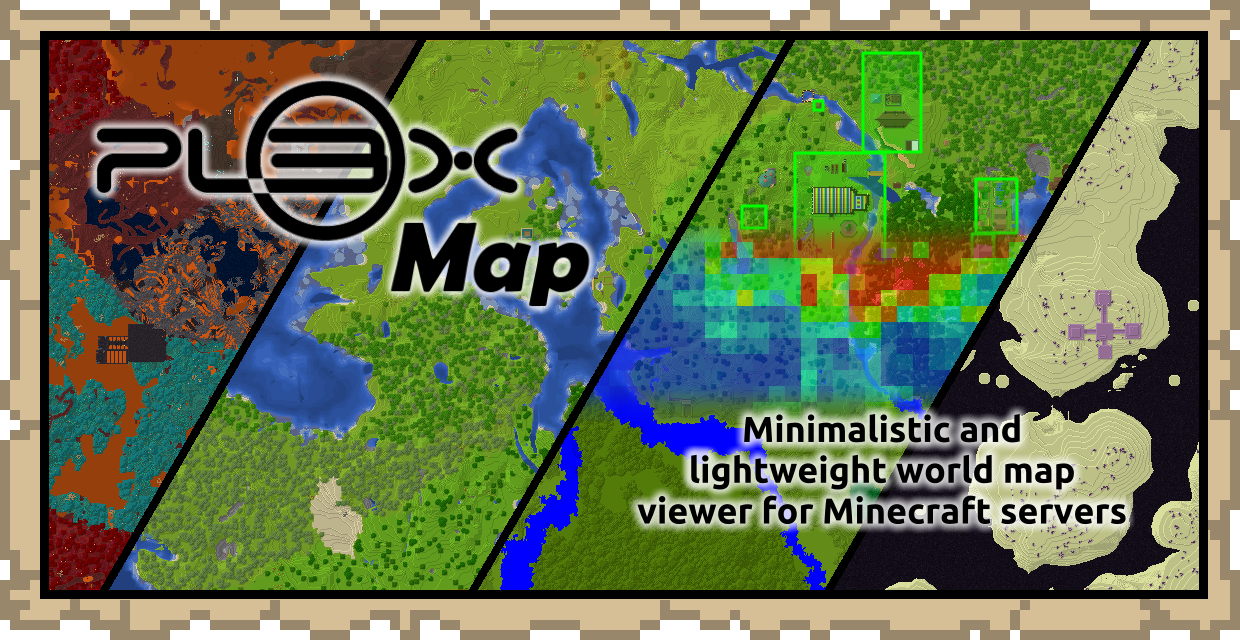
Pl3xMap is a minimalistic and lightweight world map viewer for Minecraft servers using the vanilla Minecraft rendering style
View on GitHub ↗Want your Minecraft server's world visible to friends without them logging in? Pl3xMap renders your server terrain into an interactive web map. No client-side mods needed. Just a lightweight plugin that transforms your world into a browser-viewable map with vanilla Minecraft rendering style.
What Pl3xMap Does
At its core, Pl3xMap is a Bukkit/Spigot plugin that periodically scans your server world and generates an interactive HTML map. Think Google Maps but for Minecraft. Players can zoom in, pan around, and see your terrain exactly as it appears in-game, rendered in vanilla Minecraft colors and textures. The map updates automatically as you build or explore, so your web map stays current.
Setup is surprisingly minimal. The plugin creates a directory with HTML, CSS, and JavaScript files that you host on any web server. No database needed, no complex configuration. The resulting map is just static files you can throw on any hosting.
Performance-wise, it's lightweight. The project sits at 149 stars on GitHub and is written in Java, so it integrates smoothly with standard Spigot servers.
Why You'd Use This
Building a massive survival world and want to show it off? Share a link instead of asking people to download the world file and load it locally. That's actually practical for sharing with friends or community members who aren't on your server.
Running a multiplayer server with multiple towns or factions? A web map lets players navigate and find each other's builds without spoiling everything from full visibility. You control what layers show up.
Community building matters too. If you've got builders like adderall_abuser creating detailed structures or ironmouse working on terraforming, a shared map becomes documentation. Future players can see what was built and by whom.
And honestly, it just looks professional. When someone asks "what's your server like?" you can send them a link instead of trying to explain it or expecting them to fire up Minecraft.
Getting It Installed
This part's straightforward, which is refreshing.
Download the latest release from the GitHub releases page and drop the JAR into your server's plugins folder. Restart your server. Done. Pl3xMap creates its config file automatically.
cd /path/to/your/server
cp Pl3xMap-vX.X.X.jar plugins/
java -jar server.jar nogui
The plugin generates output in a webmap folder by default. This folder contains everything you need to serve on a web server.
If you're hosting it locally for testing, you can just open the HTML files directly in a browser. For production, copy the webmap directory to your web hosting and point a domain at it.
Configuration happens in the config file that appears after the first run. You'll set things like which world to map, whether to show lighting, player markers, and how often to update. Most defaults are sensible - change them only if you've a specific reason.
Features That Matter
Pl3xMap keeps things simple, which is the whole point. But here's what you get.
Zoom and navigation work like any web map. Drag to pan, scroll to zoom. No learning curve for users.
Multiple render options let you toggle different views. Day/night, different map styles, player positions (if enabled). Someone like testuser exploring the map at night can switch to day view to see colors better.
World boundaries and markers are customizable. Mark specific locations with custom icons and labels. Your spawn point, shops, dungeons, landmarks - whatever matters for your community.
The vanilla rendering style deserves mention because it's actually distinctive. Other map plugins sometimes use isometric views or weird color schemes. Pl3xMap just shows your world as you'd see it, which feels right.
Performance is snappy. Updates happen in the background without lag. The map itself loads fast even for massive worlds because it tiles the image automatically.
Common Pitfalls and Fixes
New users usually trip on hosting.
If you generate the webmap folder locally but forget to actually host the HTML files anywhere, nothing shows up in a browser. The files need to be on a web server, not just your desktop. Use a hosting service, your own server, or even free options like GitHub Pages if you're willing to commit the folder.
Update frequency can surprise you too. By default, Pl3xMap updates periodically based on its settings. If you expect real-time updates and nothing's changed in 30 minutes, check the config. You can make it update faster, but that increases CPU usage slightly. There's a tradeoff.
Lighting and shading sometimes confuse people. The map can show terrain lighting (shadows) or a flat, day-lit view. If your map looks washed out, you're probably on a lighting mode that doesn't show detail well. Toggle it in the web interface (if you've enabled that option).
One thing that tripped me up: if you're mapping a large world and this is your first time, expect the initial render to take a while. A 5000x5000 block area can take hours depending on your server's specs. Plan accordingly and don't expect instant results on huge worlds.
Other Map Tools in the Space
Pl3xMap isn't your only option, though it's solid for the minimalist approach.
Dynmap is the big competitor. It's more feature-rich, supports more server software, and renders more aggressively in real-time. Downside: heavier on server resources and more complex to set up. If you want maximum customization and don't mind the overhead, Dynmap does more. If you want something that just works and doesn't tax your server, Pl3xMap wins.
Bluemap is another lightweight option with a different aesthetic - it renders in 3D isometric view, which some players prefer. It's also performance-conscious like Pl3xMap but takes a different approach to visualization.
Creators like joakim2tusen who care about map aesthetics might prefer the vanilla-style rendering Pl3xMap offers over 3D isometric views. So it depends on whether you want your map to match what players see in-game.
The Real Question: Is It Worth It?
If you're running a small private server with friends, probably not essential. You already know what your builds look like.
If you're hosting a community server, a public map is genuinely useful for navigation and showcase. Players send map links to show off their bases. It becomes part of your server's identity.
The installation effort is minimal - 15 minutes tops. That ongoing maintenance is basically zero unless you want to fiddle with advanced settings. If you think your players would use a map, it costs almost nothing to try.
Someone building something like housecz_zero puts in serious work on terraforming or architecture. A shared map lets them showcase that to the whole community.
So: lightweight, low-maintenance, actually useful for multiplayer servers. Worth the 5 minutes it takes to install.
Visit granny/Pl3xMap on GitHub ↗