Ellie Mod for Minecraft: Complete Guide and Installation
The Ellie Mod adds a charming companion mob to your Minecraft world. Found roaming dark wood forests, Ellie can be tamed and used as a loyal companion during your adventures. This guide covers everything you need to know about the Ellie Mod, from installation to features and frequently asked questions.
What Is the Ellie Mod?
The Ellie Mod is a Minecraft modification that introduces a new mob named Ellie into the game. Ellie is a cute, friendly creature that spawns naturally in dark wood forests and can be tamed to become your companion. Once tamed, Ellie follows you around the world, providing company during your solo adventures or multiplayer sessions.
Developed for the Forge mod loader, the Ellie Mod is available for Minecraft versions 1.20.1, 1.20, and 1.12.2. The mod requires GeckoLib as a dependency, which handles the animations and rendering for Ellie's model. With over 188,000 views on 9Minecraft, the Ellie Mod has become a popular choice for players who want a companion mob with a unique aesthetic.
Unlike many companion mods that simply add a reskinned vanilla mob, the Ellie Mod features a custom model with smooth animations powered by GeckoLib. This gives Ellie a distinctive look and feel that sets her apart from other companion mods available for Minecraft. The mod was created by SchnurriTV and has been well received by the community, earning an average rating of 4 out of 5 stars from nearly 280 votes.
The Ellie Mod is part of a growing trend in Minecraft modding that focuses on adding life and personality to the world through companion mobs. Rather than adding complex machinery or new dimensions, this mod enhances the emotional connection players have with their Minecraft worlds by giving them a friend to share their adventures with.
Ellie Mod Features
The Ellie Mod focuses on delivering a polished companion experience rather than overwhelming players with complex mechanics. Here are the key features that make this mod worth installing:
Custom Companion Mob
Ellie is a fully custom mob with her own model, textures, and animations. She is not a reskinned vanilla mob but rather an original creation designed specifically for this mod. Her animations are powered by GeckoLib, ensuring smooth movement and natural behavior as she follows you through the world. The attention to detail in her design makes her feel like a genuine part of the Minecraft universe rather than an afterthought.
Dark Wood Forest Spawning
Ellie spawns naturally in dark wood forests, the dense and atmospheric biomes filled with dark oak trees. This makes finding Ellie an adventure in itself, as you will need to explore these dimly lit forests to locate her. The spawning mechanic encourages exploration and adds a sense of discovery to the experience. Dark wood forests are relatively rare biomes, so finding one is already an exciting moment, and discovering Ellie within it makes the experience even more memorable.
Taming and Companionship
Once you find Ellie, you can tame her to become your companion. After taming, Ellie will follow you around the world, providing a loyal presence during your Minecraft sessions. Whether you are mining deep underground, building a base, or exploring new biomes, Ellie will be there alongside you. The taming process is straightforward, making the mod accessible to players of all skill levels.
Forge Compatibility
The Ellie Mod is built for the Forge mod loader, the most popular modding platform for Minecraft Java Edition. It is compatible with Minecraft 1.20.1, 1.20, and 1.12.2, giving players flexibility in which version they use. The mod also requires GeckoLib, a library mod that provides advanced animation capabilities. Forge compatibility means the Ellie Mod can be easily integrated into existing modpacks without compatibility issues.
Lightweight Design
Unlike large content mods that add hundreds of items and blocks, the Ellie Mod is lightweight and focused. It does not add unnecessary complexity to your game, making it an excellent choice for players who want a simple companion without the overhead of a massive modpack. The mod runs smoothly even on lower-end systems, and its minimal performance impact means you can enjoy Ellie's presence without sacrificing frame rate or stability.
How to Install the Ellie Mod
Installing the Ellie Mod is straightforward if you have experience with Minecraft mods. Follow these steps to get Ellie into your world:
Step 1: Install Minecraft Forge
First, you need to install the Forge mod loader for your Minecraft version. Download the appropriate Forge installer from the official Forge website and run it. Select "Install Client" and click OK. Forge is available for Minecraft 1.20.1, 1.20, and 1.12.2. Make sure you download the correct version of Forge that matches your Minecraft version exactly, as mismatched versions will cause the game to crash on startup.
Step 2: Install GeckoLib
The Ellie Mod requires GeckoLib as a dependency. Download the correct version of GeckoLib for your Minecraft version and place the JAR file in your mods folder. Without GeckoLib, the Ellie Mod will not function properly. GeckoLib is a widely used library mod that provides advanced animation capabilities for custom mobs, and many popular mods depend on it. Make sure you download the version of GeckoLib that matches your Minecraft version.
Step 3: Download the Ellie Mod
Download the Ellie Mod JAR file from a trusted source. Make sure to select the version that matches your Minecraft version:
- Minecraft 1.20.1 and 1.20: Download the Forge version for 1.20.1
- Minecraft 1.12.2: Download the Forge version for 1.12.2
Always download mods from reputable sources to avoid malware or corrupted files. The official 9Minecraft page for the Ellie Mod provides verified download links that are safe to use.
Step 4: Place the Mod in Your Mods Folder
Move the downloaded Ellie Mod JAR file into your Minecraft mods folder. The default location is:
- Windows: %appdata%\.minecraft\mods
- macOS: ~/Library/Application Support/minecraft/mods
- Linux: ~/.minecraft/mods
If the mods folder does not exist, create it manually. Make sure both the Ellie Mod JAR file and the GeckoLib JAR file are placed in this folder. Do not extract the JAR files, as Minecraft Forge reads them directly in their compressed format.
Step 5: Launch Minecraft with Forge
Open the Minecraft Launcher and select the Forge profile from the dropdown menu. Click Play to launch Minecraft with Forge and all your installed mods. Once the game loads, you can start a new world or load an existing one to find Ellie in dark wood forests. If the game crashes on startup, double check that you have the correct versions of Forge, GeckoLib, and the Ellie Mod for your Minecraft version.
If you are new to modding, check out our guide on how to install Minecraft mods for a more detailed walkthrough.
Ellie Mod Characters
The Ellie Mod centers around a single character, but her design and behavior make her a memorable addition to any Minecraft world.
Ellie
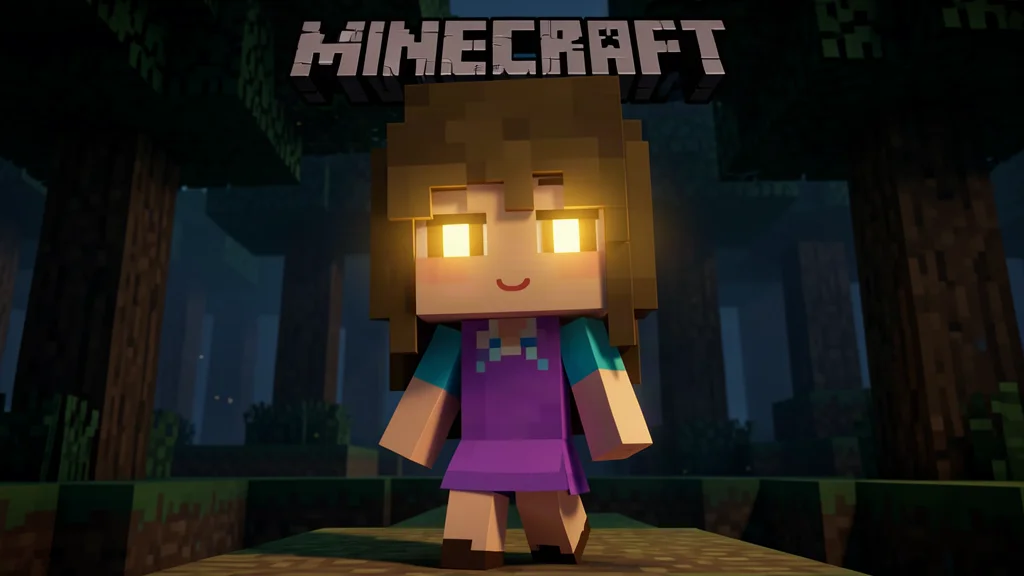
Ellie is the main and only character added by the mod. She is a cute, friendly mob with a custom model that features smooth animations. Ellie spawns in dark wood forests and can be tamed by the player. Once tamed, she becomes a loyal companion who follows the player throughout their adventures.
Ellie's design emphasizes cuteness and charm, making her an appealing companion for players of all ages. Her animations are fluid and natural, thanks to the GeckoLib animation framework. Whether she is walking, running, or idle, Ellie moves with a lifelike quality that enhances the immersion of the game. Her model is carefully crafted to fit within the Minecraft aesthetic while still standing out as a unique creation.
While Ellie does not have complex interactions or dialogue systems, her presence as a companion adds a layer of warmth and companionship to the Minecraft experience. She is perfect for players who enjoy having a friendly presence in their world without the need for complex mechanics. Ellie's simplicity is her strength, as she enhances the game without distracting from the core Minecraft experience.
Ellie Mod vs Other Companion Mods
The Minecraft modding community offers several companion mods, each with its own approach. Here is how the Ellie Mod compares:
| Feature | Ellie Mod | Other Companion Mods |
|---|---|---|
| Custom Model | Yes, with GeckoLib animations | Varies, many use vanilla models |
| Spawning | Dark wood forests only | Various biomes |
| Taming | Yes | Varies |
| Complexity | Lightweight, focused | Often feature-rich |
| Dependencies | GeckoLib required | Varies |
The Ellie Mod distinguishes itself through its custom model and smooth animations. While other companion mods may offer more features such as dialogue, quests, or combat assistance, the Ellie Mod focuses on delivering a polished companion experience with minimal complexity. This makes it an excellent choice for players who want a companion without the learning curve of more complex mods.
Tips for Using the Ellie Mod
Here are some tips to get the most out of the Ellie Mod:
- Explore dark wood forests at night: Dark wood forests are easier to navigate during the day, but exploring at night can be more atmospheric. Bring a torch to light your way and keep an eye out for hostile mobs that may be lurking in the shadows.
- Bring food for taming: While the exact taming mechanic may vary, having food in your inventory is always a good idea when attempting to tame a new mob. Different foods may have different effects, so experiment to find what works best.
- Keep Ellie safe: As a companion, Ellie may follow you into dangerous situations. Be mindful of her safety during combat or exploration of hazardous areas. Consider building a safe area for her to stay when you are engaging in dangerous activities.
- Combine with other mods: The Ellie Mod is lightweight and compatible with most other mods. Consider pairing it with enchantment mods or redstone mods for a richer experience. The mod's simplicity means it integrates well with almost any modpack.
- Back up your world: As with any mod installation, it is wise to back up your Minecraft world before adding new mods. This protects your progress in case of conflicts or issues. You can find your world saves in the saves folder within your Minecraft directory.
Frequently Asked Questions
What Minecraft versions does the Ellie Mod support?
The Ellie Mod supports Minecraft 1.20.1, 1.20, and 1.12.2. Make sure to download the correct version of the mod for your Minecraft installation. Using the wrong version will cause the mod to fail to load or crash the game.
Do I need GeckoLib for the Ellie Mod?
Yes, GeckoLib is a required dependency for the Ellie Mod. Without it, the mod will not function properly. Download the correct version of GeckoLib for your Minecraft version and place it in your mods folder alongside the Ellie Mod. GeckoLib is a safe and widely used library mod that is required by many popular Minecraft mods.
Where does Ellie spawn in the game?
Ellie spawns naturally in dark wood forests. These biomes are characterized by their dense dark oak trees and dim lighting. Explore these biomes to find and tame Ellie. Dark wood forests can be found in the Overworld, typically in areas with high humidity. Using a seed that spawns you near a dark wood forest can save you time if you want to find Ellie quickly.
Can Ellie be used in multiplayer?
Yes, the Ellie Mod can be used in multiplayer. All players on the server need to have the mod installed, along with GeckoLib. Once installed, each player can find and tame their own Ellie. The mod works seamlessly in both LAN and dedicated server environments.
Is the Ellie Mod compatible with other mods?
The Ellie Mod is generally compatible with other Forge mods. However, as with any mod combination, conflicts can occur. It is recommended to test the mod with your existing modpack before committing to a long-term playthrough. If you experience crashes or glitches, try removing other mods one by one to identify the source of the conflict.
Is the Ellie Mod available for Fabric?
No, the Ellie Mod is currently only available for the Forge mod loader. There is no official Fabric version of the mod at this time. If you are a Fabric user, you will need to look for alternative companion mods that are built for the Fabric loader.

Lead writer at minecraft.how. Long-time Minecraft player running a small SMP server, testing every build, mod, and seed before writing about it.
Frequently Asked Questions
What Is the Ellie Mod?
Ellie Mod Features
Custom Companion Mob
Dark Wood Forest Spawning
Taming and Companionship
Forge Compatibility
Have a Question or Tip about this Guide?Community Q&A
Ask a question or help other players below. Join the discussion and share your Minecraft tips!
Comments
No comments yet. Be the first to share your thoughts!