Minecraft 26.3 Snapshot 10: Dappled Forest Menu & Tweaks
The latest snapshot for Java Edition has arrived. Minecraft 26.3-snapshot-10 delivers the cozy Dappled Forest panorama, cleans up map naming conventions, and refines a few minor mechanics. If you track every small interface shift and technical tweak, this update has some interesting details.
A New Dappled Forest Menu
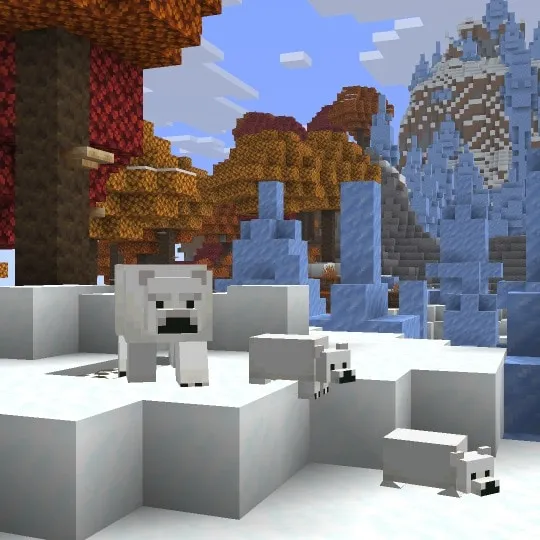
Booting up the game feels different today. The main menu now features the Dappled Forest biome, complete with an Abandoned Camp setting. It brings some serious fall vibes right to the front screen. We spend a lot of time staring at that menu while waiting for friends to join. A fresh background is always a nice touch.
It replaces the previous background from earlier in the release cycle. You get to see the warm tones of the forest before you even punch your first tree. Changing the panorama is a classic Mojang move to set the mood for an upcoming major release. Visuals like this just look great.
Before jumping into a new snapshot, you might want to update your character's look. Our skin gallery hosts 229,047 free skins with a 3D previewer right now.
Grab something seasonal that matches the new menu vibes.
Renaming The Explorer Maps
Inventory management requires reading a lot of tooltips. Developers finally updated Explorer Maps to have consistent naming across the board. And that old "Explore" or "Explorer" tag dropped from almost all of them.
Cartographer villagers sell these items to help players locate rare structures. Those old names felt slightly repetitive. Now, the naming conventions follow a much simpler format:
- Ocean Monument Explore Map became the Ocean Monument Map.
- Swamp Hut Explorer Map became the Swamp Hut Map.
- Woodland Mansion Explorer Map became the Woodland Mansion Map.
- Jungle Pyramid Explorer Map became the Jungle Pyramid Map.
One exception breaks that exact pattern. The Trial Chambers Explorer Map changed to the Buried Trial Chambers Map. It makes sense. That specific structure generates entirely underground, so adding "Buried" gives players a clearer hint about where they need to dig.
These names just read better in chests. No more redundant phrasing when you're sorting out cartography supplies after a massive trading session.
Interface And Accessibility Polish
Realms players get a slightly different onboarding experience now. A new Realms introduction screen was added to showcase key features. You can access it directly from the "Add Realm" button on the multiplayer menu.
If a free trial is available for your account, this screen pops up automatically when entering the Realms menu. It helps explain exactly what you actually get with a subscription before you commit any money.
Over in the Game Mode Switcher, the Adventure Mode icon got swapped out. It now displays as the Buried Treasure Map instead of the old icon. Just a tiny visual refresh that fits the theme of custom adventure maps.
Subtitles are a massive help for many players. Now, they point directly to the most recent sound in range. This updates dynamically based on the newest noise, rather than getting confused by overlapping ambient sounds.
Playing with subtitles on makes tracking down a creeper much easier. This change ensures the on-screen arrow directs your attention to the immediate threat.
Drowned Behavior And Combat Tweaks
Combat and mob interactions received a couple of highly specific adjustments. The recent changes to Drowned behavior and animations from earlier in this release cycle were completely reverted. Patch notes don't explain why. They just went back to the old versions.
Sometimes a tweak just doesn't feel right in live gameplay. Developers rolled it back for now.
Then there's a change for players who like capturing mobs. Enchantments now properly apply to items taking damage while protecting an Undead mob from the sun.
Think about putting a helmet on a zombie so it doesn't burn up during the day. Players do this all the time to move mobs into iron farms or custom exhibits. If that helmet has Unbreaking, the enchantment actually works now while taking that passive sun damage. Here's the thing, it extends the lifespan of the armor significantly.
Chorus Fruit eaters also get a neat visual upgrade. When you teleport randomly after eating one, particles now appear pointing in the direction of your teleportation.
It makes tracking movements slightly easier in End City fights. You can actually see where a player just popped off to.
Performance Improvements Under The Hood
Locating structures via commands or game logic got a performance boost. Improvements were made under the hood to speed up how the game finds them.
This might not sound huge for a solo survival world. But think about big multiplayer networks. Over on AppleMC, there are 1374 players online right now, all exploring different dimensions. When hundreds of people are generating chunks and triggering structure lookups simultaneously, server performance matters heavily.
This optimization should help keep tick rates stable when the server searches for a nearby village or monument. Even smaller servers benefit from cleaner, faster background code.
If you run a server and need to generate formatted announcements, check this out.
It makes styling your MOTD incredibly simple.
For mapmakers and developers, the Data Pack version bumped up to 118.0. You'll need to update your pack metadata if you plan on testing custom content in this snapshot. Loading old data packs might throw a warning in the console, so keep your files updated.
Working with portals can be confusing regardless of what version you play on. If you need help linking up a new hub, try out this tool.
Sometimes you just want to stick to a stable release instead of chasing snapshot bugs. The latest Java release is still 26.2. If you decide to load up a regular 1.21 world instead of testing 26.3-snapshot-10, you might want a good starting point.
Our community's current favorite seed is "Pink and White" (seed 5063885805507972583). It generates some beautiful terrain right near spawn.
Check out the raw changelog if you want to read every technical detail yourself.

Lead writer at minecraft.how. Long-time Minecraft player running a small SMP server, testing every build, mod, and seed before writing about it.
Frequently Asked Questions
What is the new background in Minecraft 26.3 Snapshot 10?
Did Mojang change the names of explorer maps?
What happened to the recent Drowned changes?
Do enchantments work on armor worn by undead mobs?
How did the subtitle system improve?
Have a Question or Tip about this Guide?Community Q&A
Ask a question or help other players below. Join the discussion and share your Minecraft tips!