Minecraft 26.4-Snapshot-2 Brings Graphics Overhaul
Minecraft 26.4-snapshot-2 is here, and it's focused on visual refinement: better fog rendering in the Overworld, a new celestial occluder system to hide the sun and moon behind distant terrain, and a complete redesign of the F3 debug screen that's actually readable.
Improved Fog & Transparency Gets Real
When you turn on "Improved Transparency" in video settings, the sky and clouds that sit behind far terrain now blend smoothly into the render distance fog. The old hard line between sky and loaded chunks? Gone. It's a subtle change, but it fixes one of those visual seams that'd nagged at builders for ages.
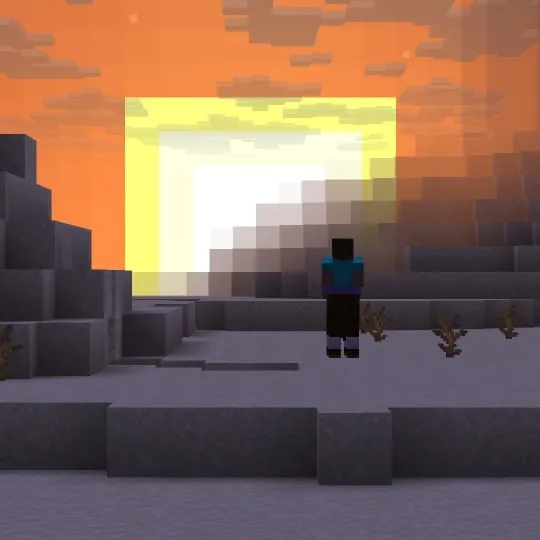
The bottom half of the skybox now occludes celestial objects like the sun, moon, and stars up to a certain angle, with a smooth border so it doesn't look jarring. Basically, distant terrain blocks out the sun realistically instead of having it hang there burning through mountains.
Celestial Occluder: Sky Rendering Gets Smarter
The new sky occluder is controlled by a fresh environment attribute: minecraft:visual/has_sky_occluder. It's true by default in the Overworld, false in the Nether and End.
Why does this matter? Build a deep valley or cave entrance, and the sun won't appear to float behind you anymore. It's one of those quality-of-life tweaks that makes hand-built terrain feel more grounded.
F3 Debug Screen: Finally Readable
If you've ever hit F3 and squinted at that wall of text, Mojang heard you. The debug overlay has been completely redesigned to be easier to read and understand.
Developers and technical players will appreciate this more than casual players, but for anyone tuning render distance or hunting performance bottlenecks, it's a real improvement. No more alphabet soup.
Technical Changes Under the Hood
Data Pack version jumped to 122.1, Resource Pack to 99.0.

The addition you'll care about: a new predicate called below_heightmap. It checks if your position sits below a given heightmap value, which opens up new possibilities for data pack creators and modders building conditional structures or custom terrain logic.
On the shader side, screenquad.vsh was renamed to screentriangle.vsh because, well, it was always representing a single triangle anyway. Look, changes to "Improved Fog" handling were also rolled out for post-process effects.
Who Should Care
If you're running snapshots to stay ahead of features, grab this. If you're building survival worlds or running a server, these are polish updates, not big deals. The graphics improvements are most visible in demanding terrain or at high render distances.
Builders and terraformers should pay attention to the occluder changes. If you're using data packs or custom resource packs, check whether those need version bumps to stay compatible.
Getting Started
Install it the usual way: grab the snapshot from the launcher, create a backup of your world, and test it. Most worlds should load without issues, but incompatible mods or old data packs might cause problems.
For technical details and the full changelog, check the official source.

Lead writer at minecraft.how. Long-time Minecraft player running a small SMP server, testing every build, mod, and seed before writing about it.
Frequently Asked Questions
What exactly is the celestial occluder in this snapshot?
Do I need to enable anything to see the improved fog?
Will my old data packs still work with this snapshot?
Is this snapshot stable for survival worlds?
How do I install Minecraft 26.4-snapshot-2?
Have a Question or Tip about this Guide?Community Q&A
Ask a question or help other players below. Join the discussion and share your Minecraft tips!