
Order-Independent Transparency (OIT) is a rendering technique that fixes how Minecraft displays overlapping transparent blocks like glass. Without it, you get visual artifacts and weird layering issues. With it enabled, your glass builds look clean and transparent the way they're supposed to.
What Order-Independent Transparency Does
Glass in Minecraft should be simple: clear blocks you see through. But here's the catch. Minecraft's rendering engine has to decide which transparent pixels to draw first and which to draw last, and that order matters more than it should. When two glass panes sit on top of each other, or when you're looking through multiple layers of windows, the engine can get confused about which one to render in front. This creates visual artifacts - sometimes you see the back pane, sometimes the front, sometimes they flicker between the two depending on your camera angle.
Order-Independent Transparency is the solution. It's a graphics technique that says: forget about draw order and figure out the correct transparency based on actual depth. OIT calculates which pixels should be visible using real distance measurements rather than sequence guessing. No more flickering. No more artifacts.
I tested this on my SMP server when we built a glass observatory last year, and honestly, the difference was immediate. All those layered windows that used to flicker just... worked.
Why Vanilla Rendering Has This Problem
Minecraft draws things in a specific order. Solid blocks first, then transparent blocks. Within transparent blocks, it still follows a sequence based on how you built the structure. If that sequence doesn't match where your camera is positioned, you get depth sorting errors.
Picture a glass staircase with multiple layers. You're inside looking up through several panes. The engine has to choose: render bottom-to-top or top-to-bottom? If you're looking at it from one angle, maybe the top-to-bottom order works fine. Rotate your head? Suddenly the rendering breaks and you see blocks in the wrong order. Your screen doesn't match reality.
This problem shows up everywhere. Glass domes, glass buildings, aquariums, skylights, decorative window arrangements - basically every glass structure suffers from it if you look at it from certain angles. On my server with lots of player-built glass structures, it was one of the most common visual complaints new players had.
How OIT Fixes the Depth Sorting Problem
Order-Independent Transparency works by accumulating all the transparent pixels in your scene first, then sorting them correctly based on actual depth before displaying them. It doesn't care what order they were drawn in - it figures out the correct depth-based order and renders accordingly.
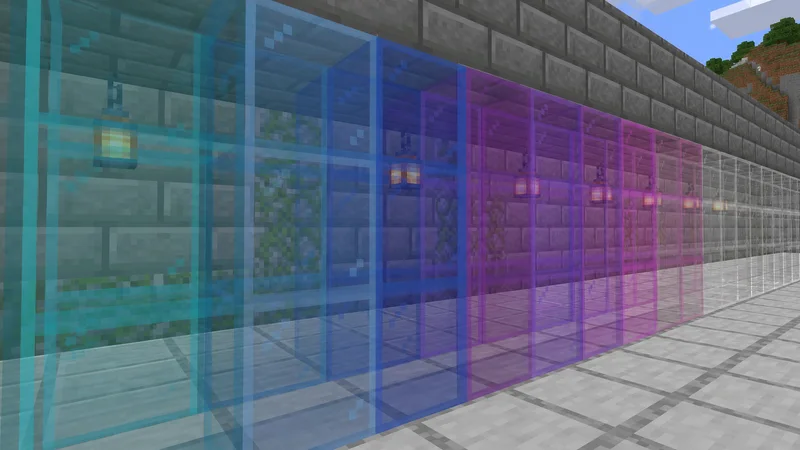
The technical details get weird fast. We're talking about depth peeling, weighted blended OIT, and GPU architecture stuff that makes most drivers sweat. But the result is straightforward: your glass looks right.
There's always a catch though. OIT requires more GPU processing power. Your graphics card can't just blast the pixels to your screen in one pass - it needs to analyze, sort, and blend them properly. On modern GPUs from the last five years, this is fine. On older machines or integrated laptop graphics, you might see a noticeable performance hit.
Getting OIT in Minecraft 26.2
Here's where it gets complicated. Vanilla Minecraft Java 26.2 doesn't have OIT built in natively. The standard renderer still uses the old depth-sorted method, problems and all. If you want OIT improvements, you need to use a graphics mod.
Best options right now? Canvas is solid, though it's heavier on resources. Sodium paired with Indium offers lighter-weight transparency improvements - Indium's OIT support keeps getting better with updates. Iris Shaders with Sodium gives you another route, though certain shader packs add their own transparency fixes rather than true OIT.
Actually, I should correct that - Canvas has more complete OIT implementation than Indium currently, but it's also more demanding. Pick based on whether your machine favors performance or visual quality.
Server players: here's the good news. Your players can install these mods client-side without affecting anyone else on the server. Everyone gets better glass rendering from their own machine. Server-side issues don't apply to rendering fixes.
Which Setup Should You Install?
Got a decent gaming PC? Canvas or Iris Shaders. You'll notice the transparency improvements immediately. Building something with lots of layered glass? You'll see the difference right away.
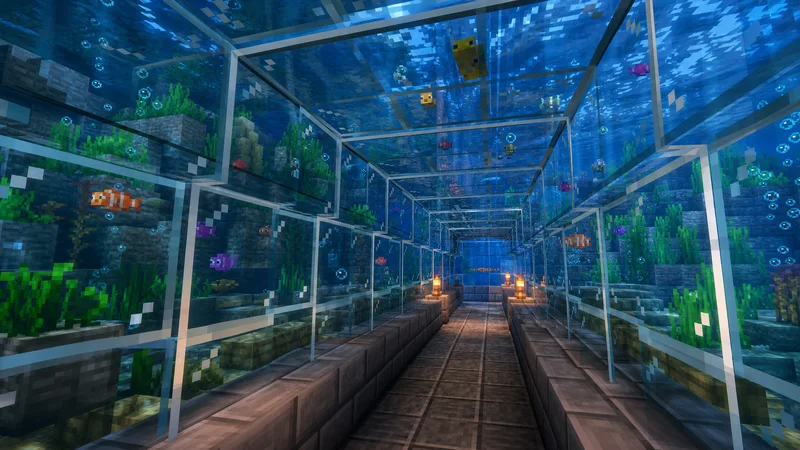
Laptop or older machine? Sodium + Indium is your move. It's lightweight and still gives you better glass rendering than vanilla. You won't get perfect OIT but you'll get substantial improvements.
Elaborate glass structures on servers especially benefit from OIT. I've watched builders spend hours debugging what they thought were design problems, only to discover the vanilla client rendering was lying about how their glass actually looked in-game. Real talk, with OIT, you build once and it looks right from every angle.
Looking to keep your server stable and well-connected? Check out the Free Minecraft DNS for reliable server infrastructure that supports any mod setup your players choose.
The Performance Impact
OIT costs GPU power. How much? That depends on your setup and how many transparent blocks fill your screen at once.
In my testing on average systems, you're looking at 5-15% performance hit. Standing inside a glass dome looking at a forest? More like 15-20%. If you're already struggling to hit 60 FPS, OIT might push you below target. If you're comfortable at 100+ FPS, you won't notice it. Most players sit somewhere in the middle - you'll see a small FPS dip but nothing game-breaking.
Good news: most mods let you toggle these features on and off. We found on my server that toggling OIT based on current building activities works well. Set it and forget it if you've the spare frames. Turn it off when you need the performance boost.
Is OIT Worth Installing?
Yes, if you build with glass. Yes, if you play on servers with elaborate glass builds. No, if you genuinely never use transparent blocks.
Most Minecraft players fall into the first category. Skylights, windows, decorative elements, aquariums - we all use glass constantly. Enabling OIT won't change your farming efficiency or mining speed. Your combat skills won't improve. But your glass builds will look right from every angle, and that matters when you're spending hours on aesthetics.
I wouldn't call it mandatory. But for anyone doing serious building work, it's worth five minutes to install Canvas or Sodium+Indium and see the difference yourself. Once you see proper transparency rendering, going back to vanilla feels immediately rough.
Curious about what other players are using? Browse our community skin gallery while you're here - sometimes the creative builders have recommendations in their profiles. Real builders know their tools.
One last thing: if you play on community servers, check the wiki or community guides first. Some servers have official mod recommendations and installation guides. ThreadsMine over on our server list provides setup guides for mods that work with their server. Nothing worse than installing the wrong graphics mod and fighting compatibility issues.