Minecraft Biomes O' Plenty - Guide Complet 2026
Minecraft Biomes O' Plenty reste l'un des meilleurs mods de biomes en 2026 parce qu'il ajoute 50 lieux ou plus à explorer, reste fidèle à la vanille, et offre maintenant des options plus claires pour les joueurs Java et Bedrock. Si l'exploration vanille te semble monotone, c'est le meilleur correctif en ce moment.
Ce que Minecraft Biomes O' Plenty ajoute
Biomes O' Plenty ne cherche pas à transformer Minecraft en un jeu complètement différent. C'est d'ailleurs une grande raison pour laquelle il continue d'exister. Au lieu d'empiler des systèmes de progression bizarres sur la survie, il se concentre sur la génération du monde, les paysages, les plantes, les arbres et les matériaux de construction.
Les descriptions officielles sur Modrinth et GitHub le présentent toujours comme une expansion de biomes avec 50 biomes personnalisés ou plus dans l'Overworld, le Nether et l'End, plus des fleurs supplémentaires, du feuillage, du bois et des blocs décoratifs. Le pitch est donc simple: de meilleurs endroits pour explorer, et de meilleures choses à construire une fois que tu y arrives.
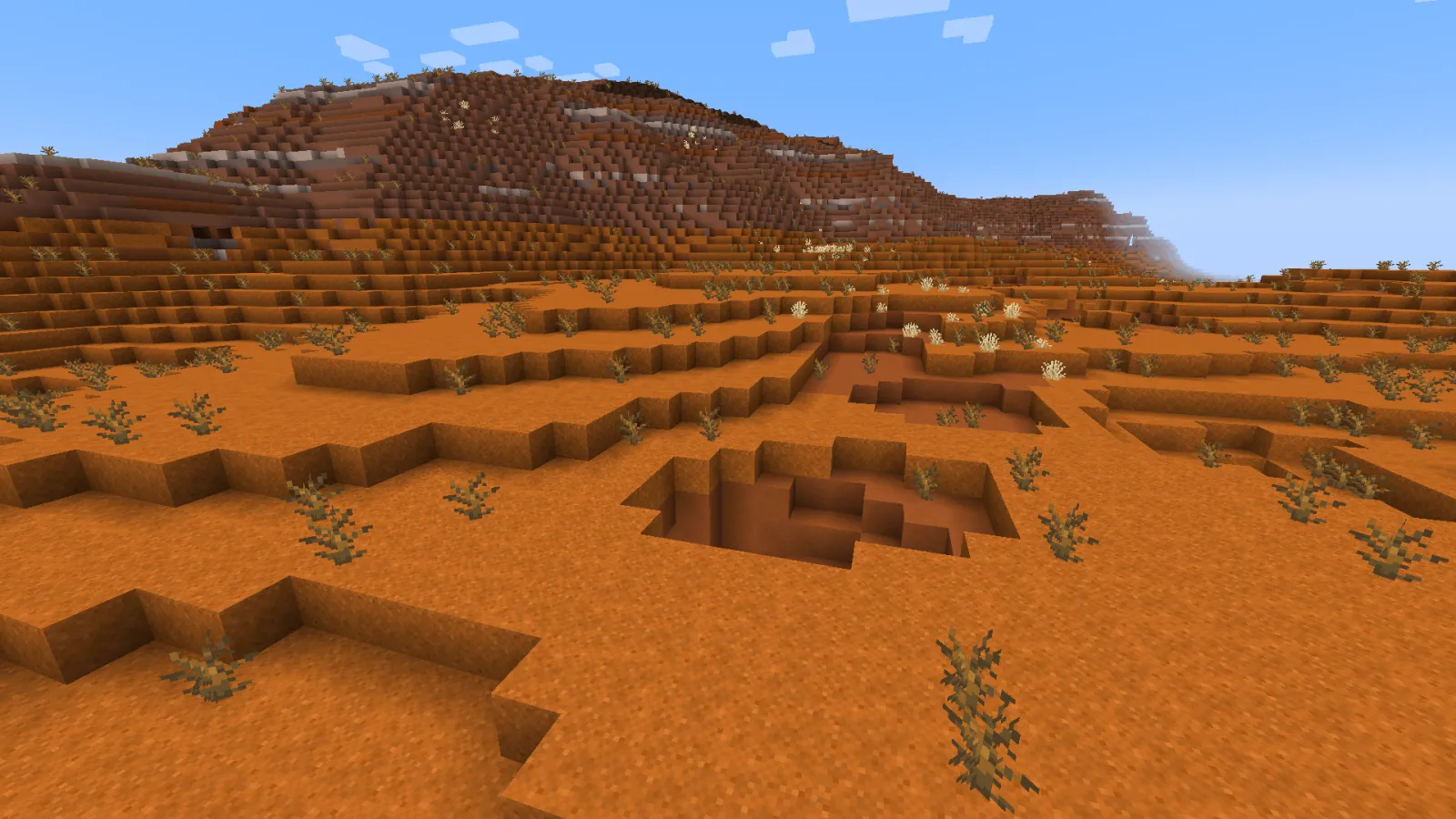
Ça semble basique, mais ça marche. Tu obtiens des biomes lumineux et calmes pour des constructions cosy, d'autres plus sombres pour des débuts de survie flippants, et plein de terrain qui semble choisi à la main plutôt que généralement bruyant. Des champs de lavande, des forêts de séquoias, des falaises de jade, des vergers, des bois sinistres et des zones volcaniques - voilà le genre d'endroits qui font que les gens s'éloignent du spawn et oublient pourquoi ils ont quitté leur base.
Il fait un seul travail vraiment bien.
Et ce travail, c'est rendre la carte digne de marcher dessus à nouveau.
Pourquoi Minecraft Biomes O' Plenty compte toujours en 2026
Minecraft vanille avance plus vite maintenant. PCGamesN a rapporté que Mojang traite toujours les mises à jour comme des livraisons plus petites sur un rythme d'environ tous les trimestres, avec Tiny Takeover attendu en mars 2026. Ça rend le support des versions plus important qu'il y a quelques années, parce que même les mods adorés peuvent devenir des pièces de musée si le flux de mise à jour s'arrête.
Biomes O' Plenty ne s'est pas arrêté. Depuis mars 2026, CurseForge affichait encore des fichiers actifs sur les versions 1.21 actuelles pour Fabric, Forge et NeoForge. C'est la première chose que je vérifie avant de recommander un ancien mod worldgen. Si la page semble abandonnée, je passe. Minecraft a déjà assez de façons de te faire gaspiller ta soirée.
Il y a aussi la question du style. Beaucoup de mods de biomes veulent que tu les remarques toutes les dix secondes. Biomes O' Plenty généralement non. Ça semble plus proche d'une vanille améliorée qu'un pack de conversion totale. Ça signifie qu'il s'intègre dans les mondes de survie et les petits SMPs sans faire en sorte que tout ressemble à douze mods se disputant dans le générateur de chunk.
Comment installer Minecraft Biomes O' Plenty en 2026
C'est là que les gens trébuchent généralement.
Java single-player
Modrinth dit que les versions actuelles ont besoin de GlitchCore pour Minecraft 1.20.4 et plus récent, et TerraBlender pour 1.18 et plus. Si tu utilises Fabric, tu as aussi besoin de Fabric API. Donc non, "je mets un jar dans le dossier mods et je crois en moi" n'est pas une méthode de configuration.
- Choisis d'abord ta version exacte de Minecraft.
- Choisis le loader correspondant, Fabric, Forge ou NeoForge.
- Télécharge le fichier Biomes O' Plenty correct pour cette version.
- Ajoute les dépendances requises, surtout GlitchCore et TerraBlender.
- Balance tout dans le dossier mods et génère un nouveau monde.
Cette dernière étape compte plus que tu ne le penses. Modrinth note que les mondes existants ne se remplissent pas soudainement de nouveaux biomes à moins que tu génères des chunks intacts, ou que tu fasses des modifications NBT. Tu peux faire ça si tu veux. Je ne le suggère généralement pas à moins que tu aimes le nettoyage évitable.
Serveurs
La configuration du serveur est plus propre sur les versions modernes. Selon Modrinth, 1.18 et plus récent n'exigent pas de modifications spéciales de server.properties juste pour que les biomes apparaissent. Tout le monde qui rejoint a toujours besoin de la même configuration de mod, évidemment. Minecraft a beaucoup de cadeaux, mais la synchronisation télépathique de dépendance n'en fait pas partie.
Les versions plus anciennes sont plus difficiles et peuvent nécessiter des paramètres de type de monde, mais en 2026 la plupart des joueurs font mieux de rester sur une version actuelle à moins qu'un modpack spécifique ne te donne une très bonne raison de ne pas le faire.
Ce qui casse généralement
Si les biomes n'apparaissent pas, la cause est généralement ennuyeuse: mauvaise version du jeu, mauvais loader, dépendance manquante, ou essayer de coller le mod sur une vieille sauvegarde et s'attendre à ce que le terrain se réécrive lui-même. Moins souvent, un autre mod worldgen marche dessus. Les mods de biomes peuvent coexister, mais seulement quand le pack a été construit avec une certaine retenue. Installe quatre terrains overhaul à la fois et éventuellement le jeu commence à agir comme un tout-petit avec un éditeur de carte.
Les meilleures parties de Biomes O' Plenty ne sont pas juste les biomes
Les gens parlent d'abord du terrain, c'est juste, le terrain c'est ce qui vend. Mais la palette de construction est pourquoi le mod reste installé après la première semaine. Des arbres supplémentaires, des buissons, des fleurs, des feuilles et du couvre-sol rendent les constructions ordinaires moins répétitives sans te forcer dans un pack fantastique complet.
Ce look vanilla-friendly compte en multijoueur. Un joueur peut devenir complètement cottage-core, un autre peut construire une forteresse dans un coin volcanique fumant, et les deux bases se sentent toujours comme Minecraft au lieu de deux jeux non liés partageant une seed.
- Les zones riche en séquoia et sapin sont parfaites pour les lodges géants, les ponts et les constructions de maison dans les arbres qui se sentent vraiment enracinées dans le monde.
- Les champs de lavande, les vergers et les biomes forestiers plus doux marchent super bien pour les chalets, les serres et les villes orientées sentiers.
- Les bois sinistres et les styles de forêt morte sont idéaux pour les cabanes de sorcière, les cartes d'horreur ou les débuts de survie avec une vraie atmosphère.
- Les régions tropicales et volcaniques te donnent du matériel facile pour les ruines, les stations balnéaires, les bases de falaise et les captures d'écran spectaculaires.
Tu as déjà essayé de construire un vrai verger avec juste des blocs vanille? Ouais, c'est possible. C'est aussi une petite dispute avec les feuilles.
Si tu veux le look fantastique plus lumineux, le skin Plentyofstars Minecraft s'adapte bizarrement bien aux biomes riche en fleurs de BOP et aux constructions en verre surdimensionnées.
C'est l'attrait réel. Non seulement plus d'endroits à trouver, mais plus de raisons d'y construire.
Minecraft Biomes O' Plenty est-il sur Bedrock, PS5 et consoles?
Pendant longtemps, la réponse rapide était "Java uniquement." En fait, ce n'est plus tout à fait exact.
La page officielle Modrinth pointe maintenant les joueurs vers une version du module Bedrock Marketplace, ce qui est un vrai changement en 2026. Donc les joueurs Bedrock ont finalement un chemin légitime, juste pas le même que les joueurs Java. Sur Java, tu installes des jars et des dépendances. Sur Bedrock, tu gères les règles Marketplace, les limites des modules et un système plus organisé.
Mojang a lancé Minecraft natif pour PS5 le 22 octobre 2024, avec cross-play Bedrock et accès Marketplace. Ça signifie que les joueurs console, y compris les utilisateurs PS5, ne sont plus complètement verrouillés hors de l'idée Biomes O' Plenty. Mais Java reste la version complète si tu veux des loaders de mod ouverts, des packs personnalisés et moins de barrières de plateforme.
Un avertissement cependant: les tutoriels Java ne s'appliquent pas automatiquement à Bedrock ou aux consoles. Si quelqu'un te dit de placer des mods Fabric dans une configuration PS5, éloigne-toi lentement.
Biomes O' Plenty vaut-il le coup en 2026?
Oui, si tu es ennuyé par l'exploration vanille et que tu veux un monde qui semble plus grand, plus joli et moins identique sans réécrire tout le jeu. Les constructeurs en profitent le plus, les petits SMPs en bénéficient rapidement, et les mondes de survie occasionnels se sentent mieux presque immédiatement.
Mais ce n'est pas magique. Si tu détestes les dépendances supplémentaires, que tu veux une parité vanilla stricte, ou que tu exécutes déjà une pile worldgen encombrée avec plusieurs mods de biomes se battant sur la même bordure de chunk, ça peut devenir désordonné rapidement. La plupart des conflits de terrain ne sont pas dramatiques jusqu'à ce qu'ils le soient, et puis tu regardes un crash log comme s'il venait d'insulter ta famille.
Mon choix en 2026 est toujours Biomes O' Plenty pour les joueurs qui veulent plus de paysages sans transformer Minecraft en un autre genre. Ce n'est pas le mod le plus flashy. C'est un peu le but.
Et si un mod peut rester pertinent aussi longtemps, continuer à se mettre à jour et rendre l'exploration fraîche, il fait quelque chose de bien.
Source: Consulter la page de référence.

Lead writer at minecraft.how. Long-time Minecraft player running a small SMP server, testing every build, mod, and seed before writing about it.
Questions fréquentes
Quelles dépendances faut-il installer avec Biomes O' Plenty?
Est-ce que mes mondes existants vont avoir les nouveaux biomes après l'installation?
Pourquoi les biomes n'apparaissent pas dans mon jeu après avoir installé Biomes O' Plenty?
Biomes O' Plenty fonctionne-t-il sur un serveur multijoueur?
Quels types de biomes ajoute Biomes O' Plenty?
Est-ce que Biomes O' Plenty est compatible avec d'autres mods de génération de monde?
Commentaires
Aucun commentaire pour le moment. Soyez le premier à partager votre avis !