
How Redstone Comparators Work: The Complete Guide

Redstone comparators are one of the most misunderstood redstone components in Minecraft, but they're also one of the most powerful. At their core, they measure and compare signal strengths from containers and other redstone sources, letting you build logic gates, item counters, and automation systems that would otherwise be impossible. Understanding how they work opens up an entire dimension of building possibilities.
What Exactly is a Redstone Comparator?
A redstone comparator is a block that looks like a tiny measuring device (because it basically is one). You craft it with three nether quartz, three stone blocks, and a comparator. It has two operating modes: compare mode and subtract mode. In compare mode, it outputs a signal if one input is stronger than another. In subtract mode, it takes the signal on the side and subtracts it from the signal in front. Sound confusing? It gets clearer when you actually use one.
The comparator reads container fill levels.
This is the key feature that makes comparators different from repeaters. When a hopper, chest, barrel, or any storage container is placed in front of a comparator, the comparator measures how full that container is and outputs a redstone signal strength equal to roughly 1/15th of the container's capacity for each item unit. A half-full chest outputs a signal strength of about 8. A nearly full barrel outputs signal strength 14 or 15.
Comparators also read other things: cauldron water levels, lectern book page counts, and redstone signal strength from other sources. They're essentially a way to convert analog information (how full is this container?) into a digital redstone signal.
The Mechanics: Understanding Signal Flow
Here's where comparators get tricky, and honestly, most players get confused by this part. The comparator has a primary input (the back), side inputs (left and right), and an output (front). This back input receives the signal you're comparing. This side inputs receive the signal you're comparing against in compare mode, or the amount you want to subtract in subtract mode.
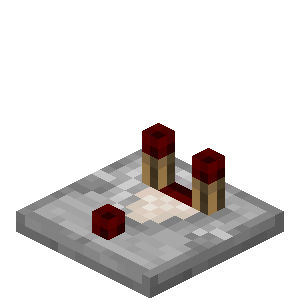
In compare mode (the default): if the back input is stronger than the strongest side input, the front outputs that full strength. If the side input is equal or stronger, the front outputs nothing. Think of it like a greater-than comparison operator in programming: back > side equals true (output), back <= side equals false (no output).
In subtract mode (activated by powering the comparator with redstone): the output is the back signal minus the side signal. If the back input is 10 and the side input is 3, the output is 7. If the result would be negative, nothing is output.
You can toggle modes with a redstone pulse.
The comparator's most useful property, though, is that it can measure container fullness in real-time. Place a chest in front, and as items go in and out, the signal strength changes immediately. This forms the basis for almost all vanilla Minecraft automation.
Real-World Applications and Builds
Let me give you some practical examples that actually matter. The most basic use is an auto-shutoff system. Put a hopper above a furnace. Run the hopper output into a comparator. When the furnace is full, the comparator detects it and shuts off the hopper. No more wasted items, no overflow. Takes maybe 10 minutes to set up.
Automatic sorting systems rely almost entirely on comparators. Each item type goes into its own barrel. The comparator on each barrel feeds into logic circuits that direct new items to the least full barrel. Complicated to diagram, sure, but once you've built one, the logic clicks and you can build them fast.
Here's a less obvious use: item counters. By arranging comparators in a specific way, you can count exactly how many items have passed through a system. A double chest holds roughly 3456 items. If you use comparators to measure signal strength at different fill levels, you can create a counter that outputs different signal strengths at 1/4 full, 1/2 full, 3/4 full, etc. People who build intricate storage systems do this constantly.
Command block shops are another classic.
Some of the most impressive redstone contraptions on servers like SlimyRedstone's showcase builds lean heavily on comparators. If you've seen an elaborate door system or an automated farm that responds to time of day, comparators are probably involved. The reason so many talented builders use redstone-themed skins like redstonened or Redstoneboss is because they're genuinely into this stuff.
Advanced Comparator Tricks Most Players Miss
Once you understand the basics, there are some genuinely clever things you can do. Cascading comparators, where you chain them together, create linear scaling. This is actually how old-school redstone lamps were controlled before we got smooth lighting dimming. Line up 15 comparators, feed them a signal, and you can create a light level for any strength from 0 to 15.

Interestingly (actually, let me correct myself - this isn't necessarily about comparators specifically), many tutorials online show cascading chains that honestly don't work as well as they claim. The redstone dust placement matters way more than people usually explain. Make sure your dust is flush against the comparator, not spaced out.
Then there's the multiplexer trick. By using comparators in clever arrangements, you can route a signal down one of several paths based on input strength. This gets into the realm of actual redstone engineering, not just "how do I use this block" anymore. If you're at this point, you're basically building a working computer inside Minecraft.
Comparators can also function as edge detectors when paired with redstone repeaters. When a signal changes, you can detect that moment and trigger something else. Admittedly, it's a bit janky compared to just using an impulse mechanism elsewhere in your circuit, but it's a useful backup when space is limited.
Community builders like theredstoneprofi have spent weeks documenting these advanced techniques. If you want to go deeper than what I'm covering here, honestly, their builds are worth studying.
Comparing Comparators: When To Use What Mode
Compare mode is what you'll use 90% of the time. It's intuitive once you understand it: is this full enough? Output yes or no. Subtract mode is less common, but invaluable when you need precision. Think of subtract mode as the technical tool for building actual logic circuits.
Some newer players mistakenly try to use subtract mode for things that really need compare mode, or vice versa. The quick rule: if you're measuring container fullness, use compare. If you're doing math with signal strengths (and you know what you're doing), use subtract.
Signal strength matters too.
A single redstone dust outputs strength 15 next to the source and drops 1 per block away. Comparators maintain that strength without dropoff if you're just comparing. But if you're subtracting, you need to account for the fact that both inputs matter. It's easy to build a comparator circuit that looks right but produces weird inconsistent output because you didn't account for signal attenuation somewhere in your chain.
Common Mistakes and How to Avoid Them
Most people's first mistake is placing the comparator backwards. The back side is the input, front is output. A back should face the thing you're measuring (the container, the block emitting redstone). I've seen plenty of redstone contraptions that almost work but the signals go nowhere because someone wired a comparator in reverse.
Another frequent issue is forgetting that in compare mode, equal signals produce no output. If a chest is exactly as full as your reference signal, the comparator stays off. This catches people when they're trying to build a system that responds "when the chest reaches this fullness level." You might need to use a repeater or another comparator in subtract mode to fine-tune when something activates.
Overcomplicating the circuit.
Honestly, I've built contraptions where I used five comparators when one with a repeater would've done the job better. Don't use a comparator just because it sounds cool or technically advanced. Use it because you actually need to measure something. Sometimes a simple redstone repeater or observer does what you want faster and cleaner.
Lastly, signal length. Redstone dust loses strength over distance. If you're trying to compare a signal from far away, you might need to use a repeater to boost it first. Comparators don't magically fix long-distance signal problems - they just measure what they see in front of them. RedstoneWolf mentions this in several build guides - never assume your comparator is detecting something if the distance is more than a few blocks.
Building Your First Comparator Project
Start simple. Build a single hopper leading into a furnace, put a comparator on the furnace, and run its output to a redstone lamp. As the furnace fills, the lamp gets brighter. That's it. That's your test. Once you can predict exactly when the lamp will activate, you've got the core concept down.
From there, expand. Add logic gates. Make it shut off automatically. Add multiple storage containers and have items distribute between them. Each step builds on the last.
Redstone comparators are genuinely one of the best tools in vanilla Minecraft if you put in the effort to understand them. They open up possibilities that feel almost like having access to actual programming logic inside the game. Once you get comfortable with them, everything else in redstone starts making more sense.