Monocraft: How to Use the Minecraft Font for Coding
Monocraft (IdreesInc/Monocraft)
A monospaced programming font inspired by the Minecraft typeface
Ever opened your code editor and thought, "This looks nothing like Minecraft"? Monocraft fixes that exact problem. It's a free monospaced font that brings Minecraft's iconic blocky aesthetic straight into your development environment, complete with programming ligatures and even support for the Standard Galactic Alphabet used in Minecraft's enchantment tables. Whether you're learning to code or just want your IDE to feel more fun, this fan project delivers in ways you wouldn't expect.
What's Monocraft?
Monocraft is a monospaced programming font inspired by Minecraft's UI typeface. The creator redesigned every single glyph - over 1500 of them - to work properly in a monospaced environment while keeping that distinctive blocky, pixelated look you recognize from the game itself. It's not affiliated with Mojang or Minecraft (the project makes that clear up front), but it captures the aesthetic perfectly enough that looking at your code feels like you're staring at a GUI from the game.
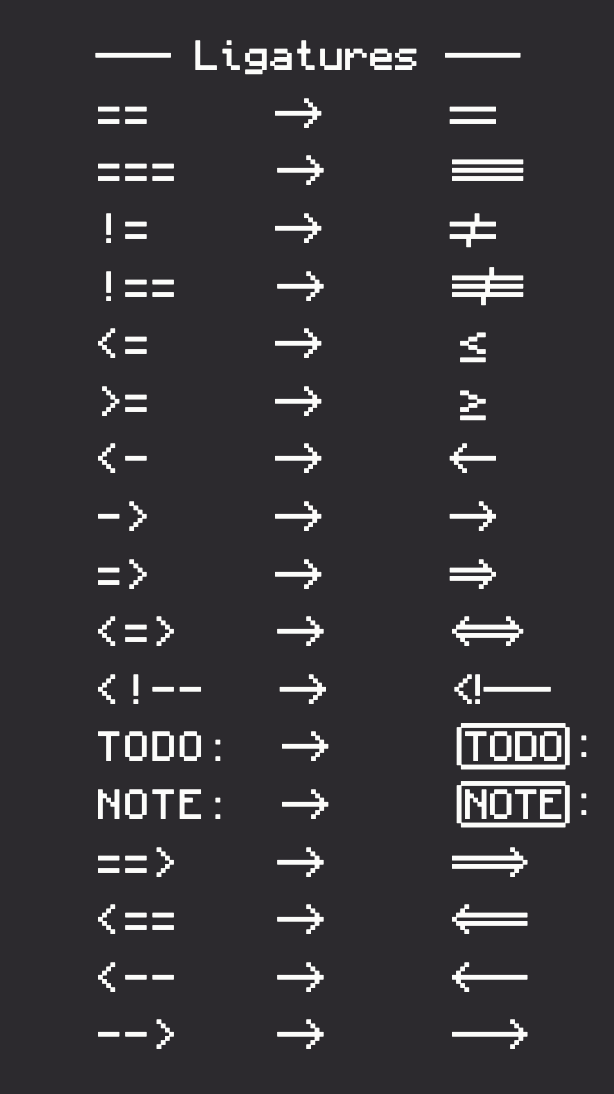
The font includes far more than just standard letters and numbers. You get programming ligatures that render operators as actual arrows and symbols, support for the Standard Galactic Alphabet used in enchantment tables, and careful spacing work so thin characters like "i" and "l" don't look absurd in a monospaced layout. It's the kind of project that started as a fun weekend idea and somehow accumulated over 10,000 stars on GitHub.
What makes it stand out isn't just the Minecraft theme. The creator genuinely cared about readability.
Why You'd Use This
Okay, so it looks cool. But should you actually install it on your main development machine?
If you're someone who switches between Minecraft and your IDE regularly, there's something genuinely satisfying about the visual continuity. You're in the game one minute, modifying a Minecraft plugin the next, and suddenly your code editor's font language matches the universe you're working in. It sounds silly until you try it, and then it just... works. Psychologically.
Beyond aesthetics, there are real practical reasons to consider it. The programming ligatures aren't just pretty - they're actually useful. When you're scanning code quickly, seeing `=>` render as an actual arrow or `==` as a proper comparison operator makes the code easier to parse at a glance. It's the same reason other developers use fonts with ligatures. The Minecraft theming is the fun part, but the ligatures are the substance.
If you're building Minecraft-themed websites or running a community server, you could embed Monocraft in your CSS. The project provides a CDN link, so you don't need to host the font file yourself. Suddenly your documentation, code examples, and terminal blocks have visual consistency with the Minecraft aesthetic. That's a small touch that community members actually notice and appreciate.
And honestly? If your job involves spending eight hours a day staring at code, making your editor look like something you enjoy seems like a reasonable use of five minutes to install a font.
Installing Monocraft on Your System
Windows
Download the most recent `.ttc` file from the GitHub releases page. Right-click it and select "Install". You might need admin access - that's standard for Windows font installation. Once it's done, you'll see "Monocraft" (note the space - the name matters) in your font dropdown in VS Code, Sublime Text, or whatever editor you're using.
Mac
If you use Homebrew, installation is a single command:
brew install --cask font-monocraftOtherwise, grab the `.ttc` file from the releases page, double-click it, and select "Install Font" when the dialog appears. Either way, you're done in seconds.
Linux
Create the fonts directory if it doesn't exist, copy the file, then refresh your font cache:
mkdir -p ~/.local/share/fonts
cp Monocraft.ttc ~/.local/share/fonts/
fc-cache -fv
If your terminal or editor doesn't pick it up immediately, try logging out and back in. Sometimes the font daemon needs a clean restart.
On Your Website
Want Monocraft on your own site or blog? Add this to your CSS:
@font-face {
 font-family: 'Monocraft';
 src: url('https://cdn.jsdelivr.net/gh/IdreesInc/Monocraft@main/dist/Monocraft-ttf/Monocraft.ttf') format('truetype');
 font-weight: normal;
 font-style: normal;
}
Then use `font-family: 'Monocraft'` on whatever elements need the styling. This is perfect for Minecraft community sites, blogs, server listings, or portfolio projects. The jsDelivr CDN handles distribution, so you don't need to host anything yourself.
Features That Matter
The programming ligatures are the first thing people notice and honestly? They work. Arrows, comparison operators, common programming patterns - they're all redesigned to look crisp and meaningful instead of like random keyboard mashing. When you're debugging and scanning through code quickly, every bit of visual clarity helps. It's subtle but effective.
The enchantment language support is niche, sure. Not everyone needs to type Standard Galactic Alphabet characters. But it's there if you want to add Minecraft flavor to documentation, code comments, or Discord messages with your friends. It's the kind of feature that makes the project feel complete rather than half-baked.
Font hinting is new in recent releases. On Windows and Linux - especially at smaller sizes like terminal text - the characters render sharper and cleaner. If you tried Monocraft before and thought it looked fuzzy on Windows, that's been addressed. Actually, there was a specific issue with PANOSE metadata values that made Microsoft software like VS Code render it incorrectly. That's fixed now. The latest releases also bundle the complete NerdFonts icon set, so terminal users get more icons than before.
Things That Catch New Users
The font family name has a space in it.
That matters more than you'd think. When specifying it in CSS or terminal config files, it's "Monocraft", not "monocraft" or "moncraft". Getting that wrong is the most common issue. It seems small until you're troubleshooting why your font-family declaration isn't working.
If you install it on Linux and your terminal doesn't immediately see it, the font daemon might need time to refresh. Logging out and back in solves this. Some terminals don't handle custom TTF files well - if you're using an ancient terminal emulator, that could be the issue.
There are also multiple download options, which can be confusing. The standard `.ttc` file (TrueType Collection) works everywhere and includes multiple weights in one file - that's what most people should grab. There's also a NerdFonts patched version for extra icon support, a no-ligatures version (why you'd want this is unclear), and separate TTF and OTF files if you're particular about format. For 99% of users, just download `Monocraft.ttc` and move on.
Similar Projects and Alternatives
If Monocraft doesn't feel like your thing, there are alternatives. Miracode is a vectorized version of the same font concept if you want something that scales better or feels slightly more polished. Some developers prefer traditional fonts like Cascadia Code or JetBrains Mono, which have excellent ligatures and monospacing but without any Minecraft theming. For pure aesthetic matching with Minecraft's visual language, though, nothing else captures that pixelated blocky vibe quite like Monocraft.
If you're building Minecraft community tools, integrating Monocraft with other project elements makes sense. Something like pairing it with a Minecraft Server Status Checker creates visual coherence. Or if you're showcasing community content alongside a Minecraft Skin Creator, the typeface reinforces that everything on your site belongs to the same ecosystem.
The Monocraft Discord community is active if you run into issues or want to suggest features. A maintainer takes feedback seriously and new releases come out regularly with improvements and bug fixes. It's a straightforward project, but the development is clearly ongoing.
Open the Monocraft repo ↗
Lead writer at minecraft.how. Long-time Minecraft player running a small SMP server, testing every build, mod, and seed before writing about it.