mcaselector: How to Manage Minecraft Chunks in 2026

Querz/mcaselector
A tool to select chunks from Minecraft worlds for deletion or export.
View on GitHub ↗Need to reset chunks in your Minecraft world without nuking the entire thing? mcaselector lets you surgically remove or export specific chunks and regions - handy when you've got corruption, lag sources, or just want a fresh terrain regeneration in one area. It's the kind of tool that stops you from rage-deleting hours of work.
What This Project Does
mcaselector is a desktop application that loads a Minecraft Java Edition world and lets you see exactly where chunks and regions are stored. You can then select specific chunks, delete them (forcing Minecraft to regenerate the terrain), export them to a separate world, or filter them by criteria like structure type, biome, or modification date. The tool reads the actual world file format (.mca files), so it's making real modifications to your save data, not simulating or predicting changes.
Built in Java, it runs standalone on Windows, macOS, and Linux. Current version supports everything from Minecraft 1.2.1 through 1.21.5+, though the maintainer regularly updates it as new snapshots and full releases drop. With over 4400 GitHub stars, it's become the de facto standard for this kind of work in the community.
Why You'd Use It
Chunk corruption happens. You're mining peacefully, a server crashes, and suddenly half your base is floating or missing textures. Or you've got a sprawling world where one region got accidentally covered in bad terrain generation and you can't just recreate it by hand. Instead of starting a new world or tediously cutting out that section manually, you run mcaselector, select the corrupted chunks, and delete them.
But it's not just damage control. Content creators use it to prepare worlds for showcase videos, deleting uninteresting areas while keeping the important builds. Admins use it to reset the Nether or End on long-running servers without touching the Overworld. Players exploring real-world maps (yeah, some folks rebuild Earth in Minecraft) use it to export specific chunks and stitch them into other worlds.
Actually, that brings me to something worth noting - you need backups before you touch this tool. mcaselector modifies your actual world file directly. One wrong click, and you're not hitting undo in the UI; you're restoring from backup or accepting the loss. That's not a flaw in the tool, just the reality of working with world data.
How to Install
Download the latest release from GitHub. There's a Windows installer if you prefer clicking through a setup wizard, or a universal JAR file that runs on any system with Java installed.
java -jar mcaselector-2.7.jarThat's it. The JAR is portable - no installation required, just run it. On Windows, the installer bundles Java for you if you don't already have it, which is nice if you're not typically a Java developer.
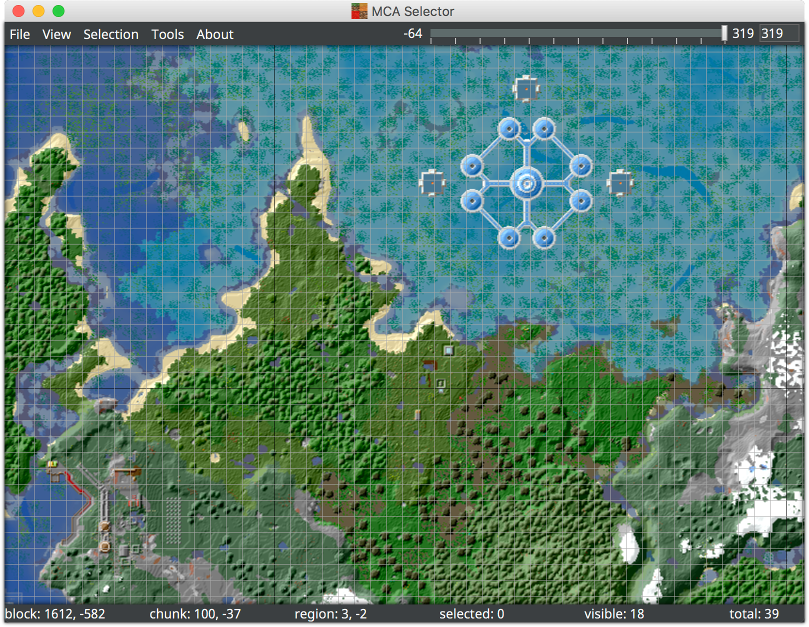
Launch the application, and you'll see a file browser. Point it at your Minecraft world folder (usually.minecraft/saves on Windows or Linux, or ~/Library/Application Support/minecraft/saves on macOS). Wait for it to load - large worlds take a few seconds to render all the chunk data. Once loaded, you're looking at a grid where each square represents a chunk (16x16 blocks). Regions (32x32 chunks) are outlined with thick lines.
Key Features That Matter
The selection tools are the heart of the tool. You can select chunks manually by clicking and dragging, but the real power is the filter system. Want to delete all chunks modified before a certain date? Select by timestamp. All chunks containing a specific biome? Filter by that. All chunks with a certain structure (village, mansion, stronghold)? Checkbox it. Then import selections from CSV files if you want to work with external data.
One standout addition in the latest version is subtraction mode. Select a group of chunks with one filter, then subtract another filter's results from that selection. Say you want to reset your Nether except where you've built a farm - you'd select the whole Nether region, then subtract chunks containing your specific structure. Precise work that used to require multiple manual passes.
The export functionality is underrated. You don't have to delete chunks - you can copy them to a new world file instead. Grab those beautiful mountains from your 1.20 world, export them, and import them into a creative-mode building project. Or archive chunks before you reset them, keeping the original data safe.
Batch editing is there too. Found a chunk you want to tweak? Change it directly without reloading the whole world. The interface shows you what you're about to modify before you commit to it, which is genuinely useful given the irreversibility of the tool.
Gotchas and Things to Know
First: always make a full backup of your world folder before opening it in mcaselector. Seriously. I know I mentioned this earlier, but it bears repeating. There's no recovery inside the app.
Second, the tool updates regularly to support new Minecraft versions, but those updates don't happen instantly. If you're playing on the bleeding edge of snapshot versions, mcaselector might not recognize your world format yet. The maintainer is active and usually catches these within a few releases, but there can be a lag - actually, version 2.7 just added support for Minecraft's new world folder structure (dimensions/minecraft/) from 1.21+, so that's worth knowing if you're on a recent build.
Third point: chunk deletion in Minecraft isn't instant from a gameplay perspective. When you delete a chunk, you're telling Minecraft "regenerate this terrain next time it loads." If that chunk had player-placed blocks or mobs, they vanish without warning. The chunks surrounding the deleted ones remain untouched, so you might get some weird seams or terrain cliffs at the boundaries. Most of the time it blends naturally, but not always.
Also worth mentioning: if you're using a modded world, mcaselector might not understand all the custom NBT data in your chunks. It handles vanilla Minecraft fine, but heavily modded installations can be risky. The tool will load them, but there's potential for data loss if you're not careful.
Who's Using This
Server admins rely on it. YouTube creators use it. Players like adderall_abuser, ironmouse, and joakim2tusen have used similar tools to manage large-scale Minecraft projects. If you're running a long-term world or collaborative server, you'll run mcaselector eventually. And if you're not, you probably will the moment chunk corruption hits.
Some players also use it for creative world setup. You want a blank canvas with just one specific biome? Select those chunks, export them, start a new world, and import them. Or grab specific terrain features from different worlds and stitch them together. The possibilities are there if you're willing to think outside the typical "load world, play survival" flow.
Alternatives (Not Many)
Honestly, there's not much competition here. WorldEdit mods exist, but those require Fabric or Forge, modify your game, and work from inside Minecraft - mcaselector works standalone and doesn't touch your game installation. For pure chunk-level manipulation of vanilla worlds, mcaselector is pretty much it. Some players use NBT editors for ultra-precise work, but that's a completely different (and much more fragile) workflow.
If you're running a server, plugins like VoxelSniper exist for in-game world editing, but again, those require server mods. mcaselector is unique in being a standalone tool that understands the raw world format without any server component.
There are also cloud-based world editors that let you upload your world and edit it in a browser, but those come with privacy questions and aren't always free. mcaselector does everything locally on your machine, no upload required.
🔗 GitHub: Querz/mcaselector - MIT, ★4404