Mc-datapack-map: Visualize Your Custom Minecraft Worlds
jacobsjo/mc-datapack-map
A Minecraft biome map capable of handling worldgen datapacks.
View on GitHub ↗If you're experimenting with custom worldgen datapacks, you're probably tired of loading full Minecraft worlds just to see whether the biome distribution looks right. This tool lets you preview exactly what those datapacks generate before you commit hours to a new world. It's fast, it works with complex mods, and the online version is completely free.
What This Does
Mc-datapack-map is a map viewer built for Minecraft's worldgen system. You feed it a datapack (or upload a vanilla version), and it generates a visual representation of how biomes and structures will appear in your world. Think of it like an X-ray view of your terrain without needing to spawn in survival mode.
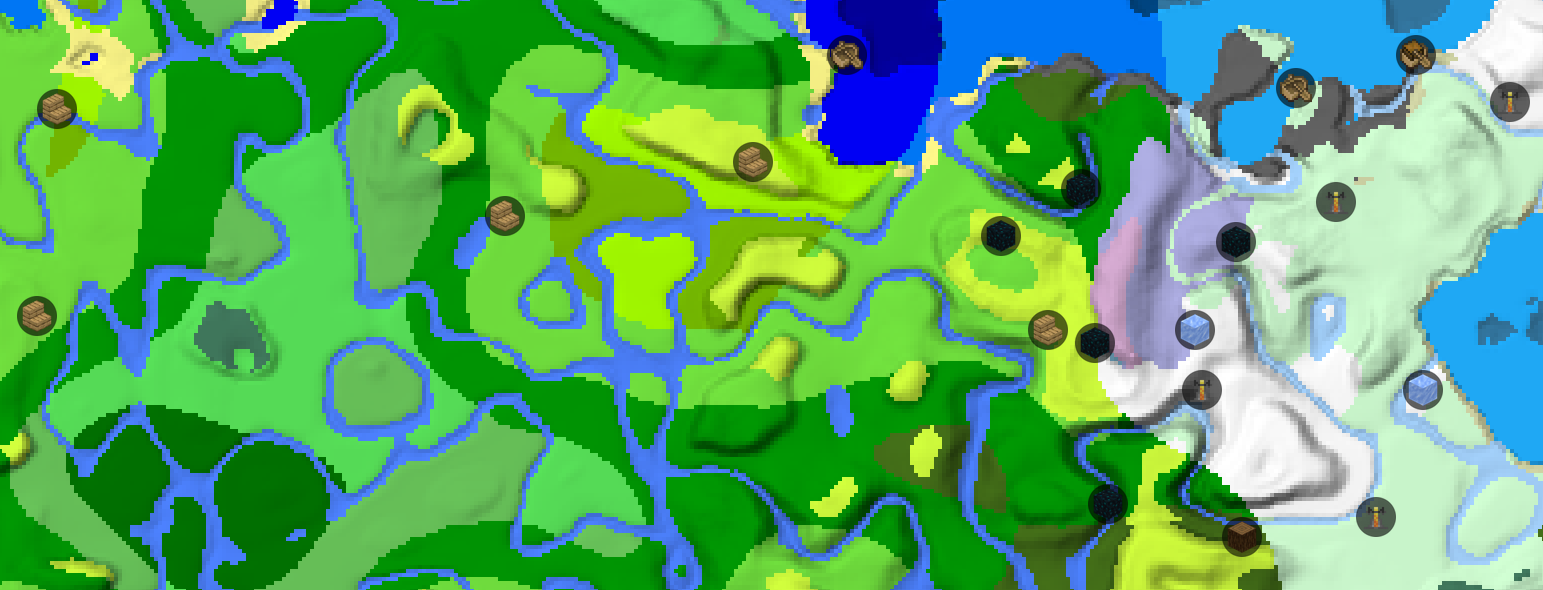
The project uses Leaflet, the same library that powers Google Maps. You get the familiar pan-and-zoom interface you'd expect from any web map, except instead of roads and borders, you're looking at Minecraft terrain generation. Biomes appear as color-coded regions. Structures like villages, temples, and fortresses show up as markers or highlighted areas depending on what data the datapack provides.
The clever part? It actually understands worldgen datapacks. Many biome viewers just show vanilla Minecraft. This one ingests the rules your custom pack defines and generates the map based on those rules. If your datapack tweaks mountain generation or adds new biome types, the map reflects that.Why You'd Use This
Let's say you're building a large survival server and found a modpack with custom worldgen. Before you allocate a permanent world file and point players at it, you want proof that the terrain won't be boring or broken. Run it through this tool first.
Or you're a datapack creator. You wrote your own worldgen pack and need to verify it doesn't create weird biome borders or fail to generate structures in key areas. Spending an hour here saves you the embarrassment of shipping broken terrain.
Even for vanilla, this is useful. Curious what the latest Minecraft update changed about biome distributions? Load it in and compare side-by-side with the previous version.
The speedrun community uses tools like this to scout seeds before investing time. Server admins use them to preview terrain before committing to a world. Builders planning massive projects (cities, terrain reshaping, monument placement) sometimes check the base generation first to understand what they're working with.
How to Get Started
There are two paths: the easy online version, or running it locally.
Online (simplest option): Head to https://map.jacobsjo.eu. It's already set up with vanilla Minecraft worldgen baked in. You can view the default map and explore how different Minecraft versions generate terrain. If you just want to play around with vanilla biome distributions, you're done.
For custom datapacks, that online version has an upload feature. Zip up your datapack, select the target Minecraft version, and upload it. The tool processes it and shows you the result. No installation required.
Local setup (more control): If you want to run this yourself or integrate it into a build pipeline, the project includes dev instructions.
pip install -r requirements.txt
npm i
npm run createZips
npm run dev
The first two lines install dependencies (Python and Node). That third generates the vanilla datapack files. This fourth starts a dev server on http://localhost:5173. But this requires a browser that supports ES modules in web workers - most modern browsers handle this fine (Firefox 89+, Chrome/Edge 89+, Safari 15.2+).
When you're ready to deploy a built version, run npm run build and then npm run preview to test the production build locally.
What Sets It Apart
Generic biome viewers exist, sure. Most of them either show only vanilla terrain or they handle custom datapacks in a limited way. This project actually parses datapack worldgen configurations and respects them.
The color scheme is readable. Biomes are distinguishable at a glance, and you can hover over regions to see their names and properties. Structure markers are clear without being visually overwhelming. Navigation is smooth, even when zoomed way in or viewing huge maps.
It's written in TypeScript. The codebase is clean and modular enough that if you need to fork it or extend it, you won't be wrestling with spaghetti code.
Also, it's open-source under the MIT license with 100 GitHub stars, and the maintainer is actively responsive. The project accepts contributions (though you should ask before major changes), and there's a translation effort underway for multiple languages.
Things That Might Trip You Up
The dev environment requirement is worth noting: you can't just open an HTML file and run this locally without some setup. The build pipeline exists for good reason (module bundling, datapack processing), but if you're the type who usually avoids Node.js, be prepared to install it first.
Custom datapack uploads process on the client side (in your browser), not on the server. And this is privacy-friendly and keeps the host's computational load down. But it also means very large packs might take a moment to process, and if your browser crashes mid-load, you'll start over. Actually, that's overstating it - processing is usually fast enough that it's not really an issue for typical-size datapacks.
Vanilla datapack versions lag slightly behind new Minecraft snapshots. The maintainer usually catches up within a few days of release, but if you're testing bleeding-edge snapshot features, you might need to wait or build from source.
One more gotcha: it only handles worldgen datapacks, not modpacks. If you're trying to visualize a modpack with custom content mods (like custom ore distribution or structure mods), this tool won't help. It's specifically for vanilla datapack-based generation changes.
Practical Example: Testing Before Committing
Imagine you're evaluating a custom worldgen datapack for your server. You download it, zip it up, and upload it to the map tool for Minecraft 26.1.2 (the current release). In seconds, you see a full preview. The biome distribution looks reasonable. Villages appear to spawn in the right places. Mountains generate at a height that makes sense for building.
Now you're confident enough to allocate a world file and point your server at it. That's worth the two-minute preview.
If you're also curious about biome specifics, minecraft.how has a block search tool where you can look up which blocks belong to which biomes. Use that to cross-reference what the map shows. And while you're here, if you're planning any custom texture work for your world, our skin creator might be useful for testing custom player skins before you use them in-game.
Alternatives
Other biome visualization tools exist, but most are either abandoned or limited to vanilla terrain.
Chunkbase and similar seed database sites show vanilla biome maps, and they're great for finding specific seeds. But they don't support custom datapacks.
Some servers use Dynmap or BlueMap for live world visualization, but those require the world to already exist and render continuously. That's overkill if you just want a quick preview before creating a world.
If you're doing serious datapack development, you might write custom tooling specific to your use case. But for a general-purpose, no-setup-required visualization of how a datapack generates terrain, this tool does the job right.Visit jacobsjo/mc-datapack-map on GitHub ↗

Lead writer at minecraft.how. Long-time Minecraft player running a small SMP server, testing every build, mod, and seed before writing about it.