ModernUI-MC: Interfaces Melhores para Mods Minecraft
BloCamLimb/ModernUI-MC
Mod Minecraft que incorpora Modern UI no Minecraft, fornecendo API de modding, mecanismo de layout de texto e alguns widgets.
Ver no GitHub ↗Cansado de interfaces de usuário obsoletas e desajeitadas em mods Minecraft? ModernUI-MC é um framework Java que permite que desenvolvedores de mods e criadores de resource packs construam interfaces gráficas elegantes e modernas diretamente no Minecraft sem reinventar a roda.
O que ModernUI-MC Faz
No seu cerne, ModernUI-MC é um mod Minecraft baseado no ModernUI Framework, um construtor de aplicações desktop multiplataforma. Ele integra esse framework ao Minecraft, oferecendo aos modders um kit de ferramentas de UI de nível profissional. Você ganha widgets, um mecanismo de layout de texto, otimizações de renderização de texto e uma API de modding que se conecta ao Forge, NeoForge ou Fabric.
O mod inclui um poderoso sistema de renderização de texto que é genuinamente impressionante. Estamos falando de visualização de fonte em tempo real, suporte TrueType/OpenType, anti-aliasing, emoji Unicode 16.0, texto bidirecional e renderização SDF em 2D e 3D. Até mesmo suporta Google Noto Color Emoji, o que é raro para Minecraft.
Mas ModernUI-MC não é apenas para desenvolvedores de mods construindo interfaces personalizadas. Veja bem, ele também inclui ajustes de qualidade de vida que qualquer jogador pode usar: desfoque Gaussiano para fundos de tela, rolagem mais suave em listas de seleção, pressionar "C" para zoom (estilo OptiFine), desfazer/refazer para campos de texto, e até reprodução de música local com visualização de espectro.
Por Que Você Instalaria
Três razões principais: melhor renderização de texto em todo o jogo, melhorias para desenvolvedoras de mods se você usar mods que usam o framework, e alguns recursos genuinamente úteis integrados.
As melhorias na renderização de texto são substanciais. O sistema de fontes padrão do Minecraft não foi projetado para suportar Unicode moderno ou altas densidades de pixels. ModernUI-MC substitui isso por um mecanismo de layout otimizado para legibilidade em qualquer escala. Texto de placa, texto de chat, texto de interface gráfica personalizada em mods - tudo recebe renderização mais nítida e rápida com menor uso de memória. O framework calcula métricas de fonte exatas para renderização de glifos nativa e usa um algoritmo mais rápido de empacotamento de retângulos para atlas de glifos.
Se você está usando vários mods com interfaces gráficas personalizadas, eles parecerão mais coesos e responsivos. A rolagem suave funciona em telas vanilla e modificadas. O suporte a código de emoji do Discord/Slack/GitHub é um pequeno recurso, mas é o tipo de coisa que mostra que o desenvolvedor pensou em qualidade.
Aumento de Desempenho
ModernUI-MC aumenta significativamente o desempenho da renderização de texto de interface gráfica em comparação com o vanilla. As alocações de memória diminuem, a pressão do GC alivia e a taxa de quadros durante a navegação de menus permanece estável. Se você está jogando em hardware mais antigo ou uma instância com muitos mods, isso importa.
Como Instalar
A instalação depende da sua configuração de Minecraft. ModernUI-MC suporta carregadores Forge e Fabric em múltiplas versões.
Para usuários de Fabric no Minecraft 1.21.8 (o mais recente), baixe a compilação Fabric 1.21.8 na página de releases e coloque-a em sua pasta de mods:
ModernUI-Fabric-1.21.8-3.12.0.4-universal.jarSe você está no 1.21.4, 1.21.1 ou 1.20.1, compilações específicas de versão existem para cada. Mesmo processo - nenhuma configuração extra necessária.
Usuários de Forge têm opções similares. Baixe o JAR compatível com Forge para sua versão:
ModernUI-Forge-1.21.1-3.12.0.2-universal.jarColoque na pasta de mods, reinicie o launcher e ele carrega automaticamente. O mod não requer arquivos de configuração ou busca de dependências - é um JAR independente.
Notas de Compatibilidade
ModernUI-MC funciona com OptiFine, Sodium (Rubidium), Iris (Oculus) e a maioria de outros mods de renderização. É compatível com definições de fonte JSON integradas do Minecraft para fontes bitmap e TTF. Se você está usando vários pacotes de textura ou configurações de shader pesadas, o mod se integra perfeitamente sem conflitos.
Recursos Principais que se Destacam
Além do básico, ModernUI-MC inclui recursos que parecem mais uma suite completa do que apenas um renderizador de texto.
Renderização Avançada de Texto
O cálculo de layout de texto Unicode é rápido e assíncrono. O mod lida com scripts complexos, regras de quebra de linha (estilo CSS), variantes de tom de pele de emoji e idiomas da direita para esquerda. O fallback de fonte funciona de forma inteligente - se sua fonte escolhida não tiver um glifo, ela se encadeia para a próxima fonte sem quebrar o layout.
Personalização de Tela
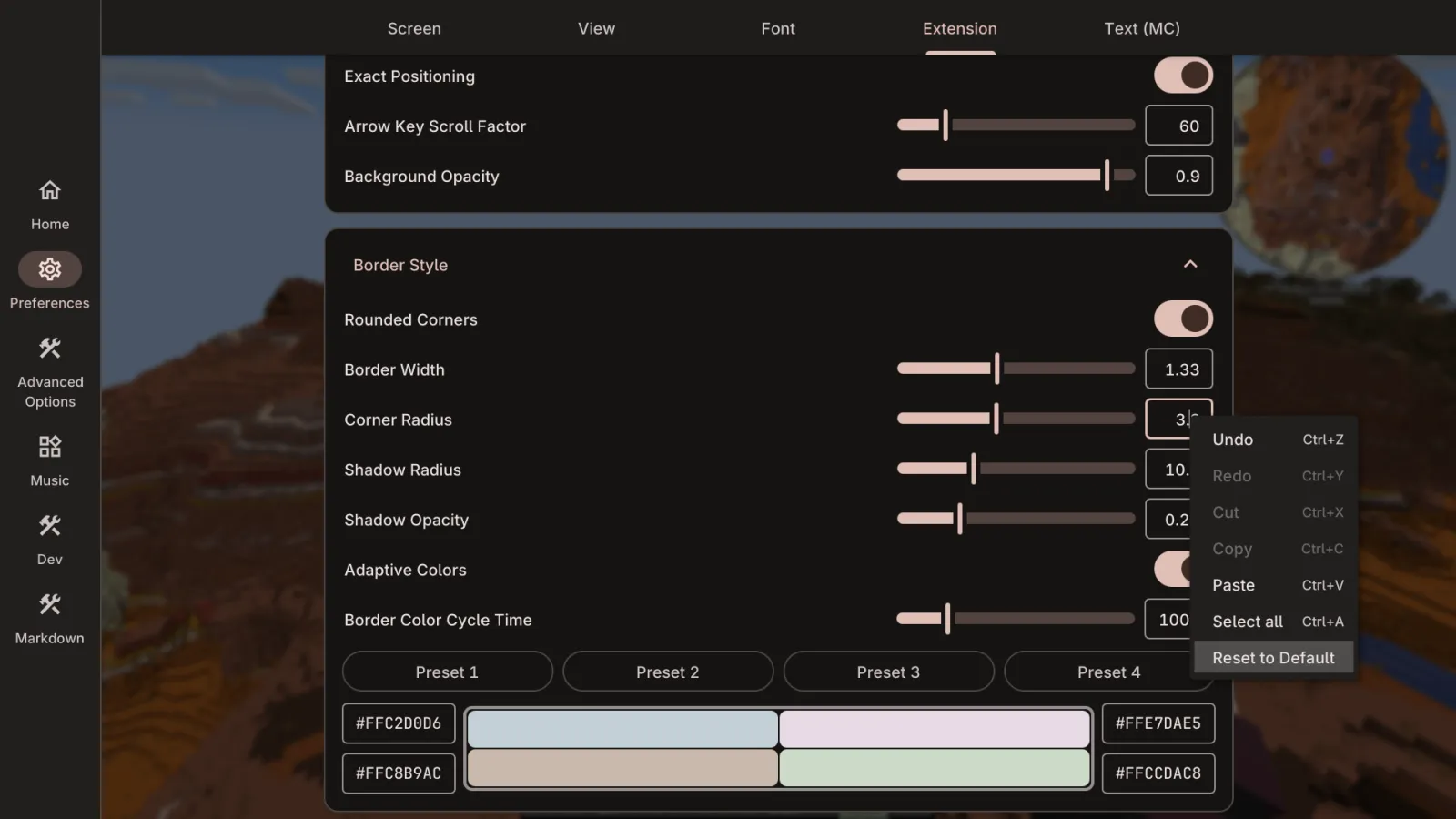
Altere cores de fundo para sua tela de pausa, desfoque o fundo com intensidade de desfoque Gaussiano ajustável, adicione animações de fade-in. Isso pode parecer cosmético, mas é o polimento que separa um mod de uma ferramenta.
Modos de Janela e Controle de Taxa de Quadros
Modo de tela cheia sem bordas e modos de janela maximizada (além das opções limitadas do vanilla), limitação de taxa de quadros, atenuação de volume quando a janela perde o foco e pausa singleplayer quando você abre o inventário. Não é revolucionário, mas são melhorias de qualidade que se acumulam.
Estilo de Dica Aprimorado
As dicas podem ter bordas arredondadas ou normais com anti-aliasing, formatação de título personalizada, texto RTL centralizado e posicionamento perfeito em subpixel. Se você está fazendo um modpack, isso adiciona polimento visual a cada estado de passagem do mouse.
Armadilhas Comuns e Resolução de Problemas
ModernUI-MC é estável em versões principais do Minecraft, mas algumas coisas pegam usuários desprevenidos.
O carregamento de fonte pode levar alguns segundos no primeiro lançamento se você estiver adicionando fontes TTF personalizadas. Isso é normal - o mod as armazena em cache depois. Não entre em pânico se sua primeira inicialização for lenta.
Se você está misturando ModernUI-MC com outros mods de GUI completos (como AppleSkin ou mods de quest personalizados), ocasionalmente surgem conflitos com a ordem de renderização de tela. Normalmente isso se resolve com ajustes na ordem de carregamento de mods, mas teste as combinações antes de implantar em um servidor ou modpack.
O mod requer Java 8+, o que qualquer configuração moderna do Minecraft tem. Se você estiver em hardware extremamente antigo ou executando modpacks muito antigos, a compatibilidade de versão vale a pena verificar primeiro no CurseForge - o projeto existe há um tempo e tem documentação sólida sobre quais versões suportam quais lançamentos do Minecraft.
Alternativas Que Vale a Pena Considerar
Se ModernUI-MC parecer excessivo para suas necessidades, existem opções mais leves.
Para apenas melhorias de renderização de texto sem recursos extras, alguns jogadores dependem sozinho da renderização de fonte do OptiFine. É menos avançado, mas não requer mods adicionais. Para criadores de modpack que desejam consistência de interface gráfica, frameworks no estilo ImGui existem no espaço Minecraft, embora nenhum combine a sofisticação do mecanismo de texto de ModernUI-MC.
Se você está construindo um mod e precisa de um kit de ferramentas de interface gráfica, as bibliotecas Java Swing são um padrão mais antigo, mas ModernUI-MC é propositalmente construído para Minecraft e lida com o contexto de renderização do jogo sem atrito.
Começando com Configuração de Servidor
Depois de instalado, ModernUI-MC funciona sem configuração. Mas se você estiver executando um servidor com mods que usam o framework, você pode querer ajustar as configurações de fonte ou desabilitar certos recursos. A configuração é mínima - o mod respeita definições de fonte vanilla, portanto, se você tiver fontes personalizadas em seu resource pack, elas se integram perfeitamente.
Para administradores de servidor implantando modpacks, esteja ciente de que os clientes precisam ter o mod instalado para experimentar as melhorias - não é do lado do servidor. Mas não há penalidade de desempenho para jogadores sem ele (eles apenas veem renderização vanilla).
Se você estiver interessado em otimizar sua configuração de servidor de forma mais ampla, o Gerador de Propriedades do Servidor pode ajudá-lo a ajustar configurações vanilla para funcionar ao lado de mods como este. E se você estiver procurando por um servidor modificado para testar, a Lista de Servidores Minecraft tem comunidades executando vários modpacks.
ModernUI-MC é atualizado consistentemente. O lançamento mais recente suporta versões recentes do Minecraft (1.20.1 a 1.21.8), e o mantenedor (BloCamLimb) acompanha os novos lançamentos. O desenvolvimento ativo significa que correções de bugs e otimizações são lançadas regularmente.
BloCamLimb/ModernUI-MC - LGPL-3.0, ⭐189
Lead writer at minecraft.how. Long-time Minecraft player running a small SMP server, testing every build, mod, and seed before writing about it.
Perguntas Frequentes
Qual é o principal benefício do ModernUI-MC para desenvolvedores de mods?
Como instalar o ModernUI-MC no Minecraft com carregador Fabric?
O ModernUI-MC é compatível com mods de renderização como OptiFine?
Have a Question or Tip about this Guide?Community Q&A
Ask a question or help other players below. Join the discussion and share your Minecraft tips!
Comentários
Nenhum comentário ainda. Seja o primeiro a compartilhar sua opinião!