Radiance: Quebrando os Limites do OpenGL no Minecraft
Radiance (Minecraft-Radiance/Radiance)
Radiance é uma reconstrução do renderizador do Minecraft em um backend C++ Vulkan, com suporte nativo a Ray Tracing em Hardware para Windows e Linux. Libere-se dos limites do OpenGL no Minecraft.
Está cansado de esperar o Minecraft modernizar seus gráficos? Radiance é um mod construído pela comunidade que substitui completamente o renderizador vazio por renderização impulsionada por Vulkan, adicionando ray tracing em hardware em sistemas Windows e Linux. Se você já se perguntou como o Minecraft poderia parecer com iluminação e cálculos de reflexo em tempo real, esse projeto torna isso possível.
O que a Radiance Faz
A realidade técnica é a seguinte: o Minecraft roda no OpenGL desde sua criação, o que fazia sentido em 2009. No entanto, o OpenGL tem limites fundamentais para efeitos avançados como o ray tracing. A Radiance contorna isso completamente usando o Vulkan, uma API gráfica moderna projetada para renderização de alto desempenho.
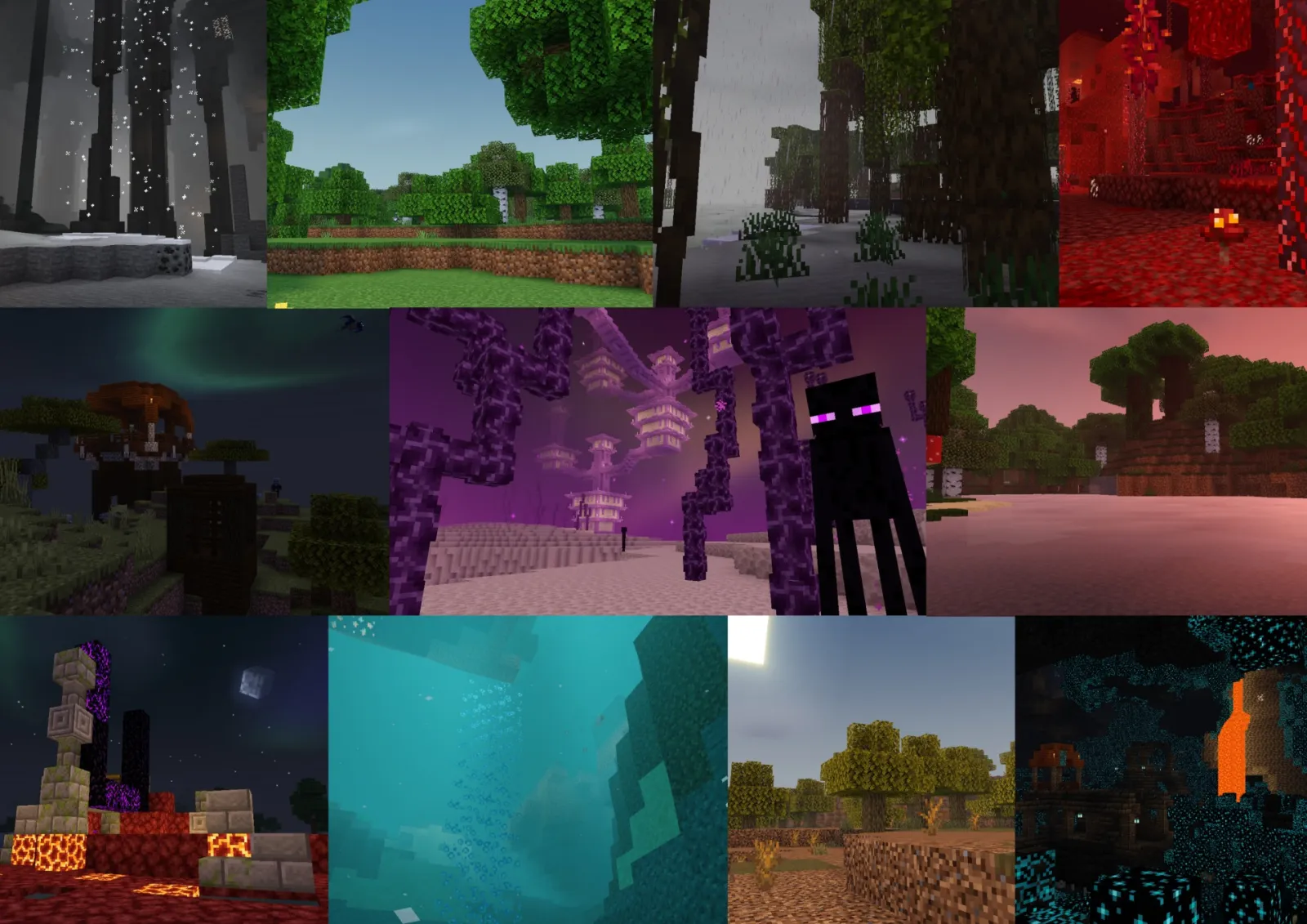
Em vez do método tradicional, onde a luz salta de maneira estática e pré-calculada, o ray tracing simula a física real da luz. Os raios viajam pelo seu mundo, saltam de superfícies e criam sombras, reflexos e iluminação indireta realistas. Conversemos francamente, no Minecraft, isso significa que cavernas se sentem genuinamente escuras, a água reflete o céu com precisão e a luz solar cria sombras acreditáveis ao longo do terreno. É o tipo de coisa que parece imediatamente diferente quando você carrega um mundo.
O projeto tem dois componentes principais: o mod Java que você baixa e instala, e o backend de renderizador Vulkan C++ que faz o trabalho pesado. Você não precisa pensar nessa divisão técnica na prática, mas é bom saber que ela existe.
Por que você gostaria disso
Gráficos profissionais no Minecraft soa atraente na teoria. Mas quando você realmente usaria isso?
Você gostaria disso se já construiu algo no modo de sobrevivência ou criativo e pensou, "isso seria incrível com iluminação adequada." Construções massivas se beneficiam especialmente, particularmente qualquer coisa com vidro, água ou arquitetura intricada. O conteúdo de demonstração mostra interiores de edifícios que parecem genuinamente impressionantes quando a luz flui pelas janelas de maneira realista. E se você está criando estruturas detalhadas, você pode planejar as coisas corretamente desde o início. Ferramentas como o Gerador de Texto do Minecraft ajudam a projetar sinais e etiquetas antes de construir, para que sua criação pareça polida desde o dia um.
Você também gostaria disso se gosta de personalização de shaders.
A Radiance suporta shaders personalizados, então você não está preso a um estilo visual. Dois shaders internos vêm incluídos: um para rastreamento de caminho no estilo vazio e uma opção avançada com recursos extras como ReSTIR para amostragem de luz melhorada e efeitos volumétricos.
Mas honestamente? Você gostaria disso apenas para ver como a renderização moderna parece. Mesmo se você não mantiver instalado por muito tempo, é impressionante o suficiente para mostrar para amigos ou tirar inspiração.
Instalando a Coisa
A instalação é direta, mas tem alguns detalhes. No Windows e Linux, pegue o jar do mod no Modrinth ou CurseForge (ambas plataformas são suportadas). Deixe cair na pasta `.minecraft/mods/`, como qualquer outro mod.
Copie o jar da Radiance para:.minecraft/mods/
Execute o Minecraft por meio do seu launcher habitual
Pronto. Uma coisa digna de nota: A Radiance ainda está em desenvolvimento ativo, e a versão 0.1.5-alpha é o último lançamento. Funciona solidamente, mas não espere que todos os lançamentos menores do Minecraft sejam suportados imediatamente após o lançamento.
Os usuários do Windows devem estar cientes de um problema conhecido do MSVC que pode causar crashes com certas versões do JDK. A documentação do projeto menciona uma solução envolvendo ajustes na biblioteca de tempo de execução do JDK, mas você pode nunca encontrar o problema.
O que Funciona Agora
O ray tracing é o principal show, e é genuinamente sólido. Reflexos, sombras e iluminação global funcionam como esperado. O desempenho é respeitável em hardware decente, o que é notável para Minecraft com ray tracing.
Suporte a pacotes de texturas PBR está integrado, e shaders personalizados carregam diretamente sem pré-processamento necessário. Amostragem de luz direta funciona em todos os modos, e o shader avançado adiciona técnicas sofisticadas para qualidade de amostragem. Atualizações recentes trouxeram personalização por shader, carregamento de chunk multi-thread (inicialização de mundo mais rápida), e melhorias drásticas nas velocidades de recarga de pacotes de texturas. O uso de RAM caiu significativamente também, o que importa para jogadores que executam modpacks ou trabalham com memória limitada.
Desborramento de movimento, iluminação volumétrica e renderização de nuvens fazem parte do conjunto de recursos atuais. Se você está jogando multiplayer e quer gerenciar o acesso adequadamente, a ferramenta Criador de Lista de Permissões do Minecraft lida com isso rapidamente quando você estiver pronto para convidar amigos para o seu mundo com ray tracing.
A Verificação de Realidade do Desempenho
O ray tracing não é gratuito, e você precisa de hardware decente para realizá-lo.
Você precisará de uma GPU moderna capaz de ray tracing em hardware (Nvidia ou AMD). Gráficos integrados não funcionarão. O desempenho varia drasticamente dependendo da complexidade do seu mundo e configurações, mas o time do projeto investiu esforço sério em otimização recentemente. Se você está executando uma GPU de jogos de 2 anos ou mais nova, você provavelmente obterá taxas de quadros jogáveis em configurações médias. Cartões mais velhos? Você pode precisar reduzir a intensidade do ray tracing ou usar shaders mais simples.
espere ajustar configurações.
Personalizando com Shaderpacks
Aqui a Radiance se destaca em comparação com outros projetos de renderização. Você não está preso a um estilo visual. Dois shaderpacks vêm com o mod: Vanilla PT para visuais no estilo vazio, e Avançado para os últimos efeitos. Mas você pode escrever ou instalar shaderpacks personalizados para ajustar exatamente como a iluminação se comporta, como a água parece realista, como a luz volumétrica se espalha. É aqui que os jogadores realmente personalizam a aparência do seu mundo.
A documentação da comunidade para construir e compartilhar novos shaderpacks está ativamente em desenvolvimento, então mais opções continuam chegando.
Vale a Pena Instalar ou Não
Se você é um construtor que se importa com a apresentação visual, ou se você está apenas curioso para ver o Minecraft com tecnologia gráfica moderna, instale. O projeto é estável o suficiente para brincadeiras casuais.
Se você está executando uma instalação fortemente modificada com dezenas de outros mods, talvez aguarde por agora. A Radiance é um substituto completo de renderização, então a compatibilidade universal de mods ainda não está lá.
Se você quer Minecraft vazio com alguns ajustes, isso é honestamente excessivo. Mas se você está interessado em empurrar o que o Minecraft pode parecer visualmente, é genuinamente worth testar. Baixe, passe uma noite em um mundo de teste, e veja se pega. A comunidade no seu Discord também é bastante ativa, então você pode fazer perguntas se encontrar resistência.
Olhada Rápida para Alternativas
Outros projetos existem no espaço de renderização. O Minecraft tem implementações tradicionais de shaders, mas a maioria não oferece suporte real a ray tracing em hardware. O enfoque Vulkan da Radiance lhe dá vantagens de desempenho. Se você está no Mac ou tem hardware mais antigo, outras soluções podem se adequar melhor. Mas para sistemas Windows e Linux modernos que desejam ray tracing, a Radiance é honestamente sua opção mais direta agora, com 1,025 estrelas da comunidade no GitHub mostrando adesão forte.
Minecraft-Radiance/Radiance - GPL-3.0, ★1025
Lead writer at minecraft.how. Long-time Minecraft player running a small SMP server, testing every build, mod, and seed before writing about it.
Have a Question or Tip about this Guide?Community Q&A
Ask a question or help other players below. Join the discussion and share your Minecraft tips!
Comentários
Nenhum comentário ainda. Seja o primeiro a compartilhar sua opinião!