Scoreboards Personalizados com scoreboard-library
"Poderosa biblioteca de scoreboard em nível de pacote para servidores Minecraft Paper/Spigot"
vytskalt/scoreboard-library · github.com
Construindo um servidor personalizado? Você vai querer controle sobre seu scoreboard. scoreboard-library oferece isso sem interferir em outros plugins. É uma biblioteca Java que funciona em nível de pacote, então funciona bem com tudo mais no seu servidor.
O que scoreboard-library Faz
No seu cerne, é uma biblioteca para servidores Paper e Spigot que permite criar e exibir scoreboards usando código Java. O que a diferencia é que, em vez de gerenciar o sistema de scoreboard diretamente pela API Bukkit (que pode conflitar com outros plugins), ela trabalha diretamente com os pacotes de rede que os clientes Minecraft recebem.
Pense desse jeito: cada alteração de scoreboard é uma mensagem enviada do servidor para o cliente. A maioria dos plugins passa pela API de scoreboard do Bukkit, que pode criar gargalos quando múltiplos plugins tentam atualizar dados ao mesmo tempo. Essa biblioteca contorna isso e envia exatamente os pacotes necessários, de forma limpa e eficiente.
Ela suporta tudo, desde linhas estáticas simples até scoreboards dinâmicos complexos com displays baseados em equipes, e funciona numa enorme gama de versões: Paper 1.7.10 até 26.1.2. Se você tem um servidor mais antigo ou mais novo, isso vai funcionar.
Por Que Isso Importa para Seu Servidor
O maior incômodo com scoreboards em servidores multijogador é conflito entre plugins. Você provavelmente já passou por isso: instala um plugin de loja, um de scoreboard, um de economia... e de repente o scoreboard pisca ou para de funcionar porque dois plugins brigam pelos mesmos dados. Essa biblioteca evita isso completamente porque opera em nível de pacote, o que significa que não se importa com o que outros plugins estão fazendo.
Outra vantagem real é desempenho. Tudo é completamente assíncrono, então atualizar scoreboards não vai parar a thread principal do seu servidor. Se você está rodando em hardware apertado (ou apenas quer manter sua taxa de tick limpa), isso importa.
Para servidores modernos (1.20.4+), você tem acesso a recursos mais novos como nomes de exibição de pontuação e formatação de pontuação personalizada, que a API Bukkit padrão não expõe. E se você está usando Folia (o servidor paralelizado experimental do Paper), essa biblioteca o suporta, embora você tenha que lidar com segurança de thread por conta própria (mais sobre isso depois).
Há também suporte ViaVersion integrado. Se jogadores em clientes mais antigos (1.12.2) se conectam a um servidor mais novo através de ViaVersion, a biblioteca automaticamente otimiza os pacotes enviados para eles para maximizar o comprimento da linha da barra lateral. Esse é o tipo de detalhe que mostra compreensão real de administrador de servidor.
Como Configurar
A instalação depende se você está usando Gradle ou Maven. Aqui está a abordagem Gradle (o padrão moderno para a maioria dos devs de plugin):
repositories {
 mavenCentral()
}

dependencies {
 implementation("net.megavex:scoreboard-library-api:2.7.4")
 runtimeOnly("net.megavex:scoreboard-library-implementation:2.7.4")
}
Se você está direcionando versões antigas do Paper sem suporte nativo a Adventure, adicione também:
implementation("net.kyori:adventure-platform-bukkit:4.4.1")
Certifique-se de sombrear e relocar essas dependências no seu JAR final (o plugin Shadow é a escolha padrão).
Para usuários Maven, é similar mas em formato XML (o repositório tem documentação para isso). Uma vez que você a tenha na sua configuração de build, a inicialização é simples:
ScoreboardLibrary scoreboardLibrary;
try {
 scoreboardLibrary = ScoreboardLibrary.loadScoreboardLibrary(plugin);
} catch (NoPacketAdapterAvailableException e) {
 scoreboardLibrary = new NoopScoreboardLibrary();
}
No desligamento do plugin, chame scoreboardLibrary.close() para limpar. Essa é a configuração básica.
Os Recursos Que Fazem Vale a Pena Usar
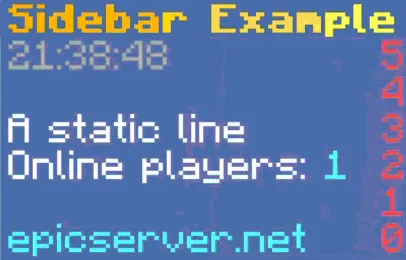
Barras laterais são o foco principal. Você pode ter até 42 caracteres por linha em clientes mais antigos (depende da formatação), e essencialmente sem limite em versões mais novas. Isso significa que você pode exibir informações significativas, não apenas trechos truncados.
Equipes são outro recurso poderoso. Você pode mostrar propriedades diferentes do scoreboard para diferentes jogadores. Um jogador vê uma exibição de equipe, outro vê algo diferente com base na sua lógica. É genuinamente útil para coisas como servidores de facção ou configurações de RPG onde diferentes jogadores veem informações diferentes.
A biblioteca também trata componentes traduzíveis automaticamente. Se seu servidor usa o sistema de tradução integrado do Minecraft, essa biblioteca traduzirá o texto do scoreboard para cada jogador com base nas configurações de idioma do seu cliente. Ela até atualiza automaticamente se eles mudarem o idioma nas configurações do jogo.
E porque ela usa a biblioteca Adventure, você obtém suporte total de cor e formatação. A construção baseada em componentes significa que você não está limitado a códigos de cor antiquados.
Atualizações dinâmicas são completamente assíncronas, então você pode atualizar scoreboards com segurança de qualquer lugar no seu código sem se preocupar com problemas de segurança de thread na thread principal.
Onde Fica Complicado
Primeira coisa: se você está rodando Folia, objetos Sidebar e TeamManager não são thread-safe. Você precisa adicionar sincronização para garantir que sejam acessados apenas de uma thread. Não é um problema importante, mas é algo que você precisa arquitetar ao redor.
Segundo, compatibilidade de versão é ampla mas não universal. A biblioteca suporta 1.7.10 até 26.1.2, mas se você estiver em uma versão não suportada, você obtém o fallback no-op (não vai gerar erro, mas scoreboards simplesmente não vão ser exibidos). Então esse mantenedor do projeto atualiza a lista de versões suportadas conforme novas versões são lançadas, então verifique as notas da versão mais recente.
Terceiro (e isso me pegou inicialmente): você precisa lidar com shading e relocação de dependência corretamente. Se você não sombrear e relocar as dependências adequadamente, você vai ter conflitos se outro plugin também depende de Adventure ou da biblioteca. É prática padrão de desenvolvimento de plugin, mas se você for novo em dev de plugin, é um passo que é fácil perder.
Também, lembre-se de chamar sidebar.close() quando você terminar com um sidebar. Se você esquecer, você está deixando manipuladores de pacote abertos, o que pode acumular vazamentos de memória ao longo do tempo em servidores de longa duração.
Você Deveria Usar Isso?
Se você está construindo um plugin que precisa de scoreboards personalizados e quer evitar o caos de APIs conflitantes, essa é genuinamente uma das melhores opções disponíveis. A abordagem em nível de pacote é inteligente, o design assíncrono é sólido, e o conjunto de recursos é completo.
Se seu servidor é simples e você só precisa de um scoreboard que nunca conflita com mais nada, você pode estar bem com o sistema integrado do Bukkit. Mas no momento em que você começar a adicionar outros plugins, você vai desejar ter usado isso.
Uma coisa mais: o projeto é mantido ativamente (a versão mais recente é 2.7.4 em abril de 2026), e a comunidade Discord é responsiva. Se você bater em uma parede, há suporte real.
Para administradores de servidor procurando afinar a experiência do jogador, ou desenvolvedores de plugin construindo a próxima geração de plugins de servidor Paper, isso vale o tempo de configuração. E se você precisar de ajuda gerenciando a configuração do seu servidor ou dados de jogador, minecraft.how tem algumas ferramentas úteis como um criador de lista branca Minecraft e uma ferramenta de busca de blocos que complementam configurações personalizadas de servidor.

Lead writer at minecraft.how. Long-time Minecraft player running a small SMP server, testing every build, mod, and seed before writing about it.
Have a Question or Tip about this Guide?Community Q&A
Ask a question or help other players below. Join the discussion and share your Minecraft tips!
Comentários
Nenhum comentário ainda. Seja o primeiro a compartilhar sua opinião!