Ferium: How to Manage Your Minecraft Mods at Scale

ferium (gorilla-devs/ferium)
Fast and multi-source CLI program for managing Minecraft mods and modpacks from Modrinth, CurseForge, and GitHub Releases
Updating five mods manually? Annoying. Updating fifty? Nightmare. Ferium is a command-line tool that takes "update all my mods" and actually makes it instant. Point it at your mod folder, configure once, then run one command to download and upgrade everything from Modrinth, CurseForge, and GitHub simultaneously.
What This Project Does
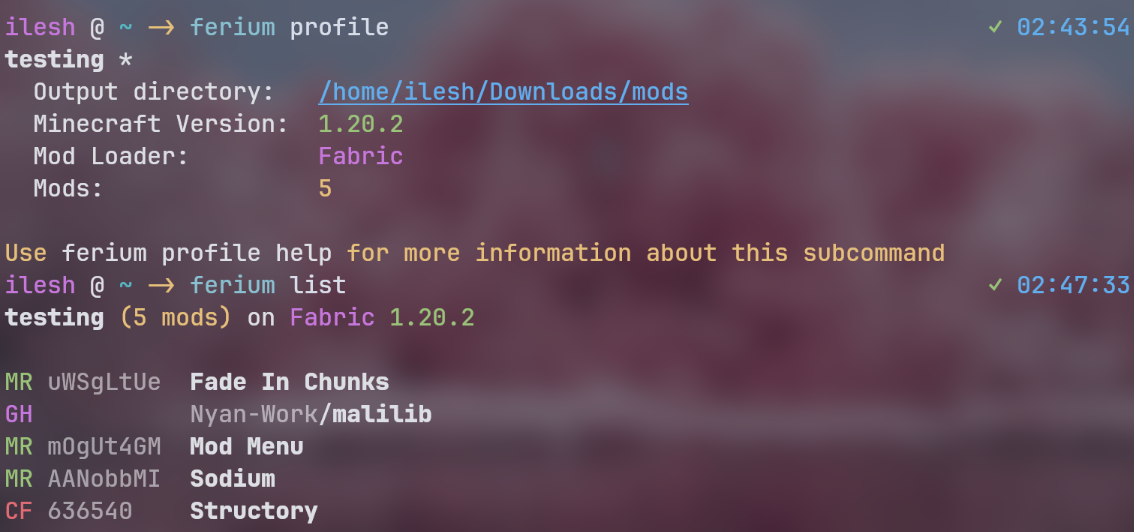
Ferium is a Rust-based CLI program (pronounced "feer-ee-um") that removes the tedium from mod management. Instead of visiting Modrinth or CurseForge, checking which mods have updates, comparing versions against your loader and Minecraft version, then manually downloading each file, you describe your setup once. Then it handles everything.
The core loop is simple: configure your mods, pick your Minecraft version and mod loader, run ferium upgrade, and watch it pull the latest compatible versions of everything in parallel. It's built in Rust, which means the binary is a single executable with no runtime dependencies (unless you go for the GUI file picker on Linux, which is optional).
This sounds like a minor convenience. It's not.
Why You Want a Tool Like This
Vanilla Minecraft is great. But modding is where Minecraft becomes genuinely yours. Want a full tech progression? Immersive Petroleum. Want better farming? Farmers Delight. Want actual dungeons with loot? Cataclysm. The instant you've eight mods, you're managing dependencies, loader compatibility, and version cascades.
The problem compounds. Mods update weekly. Minecraft 1.20.5 breaks compatibility. Your loader gets a patch. Suddenly three of your mods are mismatched, and you spend an hour figuring out which one broke. Ferium runs a check, downloads all new versions that actually work together, and you're done.
This is especially painful if you run modpacks. A good modpack has 100+ mods. If the maintainer drops it, updating everything yourself means an evening of work. Ferium does it in seconds.
Installation and First Setup
Grab the latest binary from the releases page. The project provides precompiled executables for Linux (with and without GUI), macOS (Intel and Apple Silicon), and Windows (MSVC and MinGW variants). If you're on Windows, grab the MSVC version unless you specifically need MinGW.
Move the binary somewhere in your PATH. On Linux or macOS, that's typically ~/bin or /usr/local/bin. On Windows, any folder in your system PATH works.
unzip ferium-linux.zip
mv ferium ~/bin/
chmod +x ~/bin/ferium
ferium - version # Verify it's working
Next, initialize a profile. Ferium uses profiles to manage separate mod setups. You might have a Fabric 1.20.4 profile and a Quilt 1.21 profile. Each has its own config, mods, and output directory.
ferium profile new my-modpack
ferium profile list
The CLI walks you through setting up your mod loader, Minecraft version, and output directory. Once that's done, you add mods by their ID or search by name, and Ferium fetches them from the source you specify.
The Features That Matter
Multi-source downloads. Not every mod lives on the same platform. Some creators prefer Modrinth, others CurseForge, a few publish only to GitHub Releases. Ferium handles all three without fussing. Add a mod, specify where it lives, and it stays in sync from that source.
Version compatibility checks. This is the real win. Ferium doesn't just grab the latest version of a mod. It verifies that version supports your configured loader and Minecraft version. No broken downloads. No "why is my modpack crashing?" debugging sessions.
Parallel downloads. Downloading 79 mods doesn't take 79 sequential fetches. The README shows a modpack with 79 mods downloading in 15 seconds. Another with 400 mods in under a minute. This isn't just fast, it's genuinely impressive.
Speed matters for another reason: you're more likely to actually update. If upgrading mods took an hour, you'd skip it. At 30 seconds, you run ferium upgrade before launching.
Modpack management. Beyond individual mods, Ferium can handle full modpacks from Modrinth and CurseForge. Download, extract, update with a single command. No unpacking CRX files or managing dependencies by hand.
Multiple profiles. Because your Fabric setup doesn't need to touch your Quilt setup. Create separate profiles, each with its own loader, version, and mod list. Switch between them or run upgrades on all at once.
The Details That Trip You Up
Version compatibility is powerful, but you have to set it right. Tell Ferium you're on 1.20.4 Fabric, and it filters to only mods that support that combo. Forget to update your configured version when you upgrade Minecraft, and you'll wonder why new mods aren't available.
Output directories matter too. Point Ferium at your mods folder inside your instance (like ~/.minecraft/mods or wherever your launcher puts them). It'll overwrite old versions when you upgrade, which is what you want, but you need that path right the first time. Actually, you can change it later with ferium profile edit, so that's not really a gotcha. Nevermind.
GitHub Releases can be finicky. If a mod author posts releases but doesn't tag them properly, Ferium might not find them. Modrinth and CurseForge are more reliable because they've official APIs. Most popular mods are on one of these platforms anyway, so this rarely comes up.
One real gotcha: modpacks sometimes pin specific mod versions. If you're managing a specific pack (not just a personal collection), upgrading might break intentional version choices. For personal setups, always upgrade. For maintaining a modpack for others, be careful.
The Minecraft Community Context
Ferium isn't created by Mojang or Microsoft. It's a community project built by developers who got tired of manual mod management and decided to solve it properly. That's the whole story of modding in Minecraft. The community sees a problem, ships a tool, and then the tool becomes indispensable.
This community spans everyone from skin creators designing custom characters (like the artists behind adderall_abuser, ironmouse, and testuser skins) to shader developers, texture pack artists, mod creators, and infrastructure builders like the Ferium maintainers. The game as you play it today is half vanilla and half community innovation.
Ferium is part of a bigger ecosystem. The project's sister libraries (ferinth for Modrinth API calls, furse for CurseForge) are used by other tools. It's not an island. Tools like this are why Minecraft modding remains viable in 2026.
When You Should Use This
If you've 5 mods, Ferium is overkill. Download them once and you're fine.
If you have 20+ mods, Ferium saves hours over a year. Update every two weeks, spend 30 seconds each time instead of 15 minutes.
If you're running a modpack or managing multiple instances, Ferium isn't optional. It's the difference between a project you maintain and one you abandon because updating became impossible.
If you're on Linux or macOS and comfortable with CLI tools, you're Ferium's target user. Windows users might prefer GUI launchers like MultiMC or Prism, which have built-in mod management. Nothing wrong with that choice, just different workflows.
How It Compares
Curseforge's own launcher handles mod updates, but it's wrapped in the full launcher UI. Modrinth's launcher does similar. These work fine if you want a GUI, but they manage your entire Minecraft installation.
Ferium is CLI-only. That means it's scriptable. If you want to automate updates as part of a deploy process or update mods on a server running modded Minecraft (many do), CLI is your only option. You can't GUI a headless machine.
MultiMC and Prism let you manage instances, but they're not primarily mod updaters. Ferium is laser-focused on one job. That focus shows in speed and reliability.
And yes, you can manually update. You'll save time until you have 50 mods. Then you'll realize you're doing the same task every two weeks and wish you'd automated it earlier.
The GitHub project has 1,367 stars, active commits, and maintained releases. It's not abandoned. The MPL-2.0 license means you can use and modify it freely, though if you fork and ship modifications, you need to publish your source.