Natsurainko.FluentLauncher: Лучший запускатор Minecraft для
Xcube-Studio/Natsurainko.FluentLauncher
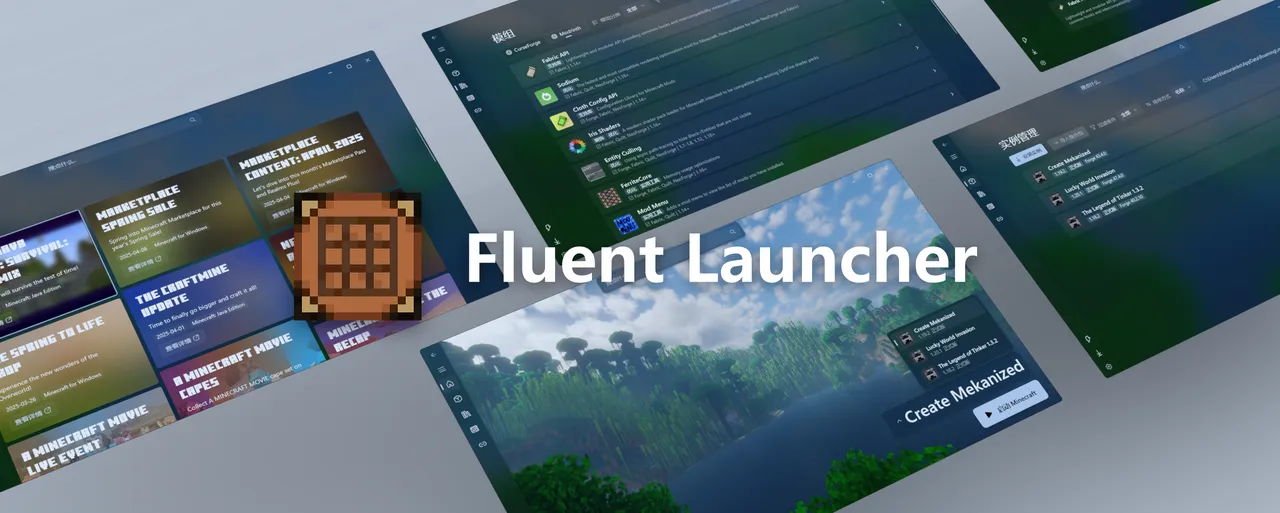
Запускатор Minecraft, специально разработанный для Windows 11, обеспечивающий чистый и плавный визуальный опыт.
Посмотреть на GitHub →Устали от запускаторов Minecraft, не соответствующих дизайну Windows 11? FluentLauncher меняет это. Разработан специально для ОС, он управляет установкой Forge, модпаками и всем, связанным с модами, без излишней сложности.
Что отличает его от других запускаторов
Большинство запускаторов Minecraft кажутся общепринятыми. Они работают одинаково хорошо на Windows 7, Windows 10 и Windows 11. FluentLauncher не пытается быть всем для всех. Он специально разработан для Windows 11, уважая язык дизайна ОС, а не борясь с ним. Интерфейс использует систему плавного дизайна, которую Microsoft ввела начиная с Windows 11 и последних сборок Windows 10. Это не только косметика - запускатор действительно feels родным для вашей машины. Вы не запускаете программное обеспечение, которое выглядит так, как если бы оно было построено в 2015 году.
Под капотом, то, что действительно важно, - это то, что он выполняет основные задачи запускатора без излишней сложности.
Вы получаете управление экземплярами, несколько методов аутентификации (аккаунты Microsoft, Yggdrasil для серверов третьих лиц, офлайн-режим), автоматическое обнаружение Java и прямой импорт модпаков из CurseForge и Modrinth. Проект открытый (лицензирован MIT) с 416 звездами на GitHub, написан на C#, и активно поддерживается. Команда, стоящая за ним, выпускает регулярные релизы и слушает обратную связь сообщества.
Когда его использовать
Если вы серьезно занимаетесь моддингом Minecraft, этот запускатор стоит протестировать. Вот почему: вместо поиска версий Java и ручной настройки загрузчиков, вы указываете FluentLauncher на файл модпака, и он упрощает сложность. Загрузите пак на основе Fabric в один день, переключитесь на Forge на следующий, протестируйте сборки Neoforge или поиграйте с Quilt. Запускатор понимает, что разработчики модов ориентированы на разные загрузчики и изолирует ваши экземпляры, чтобы вы не перезаписывали настройки между версиями.
Большинство игроков не думают об этом, пока у них не появятся три несовместимых модпака, борющихся за одну и ту же версию Java и настройки запускатора. FluentLauncher заставляет вас думать в терминах изолированных экземпляров с самого начала, что фактически предотвращает эту катастрофу.
На самом деле, быстрая отступление. OptiFine по-прежнему поддерживается отдельно, что важно, если у вас есть старые паки, построенные вокруг него (хотя большинство современных проектов перешли на оптимизационные моды на основе Fabric, такие как Sodium). Quilt также есть, который является новейшей альтернативой для разработчиков паков Fabric. Ширина поддержки загрузчиков лучше, чем у большинства GUI-запускаторов.
И если вы играете на частных серверах с кастомной аутентификацией (Yggdrasil), вы можете авторизоваться таким образом, а не только через аккаунты Microsoft. Это функция, о которой многие современные запускаторы забывают. Некоторые сообщества все еще используют внешние серверы авторизации, и возможность аутентификации через Yggdrasil означает, что вы не заблокированы от этих сообществ.
Установка: Три способа
Выберите свой уровень комфорта.
Магазин Microsoft (наиболее простой): Откройте приложение Магазин Microsoft, поищите «FluentLauncher» и установите. Это дает автоматические обновления. Требуется среда выполнения .NET 9, которую установщик обрабатывает за вас. Если вы хотите стабильность и автоматические обновления, это ваш путь.
Канал предварительных просмотров (ранние функции): Обслуживающие выпускают предварительный установщик репозиторий с сборками, содержащими экспериментальные функции, иногда включая поддержку плагинов. Вы берете последний релиз из предварительного установщика и запускаете мастер установки. И это работает хорошо, хотя вы получаете код, который еще не в стабильной версии Магазина. Поддержка плагинов все еще завершается, поэтому предварительные сборки могут сломаться или измениться.
Ручная установка: Вы можете скачать msixbundle напрямую из релизов GitHub, но Магазин и канал предварительного просмотра лучше для автоматических обновлений и управления зависимостями. Пропустите это, если у вас нет конкретной причины.
Прежде чем устанавливать, убедитесь, что ваша система соответствует минимальным требованиям: Windows 10, сборка 19041.0 или новее (любая современная сборка Windows 11 работает) и среда выполнения .NET 9. Вот и все. Если вы запускаете Windows 10 за последние несколько лет, вы в порядке.
Функции, меняющие ваш моддинг
Перетащив и отпустив импорт модпака - это ключевая функция. Seriously, просто перетащите zip из CurseForge или Modrinth в окно, и FluentLauncher распакует его, обнаружит загрузчик и версию, и запустит экземпляр. Нет кликов через три диалога. Один перетащив, готово. Если вы использовали другие запускаторы, вы знаете, сколько трения это удаляет.
Автоматическое обнаружение Java работает лучше, чем можно было бы подумать. Запускатор ищет инсталляции Java на вашей машине и выбирает разумные значения по умолчанию. Вы можете переопределить его для каждого экземпляра, если вам нужно протестировать против конкретной версии (полезно для отладки модов), но большую часть времени это просто работает. Раздражающая часть мод-гейминга - управление Java - становится невидимой.
Многозагрузочная поддержка без трения означает, что Forge, Neoforge, Fabric и Quilt сосуществуют мирно. Выберите загрузчик, установите его в экземпляр, запустите. Запускатор не заставляет вас обязаться на одном моддинг-экосистеме. Некоторые паки написаны для Forge, потому что автор хотел доступ к определённым библиотекам. Другие используют Fabric, потому что он легче. FluentLauncher относится к ним как к равно валидным, не заставляя вас чувствовать, что вы выбираете неправильно.
Шорткаты панели задач Windows и меню «Пуск» также работают. Вы можете закрепить экземпляр и запустить его без открытия приложения-запускатора. Полезно для прямого перехода в ваш основной мир вместо управления экземплярами каждую сессию. Это небольшая вещь, но она меняет, насколько часто вы фактически используете запускатор после первой недели.
Поддержка API BMCL упоминается на фоне, но важно, если вы находитесь в регионах, где скорость загрузки с серверов Mojang медленная. Запускатор может использовать общественные зеркала для более быстрой загрузки активов. Это особенно полезно в некоторых частях Европы и Азии, где прямые загрузки Mojang могут быть медленными.
Питания и реальные ограничения
.NET 9 требуется, и если у вас чистая установка Windows, вам нужно будет скачать его с сайта Microsoft сначала. Это не сложно - установщик предупреждает вас - но это дополнительный шаг, который не требуют другие запускаторы. Хорошая новость: .NET 9 обратно совместим с более старым кодом .NET, поэтому установка его для FluentLauncher не сломает ничего другого.
Поддержка плагинов существует в версиях канала предварительного просмотра, но еще не стабильна для производства. Если вы охотитесь за функциональностью плагинов, придерживайтесь версии Магазина на данный момент. Обслуживающие работают над этим, но оно не готово для повседневного использования.
Одна вещь, о которой стоит знать: если вы настраиваете сложную тестовую среду с несколькими загрузчиками или запускаете серверы вместе с клиентами, вы, возможно, вырастете за пределы того, что предлагает любой GUI-запускатор. Но для 95% моддинг-потребностей FluentLauncher покрывает всё, что вам нужно.
Только для Windows - это и функция, и ограничение. Честно говоря, система плавного дизайна связана с Windows, поэтому вы не увидите этот запускатор на Mac или Linux. Если вы прыгаете между операционными системами, это реальное ограничение.
Как он сравнивается
MultiMC и Prism Launcher - классики, и у них есть преданные пользователи по хорошей причине. Они кроссплатформенные, сильно настраиваемые и протестированные на баттleground. Если вы на Linux или Mac, они ваш ответ. Если вы на Windows и не заботитесь о родной интеграции языка дизайна ОС, они все еще солидные выборы. Оба были вокруг на годы и работают надежно.
Ванильный запускатор? Он работает для ванильного выживания и позволяет переключаться между версиями. Но если вы делаете что-то с модами, это медленный, однопоточный опыт для загрузки активов, и几乎 нет UI для управления экземплярами. FluentLauncher - шаг вперед во всех аспектах, если вы модите.
Настоящая ниша FluentLauncher - пользователи Windows 11, которые хотят запускатор, который не кажется прикрученным к ОС с 2015 года. Если это ваша настройка, стоит потратить тридцать секунд, чтобы попробовать версию из Магазина Microsoft и посмотреть, нравится ли вам. Вы можете так же легко удалить его, если это не ваше.
Строительство лучших модпак-воркфлов
Если вы создаете модпаки или тестируете моды, подход FluentLauncher к экземплярам делает итерацию быстрее. Вы можете импортировать пак, отредактировать его, экспортировать обратно в zip и поделиться им без путаницы относительно какой версии Java или настроек загрузчика требуется. Модель на основе экземпляров обрабатывает этот контекст для вас.
Когда вы строите списки модпаков или охотитесь за конкретными блоками, инструмент Поиска блоков Minecraft экономит много времени при проверке, какие моды добавляют в игру. Аналогично, если вы называете серверы или настраиваете таблички с кастомным текстом, Генератор текста Minecraft экономит много обратно-передачи форматирования. Ни один из них не является необходимым для FluentLauncher, но оба - быстрые победы, которые хорошо сочетаются с современной настройкой запускатора.
Стоит ли это
FluentLauncher бесплатный, открытый и хорошо поддерживаемый. Наихудший сценарий - вы удалите его из Магазина Microsoft и вернетесь к тому, что использовали ранее. Лучший сценарий - вы потратите меньше времени на борьбу с настройкой запускатора и больше времени на фактическую игру в модифицированный Minecraft. Для пользователей Windows 11 это действительно стоит попробовать.

Lead writer at minecraft.how. Long-time Minecraft player running a small SMP server, testing every build, mod, and seed before writing about it.
Have a Question or Tip about this Guide?Community Q&A
Ask a question or help other players below. Join the discussion and share your Minecraft tips!
Комментарии
Пока нет комментариев. Станьте первым, кто поделится своим мнением!