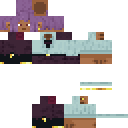
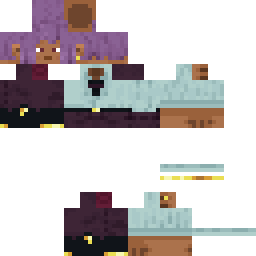
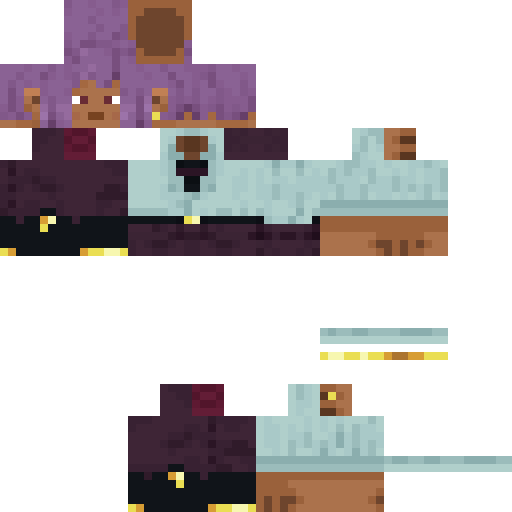
Neipe Minecraft Skin
✓ Approved
Skin for Neipe
1
Downloads
201
Views
0
Likes
Reactions
Log in to react.
Minecraft profile
8b2e89b9-9c44-436a-83aa-b5cb4a4ab573Model
classic
Views / 30 days
36
Observed names
Dates show when minecraft.how first observed each name.
Neipe—
Skin history
History grows as minecraft.how observes profile changes.

Head command
/give @p minecraft:player_head[profile={name:"Neipe"}]Users with Same Texture (51 total)
51
Total Users
19.0K
Combined Views
51
Combined Downloads
 FoughtLEGEND276
7.2K views1 downloads
 Snoxxy420
300 views1 downloads
 HektorRsej
293 views1 downloads
 Bohdan123456
290 views1 downloads
 neyghar77
282 views1 downloads
 HeadYoungin
263 views1 downloads
 Sasastur
260 views1 downloads
 apobaba6931
258 views1 downloads
 Flowzser
256 views1 downloads
 Magma699
255 views1 downloads
 Kalhotakk
255 views1 downloads
 qwekusu_
252 views1 downloads
 BingBongWong
250 views1 downloads
 FireRaven25
244 views1 downloads
 dannyqqwq555
244 views1 downloads
 temyatemya
243 views1 downloads
 dragonite_721
241 views1 downloads
 kane1709
241 views1 downloads
 find_the_nugget
237 views1 downloads
 DigitalCow91234
237 views1 downloads
 Vinny200
237 views1 downloads
 R3de3st
236 views1 downloads
 AndV2009
235 views1 downloads
 lilsoupski
234 views1 downloads
 Phoenixcatmeow
234 views1 downloads
 AlecThunder1039
233 views1 downloads
 Arcanes_Son
233 views1 downloads
 eesazzr
232 views1 downloads
 Emil5555
232 views1 downloads
 ZOROFROMEARTH
231 views1 downloads
 vulcaN04N
230 views1 downloads
 ArcadeSmasher_92
229 views1 downloads
 Thrower_game
229 views1 downloads
 Autumned
227 views1 downloads
 Avocadotoast343
226 views1 downloads
 MonkeySilverfish
225 views1 downloads
 KayaGame
220 views1 downloads
 Retromani
220 views1 downloads
 LeifisLiving
219 views1 downloads
 martq
219 views1 downloads
 Xentoo89
218 views1 downloads
 Baerlauchpesto
218 views1 downloads
 Chinchiller
215 views1 downloads
 JR_TheOof
214 views1 downloads
 izthatguy2333
212 views1 downloads
 liufucheng13
211 views1 downloads
 SupaBallerGuy121
209 views1 downloads
 Mohanni
208 views1 downloads
 insaurralde05
201 views1 downloads
 mommy_kitte
200 views1 downloads
PNG · 64×64
Share this skin
Scan with your phone to share this skin
Tags
MinecraftSkinsNeipe
Frequently Asked Questions
To download the Neipe Minecraft skin:
- Click the "Download" button to get this free Neipe skin
- The skin file
.pngwill be saved to your device - Works with both Java Edition and Bedrock Edition
- See below for complete installation instructions
To apply the Neipe skin:
- Log in to your Mojang or Microsoft account on the official Minecraft website.
- Navigate to the "Skins" section in your profile.
- Upload the downloaded
.pngfile. - Launch Minecraft, and your character will now use the Neipe skin.
Note: The process may vary slightly between Minecraft Java Edition and Minecraft Bedrock Edition.
Yes, the Neipe skin is compatible with both Minecraft Java Edition and Minecraft Bedrock Edition. However, the method of applying the skin may differ slightly between the two versions. Follow the instructions provided on this page for your specific edition.
Absolutely! You can edit the Neipe skin using a Minecraft skin editor. Simply open the downloaded
.png file in the editor, make your changes, and save the file. Then, upload the edited skin to your Minecraft profile.If the Neipe skin isn't working, try the following:
- Ensure you downloaded the correct file format
.png. - Make sure you're using the correct version of Minecraft Java Edition or Bedrock Edition.
- Check that the skin file is not corrupted. Re-download the skin if necessary.
- Log out and back into your Mojang or Microsoft account to refresh your profile.
Create your own skin
Draw a pixel-perfect Minecraft skin in the browser with our free 3D skin editor.
→ Skin Creator