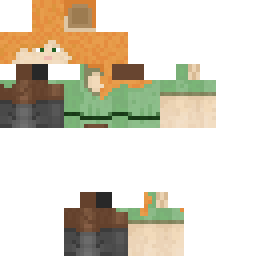
Xmattsx09 Minecraft Skin
✓ Approved
Skin for Xmattsx09
1
Downloads
98
Views
0
Likes
Reactions
Log in to react.
Minecraft profile
cbb86966-9eea-476d-be84-0aa90f1aaaffModel
classic
Views / 30 days
16
Observed names
Dates show when minecraft.how first observed each name.
Xmattsx09—
Skin history
History grows as minecraft.how observes profile changes.

Head command
/give @p minecraft:player_head[profile={name:"Xmattsx09"}]Users with Same Texture (51 total)
51
Total Users
13.0K
Combined Views
42
Combined Downloads
 livicc
4.1K views1 downloads
 Timbimboom
213 views1 downloads
 MajinZer0
204 views1 downloads
 Dnwr1
Dnwr1204 views1 downloads
 NeededArtist781
201 views1 downloads
 Isul89
194 views1 downloads
 HOLAPAA
192 views1 downloads
 myronlojm
190 views1 downloads
 Sythn_Attack
189 views0 downloads
 smart__boi
187 views1 downloads
 zyzy555
186 views1 downloads
 Katabug66
186 views1 downloads
 DChem
DChem185 views1 downloads
 coco587
185 views0 downloads
 MouGouu
185 views1 downloads
 PrimeKoalaa
184 views1 downloads
 DylanRocks94
183 views0 downloads
 Not_Ashton
182 views0 downloads
 SquigglyNest412
181 views1 downloads
 xlmFamous
181 views1 downloads
 Underaider
181 views0 downloads
 Pickles69420
179 views1 downloads
 Afad0557
179 views1 downloads
 F34rless9927
179 views1 downloads
 _Fixi
_Fixi178 views1 downloads
 yvonmoreau
177 views1 downloads
 ClownishOyster
175 views1 downloads
 KeyFeline683805
175 views1 downloads
 Cameron77546
174 views1 downloads
 jonny39
174 views1 downloads
 Linus1208DK
173 views0 downloads
 19dx
19dx173 views0 downloads
 dynemytePro889
172 views1 downloads
 redstonecold2
172 views1 downloads
 ParkTaenggul
171 views1 downloads
 callumbrack06
170 views1 downloads
 Qyrb
Qyrb170 views1 downloads
 jokazzl
170 views0 downloads
 dish_water
169 views1 downloads
 ColdIcy
169 views1 downloads
 edsonefanoff
168 views1 downloads
 AzureAbyss
166 views1 downloads
 caminion77
165 views0 downloads
 scio_nihil_
165 views1 downloads
 AshWitch
164 views1 downloads
 Sheerberry
161 views1 downloads
 Phasmatic7
160 views1 downloads
 Mashu_74
159 views1 downloads
 quackywill
157 views1 downloads
 panxdu
157 views1 downloads
PNG · 64×64
Share this skin
Scan with your phone to share this skin
Tags
MinecraftSkinsXmattsx09
Frequently Asked Questions
To download the Xmattsx09 Minecraft skin:
- Click the "Download" button to get this free Xmattsx09 skin
- The skin file
.pngwill be saved to your device - Works with both Java Edition and Bedrock Edition
- See below for complete installation instructions
To apply the Xmattsx09 skin:
- Log in to your Mojang or Microsoft account on the official Minecraft website.
- Navigate to the "Skins" section in your profile.
- Upload the downloaded
.pngfile. - Launch Minecraft, and your character will now use the Xmattsx09 skin.
Note: The process may vary slightly between Minecraft Java Edition and Minecraft Bedrock Edition.
Yes, the Xmattsx09 skin is compatible with both Minecraft Java Edition and Minecraft Bedrock Edition. However, the method of applying the skin may differ slightly between the two versions. Follow the instructions provided on this page for your specific edition.
Absolutely! You can edit the Xmattsx09 skin using a Minecraft skin editor. Simply open the downloaded
.png file in the editor, make your changes, and save the file. Then, upload the edited skin to your Minecraft profile.If the Xmattsx09 skin isn't working, try the following:
- Ensure you downloaded the correct file format
.png. - Make sure you're using the correct version of Minecraft Java Edition or Bedrock Edition.
- Check that the skin file is not corrupted. Re-download the skin if necessary.
- Log out and back into your Mojang or Microsoft account to refresh your profile.
Create your own skin
Draw a pixel-perfect Minecraft skin in the browser with our free 3D skin editor.
→ Skin Creator