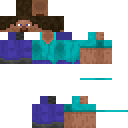
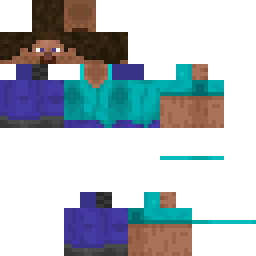
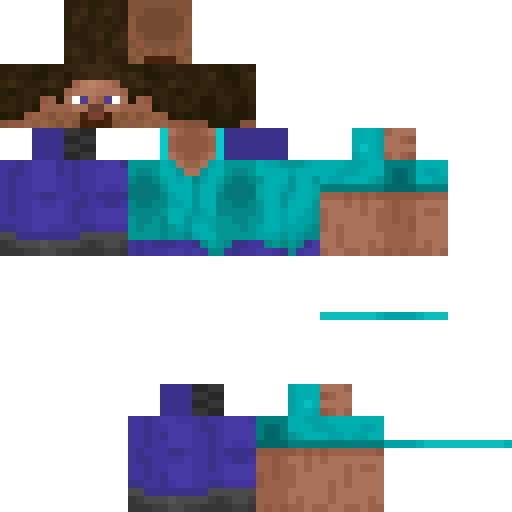
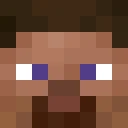
teddy_coder Minecraft Skin
✓ Approved
Skin for teddy_coder
1
Downloads
134
Views
0
Likes
Reactions
Log in to react.
Minecraft profile
796ab210-9af2-41a9-8b95-ea277048de80Model
classic
Views / 30 days
34
Observed names
Dates show when minecraft.how first observed each name.
teddy_coder—
Skin history
History grows as minecraft.how observes profile changes.

Head command
/give @p minecraft:player_head[profile={name:"teddy_coder"}]Users with Same Texture (51 total)
51
Total Users
111.4K
Combined Views
51
Combined Downloads
 Markoo21123
64.2K views1 downloads
 fan_makana666
1.3K views1 downloads
 Valius08
1.3K views1 downloads
 justus__
1.3K views1 downloads
 BadKarma32
1.2K views1 downloads
 IAmBloo
1.1K views1 downloads
 EzRocknRoll
1.1K views1 downloads
 lonewolf1986620
1.1K views1 downloads
 zogblox
1.1K views1 downloads
 herobrine7294
1.1K views1 downloads
 XEN9851
1.1K views1 downloads
 Cloyvz
1.1K views1 downloads
 Alequisan
1.0K views1 downloads
 wilnato
1.0K views1 downloads
 Mr_Deep1
1.0K views1 downloads
 Slu1mpe
1.0K views1 downloads
 ole271212
1.0K views1 downloads
 Ivanore
1.0K views1 downloads
 ehands1
999 views1 downloads
 MoonWatcher07
991 views1 downloads
 mo4zan
988 views1 downloads
 shadow_lord297
987 views1 downloads
 8fix
981 views1 downloads
 zet_man_
961 views1 downloads
 barnilson
960 views1 downloads
 riksuvonspagetti
949 views1 downloads
 simon38502
936 views1 downloads
 lapitzlazuli
921 views1 downloads
 Kaktusnin
919 views1 downloads
 domateslicorek
911 views1 downloads
 Cexf_d
911 views1 downloads
 mpspy
897 views1 downloads
 Mr_AbhinavG
893 views1 downloads
 Emmental_Suisse
888 views1 downloads
 RMMgrass_Gaming
886 views1 downloads
 LonitorGamerz
886 views1 downloads
 Evander2011
885 views1 downloads
 airyddd
881 views1 downloads
 ElBaena
853 views1 downloads
 Mohrlezockt
838 views1 downloads
 ankelbrecher
825 views1 downloads
 Dubstep102102
820 views1 downloads
 EmanucaW07
812 views1 downloads
 Tielhaz
807 views1 downloads
 Itz_tenkaichi
800 views1 downloads
 Joeydagamer
799 views1 downloads
 Parkereon
775 views1 downloads
 SpoopyPoguin
758 views1 downloads
 Sigh51
758 views1 downloads
 Kazhutan
753 views1 downloads
PNG · 64×64
Share this skin
Scan with your phone to share this skin
Tags
MinecraftSkinsteddy_coder
Frequently Asked Questions
To download the teddy_coder Minecraft skin:
- Click the "Download" button to get this free teddy_coder skin
- The skin file
.pngwill be saved to your device - Works with both Java Edition and Bedrock Edition
- See below for complete installation instructions
To apply the teddy_coder skin:
- Log in to your Mojang or Microsoft account on the official Minecraft website.
- Navigate to the "Skins" section in your profile.
- Upload the downloaded
.pngfile. - Launch Minecraft, and your character will now use the teddy_coder skin.
Note: The process may vary slightly between Minecraft Java Edition and Minecraft Bedrock Edition.
Yes, the teddy_coder skin is compatible with both Minecraft Java Edition and Minecraft Bedrock Edition. However, the method of applying the skin may differ slightly between the two versions. Follow the instructions provided on this page for your specific edition.
Absolutely! You can edit the teddy_coder skin using a Minecraft skin editor. Simply open the downloaded
.png file in the editor, make your changes, and save the file. Then, upload the edited skin to your Minecraft profile.If the teddy_coder skin isn't working, try the following:
- Ensure you downloaded the correct file format
.png. - Make sure you're using the correct version of Minecraft Java Edition or Bedrock Edition.
- Check that the skin file is not corrupted. Re-download the skin if necessary.
- Log out and back into your Mojang or Microsoft account to refresh your profile.
Create your own skin
Draw a pixel-perfect Minecraft skin in the browser with our free 3D skin editor.
→ Skin Creator