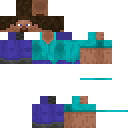
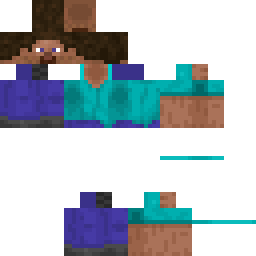
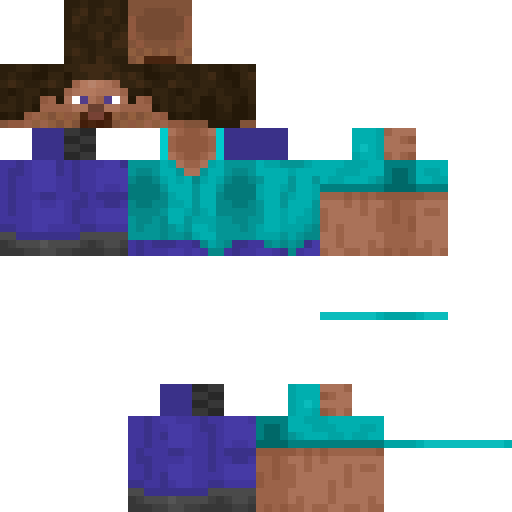
cool_boy7323 Minecraft Skin
✓ Approved
Minecraft skin for player cool_boy7323
1
Downloads
310
Views
0
Likes
Reactions
Log in to react.
Minecraft profile
36ada903-6788-46a0-b1cf-0d61cbf10cb7Model
classic
Views / 30 days
46
Observed names
Dates show when minecraft.how first observed each name.
cool_boy7323—
Skin history
History grows as minecraft.how observes profile changes.

Head command
/give @p minecraft:player_head[profile={name:"cool_boy7323"}]Users with Same Texture (51 total)
51
Total Users
107.1K
Combined Views
53
Combined Downloads
 Spider_man_2019
90.5K views2 downloads
 Dream_SMP
399 views1 downloads
 ChoriReallyBad
365 views1 downloads
 HedgehogStar
365 views1 downloads
 SouthLol
360 views1 downloads
 Moster_JDM
360 views1 downloads
 Mine_Craft_Dr
359 views1 downloads
 DeOpItalian
355 views1 downloads
 Darth_Vader21389
353 views2 downloads
 Ararat
345 views1 downloads
 Baeman
345 views1 downloads
 noface5
344 views1 downloads
 aldeanonovato
344 views1 downloads
 TACOYACO
342 views1 downloads
 dragonblockc6
341 views1 downloads
 CARL_JOHNSON0
341 views1 downloads
 SkinnyMan
341 views1 downloads
 SMG4mario64
340 views1 downloads
 doctorwho_1963
340 views1 downloads
 Caballo_Entero
339 views1 downloads
 mine_craft
337 views1 downloads
 Milosz200200
337 views1 downloads
 JohnsonWeijia
333 views1 downloads
 PeelyO2
333 views1 downloads
 hunterhuntersvi
333 views1 downloads
 Peaceonearth409
331 views1 downloads
 tokyoghoul3641
330 views1 downloads
 KittyAnnaLY
329 views1 downloads
 Kobeni98
329 views1 downloads
 Master_chiefy86
328 views1 downloads
 camman18yt657
326 views1 downloads
 Tecnoblade4
326 views1 downloads
 catstevens17
325 views1 downloads
 Slavey
325 views1 downloads
 BUILDBATTLERNICK
322 views1 downloads
 iceboyisaacyt
321 views1 downloads
 SantaClausThe1st
321 views1 downloads
 GOYO_R6
318 views1 downloads
 GiantChocolate
318 views1 downloads
 camman18_fan
316 views1 downloads
 BionicLMAO3
315 views1 downloads
 nothcrul
314 views1 downloads
 Darth_vader12345
314 views1 downloads
 MonsterCookie1s
314 views1 downloads
 Gunter458
313 views1 downloads
 SaskeUchiha
313 views1 downloads
 COMPANYGUYYT6123
303 views1 downloads
 jack_sparrow64
291 views1 downloads
 walterwhite556
289 views1 downloads
 Tommyinnit4186
249 views1 downloads
PNG · 64×64
Share this skin
Scan with your phone to share this skin
Tags
MinecraftSkinscool_boy7323
Frequently Asked Questions
To download the cool_boy7323 Minecraft skin:
- Click the "Download" button to get this free cool_boy7323 skin
- The skin file
.pngwill be saved to your device - Works with both Java Edition and Bedrock Edition
- See below for complete installation instructions
To apply the cool_boy7323 skin:
- Log in to your Mojang or Microsoft account on the official Minecraft website.
- Navigate to the "Skins" section in your profile.
- Upload the downloaded
.pngfile. - Launch Minecraft, and your character will now use the cool_boy7323 skin.
Note: The process may vary slightly between Minecraft Java Edition and Minecraft Bedrock Edition.
Yes, the cool_boy7323 skin is compatible with both Minecraft Java Edition and Minecraft Bedrock Edition. However, the method of applying the skin may differ slightly between the two versions. Follow the instructions provided on this page for your specific edition.
Absolutely! You can edit the cool_boy7323 skin using a Minecraft skin editor. Simply open the downloaded
.png file in the editor, make your changes, and save the file. Then, upload the edited skin to your Minecraft profile.If the cool_boy7323 skin isn't working, try the following:
- Ensure you downloaded the correct file format
.png. - Make sure you're using the correct version of Minecraft Java Edition or Bedrock Edition.
- Check that the skin file is not corrupted. Re-download the skin if necessary.
- Log out and back into your Mojang or Microsoft account to refresh your profile.
Create your own skin
Draw a pixel-perfect Minecraft skin in the browser with our free 3D skin editor.
→ Skin Creator