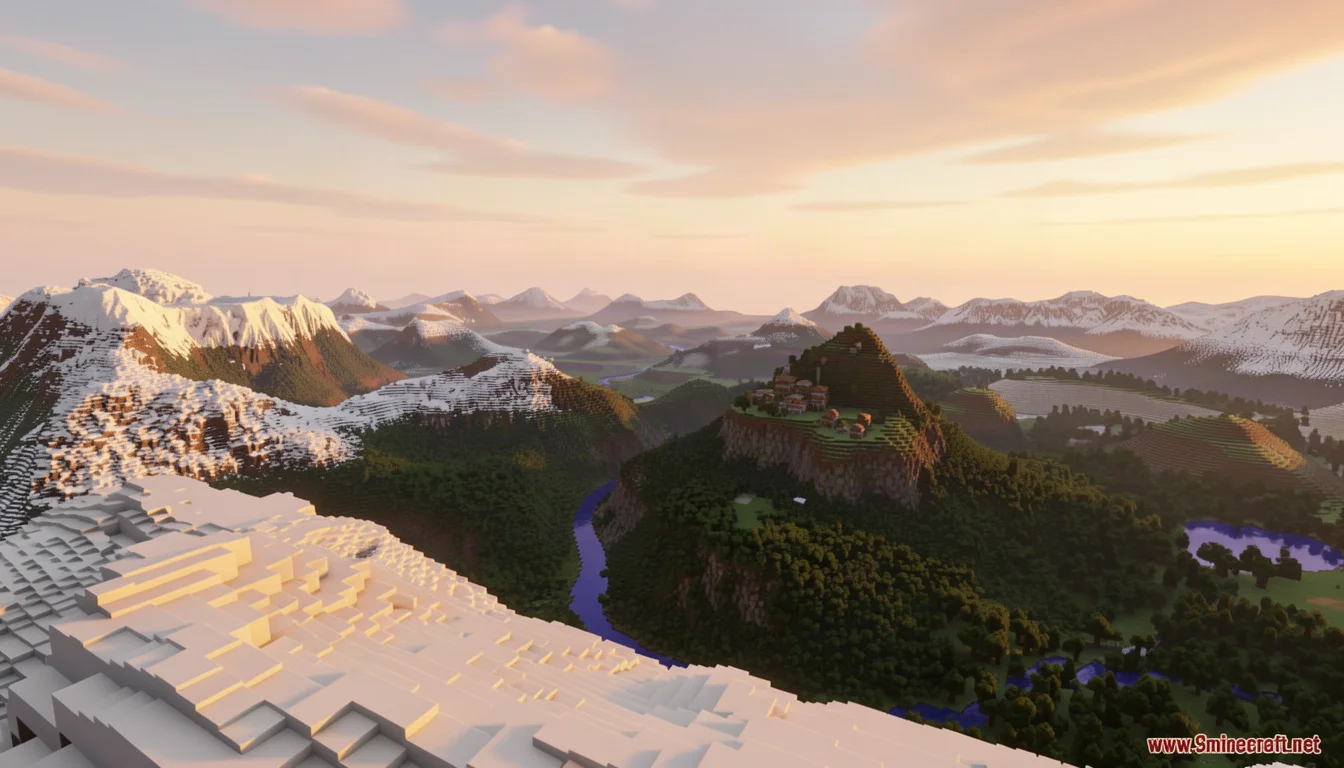

Reterraforged is a terrain generation mod that transforms Minecraft's blocky landscapes into realistic, immersive worlds with simulated erosion, winding rivers, and massive snow-capped mountains. Whether you want dramatic cliffs, lush valleys, or custom continent shapes, this mod gives you full control over how your world looks before you ever spawn.
What is Reterraforged?
Reterraforged is a modern continuation of the classic TerraForged terrain system, brought to newer versions of Minecraft. While vanilla Minecraft generates terrain using simple noise algorithms that produce blocky hills and predictable biomes, Reterraforged replaces that system with a sophisticated generator that simulates real-world geological processes.
The mod uses simulated erosion to carve mountains and cliffs the way weather and water would shape real rock over thousands of years. Rivers wind naturally through valleys instead of cutting straight lines. Continents form with realistic coastlines, and biomes blend smoothly into one another rather than ending at sharp borders.
The goal is simple: make Minecraft worlds feel like places you want to explore. Every mountain range tells a story of ancient uplift and erosion. Every river valley invites you to follow its path. Every village on a hillside looks like it belongs there, not like it was dropped there by a random number generator.
Unlike many terrain mods that simply add new biomes or change block palettes, Reterraforged works at the fundamental level of world generation. It replaces the noise functions that determine where hills form, how tall they get, and how they connect to each other. The result is terrain that feels cohesive and natural, where every hill and valley seems to follow from the ones around it rather than being placed independently.
The mod has been downloaded over 435,000 times on 9Minecraft alone, making it one of the most popular terrain generation mods available. Its popularity stems from the fact that it does not require any in-game commands or complex setup. Once installed, it simply works, transforming every new world you create into a landscape worth exploring.
How to Install Reterraforged
Installing Reterraforged requires a mod loader. The mod is available for Forge, Fabric, and NeoForge, so pick the loader that matches your setup. If you are new to modding, check out our guide on how to use Litematica for another essential mod that pairs well with terrain generation.
Requirements
- Minecraft Java Edition (supported versions include 1.20.1, 1.21.11, 26.1.2, 26.2, and 26.3)
- A mod loader: Forge, Fabric, or NeoForge
- TerraBlender mod (required for biome integration)
- Fabric API (only if using the Fabric loader)
Installation Steps
- Download and install your chosen mod loader (Forge, Fabric, or NeoForge) for your Minecraft version.
- Download the Reterraforged mod JAR file from a trusted source like 9Minecraft.
- Download TerraBlender and place it in your mods folder alongside Reterraforged.
- If using Fabric, also install Fabric API.
- Launch Minecraft with your mod loader profile and verify that both mods appear in the mods list.
Once installed, Reterraforged activates automatically when you create a new world. No additional configuration is required to start enjoying realistic terrain.
Creating Your First Reterraforged World
After installing the mod and its dependencies, launch Minecraft and navigate to Singleplayer then Create New World. In the World tab, set the World Type to Default, then click the Customize button. This opens the Presets and Defaults screen where you can select a Reterraforged preset. Choose from Default, Beautiful, Huge Biomes, Lite, or Vanilla-ish depending on your preferences.
On the Customize pages, you can fine-tune every aspect of terrain generation. Adjust continent shapes, erosion intensity, river behavior, climate zones, and cave generation using the provided sliders. The live preview map on the right side of the screen updates in real time as you make changes, showing you a top-down view of how your world will look. Once you are satisfied with your settings, click Done and then Create New World to begin playing in your new realistic landscape.
Main Features
Reterraforged introduces a wide range of features that collectively transform the Minecraft world generation experience. Here is a detailed look at what the mod brings to the table.
Realistic Terrain Shapes
The most immediate difference you will notice is the terrain itself. Instead of the rolling, uniform hills of vanilla Minecraft, Reterraforged produces dramatic mountain ranges with sharp ridges, deep valleys with terraced slopes, and rolling plains that feel like real countryside. The terrain uses advanced noise algorithms combined with erosion simulation to create landscapes that look natural and geologically plausible.
Mountain ranges form with distinct peaks and ridgelines, rather than the rounded, isolated hills of vanilla terrain. Valleys carve deep into the landscape, creating natural corridors for rivers and roads. Plains stretch out with gentle undulations rather than flat expanses, making even the most basic biomes visually interesting.
Simulated Erosion
Erosion is the secret ingredient that makes Reterraforged terrain look real. The mod simulates how water and wind would wear down rock over time, creating features like cliff overhangs, scree slopes, and rounded mountain peaks. This process gives mountains a weathered, ancient appearance that vanilla terrain simply cannot match.
The erosion simulation runs during world generation, carving away at the terrain based on slope, elevation, and simulated water flow. Steeper slopes erode faster, creating the dramatic cliff faces that make mountain ranges so striking. Gentler slopes accumulate sediment, forming the smooth, rounded hillsides that transition naturally into valleys. The result is terrain that looks like it was shaped by millions of years of geological activity rather than generated in a fraction of a second.
Improved Rivers
Rivers in Reterraforged are not the straight, narrow channels you see in vanilla Minecraft. They wind through valleys with natural meanders, varying width, and realistic depth profiles. Rivers connect to lakes and oceans in ways that make hydrological sense, and their banks feature smooth transitions between water and land.
River systems in Reterraforged follow the terrain's natural contours, flowing from high elevations to low ones with realistic gradients. Tributaries join main rivers at natural confluences, and river deltas form where rivers meet oceans. The water itself is rendered with smooth banks rather than the blocky, stair-stepped edges of vanilla rivers, making bodies of water look like they truly belong in the landscape.
Custom Decorations and Vegetation
Reterraforged enhances the natural decoration of the world. Dense forests grow in appropriate climate zones, fields of flowers dot the plains, and cherry blossom trees add splashes of color to suitable biomes. These decorations are placed with consideration for the terrain, so forests cling to hillsides and flowers fill meadows rather than appearing at random.
The mod's vegetation system takes into account elevation, temperature, and precipitation when placing trees and plants. You will find different tree species at different elevations, with conifers dominating higher altitudes and deciduous trees filling the lowlands. Flower meadows appear in areas with moderate rainfall and gentle slopes, creating the kind of pastoral landscapes that make for beautiful building sites.
Village Integration
Villages generate in locations that make sense for the terrain. You will find villages perched on rocky hillsides, nestled in mountain valleys, or overlooking rivers. The village structures adapt to the local terrain, creating the impression that settlers chose these locations for practical reasons like access to water and defensible positions.
This integration extends beyond villages to other structures as well. Outposts, pillager camps, and other generated structures all take the local terrain into account when choosing their placement. This creates a world where human-made structures feel like they grew out of the landscape rather than being imposed upon it.
Terrain Generation Options
One of Reterraforged's greatest strengths is its extensive configuration system. When creating a new world, you can access a comprehensive set of options that let you shape every aspect of terrain generation.
World Presets
Reterraforged includes several built-in presets that offer different terrain styles:
- TerraForged Default: The standard experience with balanced terrain features and moderate mountain height.
- Beautiful: A more dramatic preset with taller mountains, deeper valleys, and more pronounced erosion features.
- Huge Biomes: Expands biome size significantly, creating vast stretches of each biome type.
- Lite: A performance-friendly preset that reduces terrain complexity while maintaining the Reterraforged aesthetic.
- Vanilla-ish: A subtle preset that keeps terrain closer to vanilla Minecraft while still benefiting from improved rivers and erosion.
Continent Shaping
The continent controls let you define the large-scale shape of your world. You can adjust continent size, ocean level, and the frequency of landmasses. Want a world dominated by a single supercontinent? You can do that. Prefer an archipelago of scattered islands? That is possible too. The continent preview map updates in real time as you adjust sliders, so you can see exactly what your world will look like before committing.
Surface and Erosion Controls
Fine-tune how the land surface behaves with controls for erosion intensity, mountain height, valley depth, and terrain roughness. These sliders interact with each other, so increasing erosion intensity will also affect how valleys form and how smooth mountain slopes appear. The live preview helps you find the perfect balance.
River Configuration
Adjust river width, depth, and frequency. You can create worlds with dense river networks where water is never far away, or sparse rivers that feel like rare oases in a dry landscape. River meandering controls let you decide how much rivers wind versus how directly they flow toward the ocean.
Climate and Biome Controls
Control the distribution of temperature and precipitation across your world. These climate settings determine which biomes appear where, so you can create worlds with vast tropical regions, frozen tundra, or balanced climate zones. Biome size and blending controls let you decide how gradually one biome transitions into another.
Cave Generation
Reterraforged also enhances cave generation with more natural cave shapes, varied cave sizes, and better integration with the surface terrain. Caves follow the contours of the land above them, creating underground networks that feel connected to the world above.
Cave systems in Reterraforged wind through the underground in patterns that reflect the geology of the surface. Limestone caves form in areas with the right conditions, lava tubes follow volcanic features, and underground rivers carve channels through the rock. The result is an underground world that feels like a natural extension of the surface rather than a separate, disconnected space.
Sea Level and World Height
Adjust the sea level to create worlds with more or less ocean coverage. Lower sea levels expose more land and create vast continental interiors, while higher sea levels flood valleys and create archipelagos. World height controls let you adjust the maximum build height and the depth of the world, giving you more vertical space to work with for both terrain and building projects.
Compatibility
Reterraforged is designed to work alongside other mods, though there are some compatibility considerations to keep in mind.
Biome Mods
Reterraforged uses TerraBlender to integrate with biome mods like Biome O'Plenty and others. This means you can add new biomes to your world while still benefiting from Reterraforged's terrain generation. The mod handles the technical details of blending custom biomes into the terrain system.
Structure Mods
Most structure mods work with Reterraforged, though structures may generate differently than in vanilla worlds. Since Reterraforged changes the terrain, structures that rely on specific terrain features (like villages on flat ground) may appear in unexpected locations. This is generally a positive effect, as it creates more interesting and varied structure placements.
Performance Considerations
Reterraforged is more demanding on your system than vanilla terrain generation. The erosion simulation and advanced noise algorithms require additional processing power, especially during world generation. Players with lower-end systems may want to use the Lite preset or reduce terrain complexity settings to maintain playable frame rates.
World Conversion
Existing vanilla worlds cannot be converted to Reterraforged terrain. The mod only affects newly generated chunks in worlds created with Reterraforged enabled. If you want to use Reterraforged with an existing world, you would need to explore new chunks far from your existing builds, or start a new world entirely.
Tips and Tricks
Tip: Start with the Default preset on your first Reterraforged world. The default settings are well-balanced and will give you a good sense of what the mod can do before you start experimenting with custom settings.
Tip: Use the live preview map extensively. The preview shows a top-down view of your world with biome colors, so you can verify that your climate and continent settings produce the world you want before spending time generating it.
Tip: If you are building a specific project, use the Huge Biomes preset to ensure you have enough space. Large biomes mean fewer biome transitions, which is helpful if you want a consistent building environment.
Tip: Combine Reterraforged with shader mods for the best visual experience. The dramatic terrain really shines with dynamic lighting, shadows, and atmospheric effects that shaders provide. For multiplayer exploration, check out our list of the best Minecraft servers where you can share your world with friends.
Tip: Back up your world before making major changes to terrain settings. While Reterraforged settings only affect new chunks, it is always good practice to keep backups of important worlds.
Frequently Asked Questions
Does Reterraforged work with the latest Minecraft versions?
Yes. Reterraforged is actively maintained and supports recent Minecraft versions including 1.20.1, 1.21.11, 26.1.2, 26.2, and 26.3. Always download the version of the mod that matches your Minecraft version and mod loader.
Can I use Reterraforged on a server?
Yes, Reterraforged works on multiplayer servers. All players connecting to the server need to have the mod installed, and the server must run a compatible mod loader. The terrain generation happens server-side, so clients only need the mod to render the world correctly.
Will Reterraforged slow down my game?
World generation with Reterraforged is more CPU-intensive than vanilla generation, so you may experience longer loading times when creating new worlds or exploring new chunks. Once chunks are generated, the performance impact is minimal. Using the Lite preset or reducing terrain complexity can help if you have a lower-end system.
Can I customize the terrain after creating my world?
No. Reterraforged settings are locked in when you create a world. You cannot change terrain generation settings for an existing world. If you want different terrain, you need to create a new world with your desired settings.
Does Reterraforged add new blocks or items?
No. Reterraforged is purely a terrain generation mod. It does not add new blocks, items, mobs, or dimensions. Its sole purpose is to change how the world's terrain is generated, making it more realistic and visually appealing.
Is Reterraforged compatible with OptiFine?
Yes, Reterraforged works with OptiFine and other visual enhancement mods. The terrain generation is independent of rendering, so shader mods and optimization mods do not conflict with Reterraforged's functionality.
Reterraforged is one of the most impactful visual mods you can add to Minecraft. It transforms the world from a collection of blocky biomes into a cohesive, realistic landscape that invites exploration. Whether you are a builder looking for dramatic backdrops, an explorer seeking new horizons, or a roleplayer wanting a more immersive world, Reterraforged delivers. Install it, tweak the settings to your liking, and prepare to see Minecraft terrain in a whole new light.