FishingBot: Automatiza la Pesca AFK de Minecraft
FishingBot (MrKinau/FishingBot)
Bot de pesca 1.8 - 26.1.2 para Minecraft
¿Alguna vez te has visto AFK en un lugar de pesca esperando a que el botín se acumule, sabiendo que te estás perdiendo el verdadero juego? FishingBot resuelve esto al automatizar todo el proceso de pesca para que puedas acumular objetos valiosos y experiencia sin estar pendiente de tu personaje. Es un bot basado en Java que soporta todas las versiones de Minecraft desde 1.8 hasta 26.1.2, funciona en Windows/Linux/Mac, y maneja servidores tanto en modo offline como online.
Qué Hace Este Proyecto
FishingBot es una herramienta de automatización de pesca AFK (lejos del teclado) escrita en Java. En lugar de lanzar manualmente y hacer clic cientos de veces para atrapar peces, tesoros y basura, ejecutas el bot y él se encarga del trabajo repetitivo. El proyecto es código abierto (licencia GPL-3.0) con 384 estrellas en GitHub, se mantiene activamente, e incluye una interfaz gráfica amigable para que no tengas que lidiar con archivos de configuración si no quieres.
El bot se conecta a un servidor de Minecraft como lo haría un jugador real. Lee el estado de la caña de pescar, detecta cuándo algo muerde, realiza la acción de captura en el momento correcto, y recoge tu botín. Todo mientras tú tomas un café o trabajas en otra cosa.
Cuándo (Y Cuándo No) Usar FishingBot
Si ejecutas un servidor privado con amigos o juegas en modo individual, FishingBot es genuinamente útil. La pesca es monótona, y automatizarla significa más tiempo para construir, explorar o PvP. Acumularás libros encantados valiosos, placas de nombre y tesoros de pesca raros sin tener que sufrir la rutina.
En servidores multijugador públicos, verifica las reglas primero. Muchos servidores prohíben explícitamente los bots, y ejecutar uno podría resultar en un baneo. FishingBot no se oculta - aparece como un jugador legítimo en el chat y se muestra en /list. Los administradores del servidor lo ven inmediatamente. Solo usa esto en servidores donde el propietario te ha dado permiso o en servidores que controlas tú mismo.
El modo individual es territorio sin preocupaciones. Úsalo para acumular recursos antes de un proyecto importante, o para pescar automáticamente mientras manejas otras cosas.
Instalación y Configuración Básica
Necesitarás Java 11 o superior instalado en tu máquina. Descarga la última versión (v2.13.12 en el momento de escribir esto) desde la página de versiones de GitHub - es un archivo .jar que puedes descargar directamente.
java -jar FishingBot-2.13.12.jarEjecuta ese comando y la ventana de interfaz gráfica se abre. Desde ahí puedes configurar tu dirección del servidor, credenciales de cuenta (nombre de usuario para modo offline, o correo electrónico/contraseña para online), y qué versión de Minecraft usar. El bot detecta automáticamente las versiones soportadas desde 1.8 hasta 26.1.2, así que no tienes que adivinar.
Si prefieres configuración por línea de comandos, el proyecto soporta argumentos. La wiki tiene una lista completa, pero los básicos incluyen -server, -username, -password y -version. Útil si estás ejecutando esto en un servidor Linux sin interfaz gráfica.
También hay una imagen de Docker si quieres contenerizarlo, lo que simplifica el despliegue en un VPS o una máquina siempre encendida.
Características Clave Que Funcionan
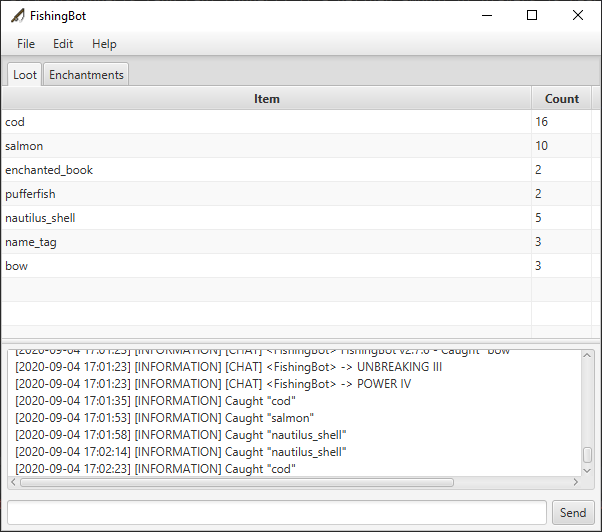
Pesca automática sin fallos. El bot detecta de manera confiable los mordiscos de peces y los enrolla con el tiempo correcto. Comparado con la pesca manual, es preciso e incansable. Ejecútalo durante una hora y tendrás más peces y tesoros que los que atraparías manualmente en tres.
Los anuncios de botín son otra fortaleza. Cada vez que el bot atrapa algo, puede anunciarlo en Discord a través de webhook, o simplemente registrarlo localmente. Imagina revisar Discord y ver "Ha atrapado libro encantado: Reparación" mientras haces otra cosa. Eso es motivador.
El bot puede reportar su propio nivel (experiencia) bajo demanda con un comando, útil si estás cultivando XP para encantamientos. También vacía automáticamente su inventario cuando está lleno, ya sea soltando objetos o depositándolos en un cofre si configuras sistemas de tolva cercanos.
La compatibilidad multi-versión es una de las características destacadas. No necesitas diferentes bots para diferentes servidores. Un solo jar los maneja a todos - servidores 1.8, servidores modernos 1.20+, incluso snapshots experimentales. Los cambios de protocolo se manejan internamente.
La compatibilidad de comandos te permite controlar el bot desde la consola o escribiendo comandos en el chat como otro jugador. Escribe "nombre_del_bot, stop" para pausar la pesca, "nombre_del_bot, empty" para limpiar el inventario, o "nombre_del_bot, help" para una lista completa. Es como tener un control remoto.
Problemas de Configuración y Consejos
El gotcha más grande es la seguridad de la cuenta. FishingBot necesita tus credenciales de Minecraft para iniciar sesión. Usa una cuenta separada para el bot si es posible - no uses tu cuenta principal. Si debes usar la principal, habilita autenticación de dos factores y usa contraseñas de aplicación donde estén disponibles. El código fuente está abierto y revisado por la comunidad, así que no es una puerta trasera, pero mejor seguro que lamentarse.
La autenticación en modo online funciona bien, pero algunas personas optan por modo offline en servidores privados para evitar el paso de autenticación completamente. Solo confirma que tu servidor permite modo offline antes de depender de ello.
La carga de chunks puede confundirte. El bot solo pesca en chunks cargados. Si tu servidor tiene una distancia de renderizado pequeña o descarga agresiva, el bot podría desconectarse cuando los chunks se descargan. Configura un cargador de chunks o mantén un jugador cerca para mantener el área, o el bot estará inactivo.
El bot no maneja bien escenarios de inventario lleno si configuras incorrectamente la acción de vacío. Configúralo correctamente (soltar objetos o vincular un cofre) o el bot se atascará. Verifica tu configuración dos veces antes de dejarlo corriendo toda la noche.
En términos de rendimiento, el bot es ligero. No va a colapsar tu servidor o tu laptop. Pero si estás ejecutando otras herramientas pesadas, dales prioridad y monitorea el uso de CPU/memoria.
Herramientas Similares y Alternativas
Si quieres una solución ligera del lado del cliente, podrías explorar mods de Minecraft como mods de AutoFish disponibles en CurseForge, aunque son específicos de versión y requieren instalar mods en tu cliente.
Para automatización de servidor más compleja, frameworks como PyMine (Python) te permiten construir bots personalizados desde cero. Eso es excesivo para pesca simple, pero es una opción si necesitas más flexibilidad más adelante.
Si no te sientes cómodo ejecutando un bot pero aún quieres ingresos pasivos de peces y tesoros, considera configurar grinders de mobs o clasificadores de objetos con sistemas de tolva. No es automatización en el mismo sentido, pero es mecánico y confiable.
Recursos y Comunidad
La wiki de FishingBot en GitHub cubre configuración detallada para cada caso de uso. Y este servidor de Discord (vinculado desde el repositorio) está activo con usuarios compartiendo consejos y el mantenedor respondiendo rápidamente a errores. Las solicitudes de características son bienvenidas en los problemas de GitHub.
Si estás diseñando un servidor donde la pesca es importante - digamos, una competencia de pesca o servidor de economía - este bot vale la pena considerar como una herramienta de prueba para verificar que tus mecánicas de pesca y tablas de botín funcionan como se pretendía.
¿Quieres verificar otras herramientas en tu servidor? Nuestro Creador de MOTD te ayuda a crear mensajes del servidor llamativos, y si estás probando infraestructura multi-servidor, nuestro Calculador de Portal del Nether es útil para la coordinación.

Lead writer at minecraft.how. Long-time Minecraft player running a small SMP server, testing every build, mod, and seed before writing about it.
Comentarios
Aún no hay comentarios. ¡Sé el primero en compartir tu opinión!