Inicia tu primer servidor de Minecraft modificado
Setting up a modded server as a beginner is more manageable than most think. You need the right hosting platform, essential mods installed correctly, and clear permission management. This guide covers exactly what you need to launch and maintain your first modded server without overwhelming yourself.
What Exactly Is a Modded Server?
A modded server is just a regular Minecraft multiplayer server running custom mods that add new content, mechanics, or quality-of-life features. Unlike vanilla servers where everyone plays with the same features, modded servers let you customize the entire experience.
This is where things get genuinely interesting for beginners. You're not limited to the default blocks, items, and creatures anymore. Players might be exploring custom biomes, crafting with new materials, using tech mods for automation, or playing through complete gameplay overhauls. It's the deeper get into Minecraft most players actually want.
Here's the thing though: mods aren't official Microsoft or Mojang products. Industry trade associations have opinions about this, so just know that community-run servers using mods exist in a different space than officially-supported content. That said, millions of players run modded servers daily without issue. It's worth understanding the distinction, but it shouldn't scare you away.
The Mods You Need
Starting a modded server means picking your mods first, which sounds harder than it's. You don't need dozens. I've run servers with three solid mods that performed better than servers with fifty mediocre ones. Quality over quantity works here.
Here's what I'd genuinely recommend for beginners:
- Fabric or Forge (the mod loader) - This is the foundation everything else runs on. Think of it as the translator between mods and Minecraft 26.2. Whichever has the most mod support available right now is your choice.
- WorldEdit - Lets you build faster and manage terrain. Honestly, this alone saves hours of tedious work and isn't even controversial for vanilla players.
- One or two mods for your actual playstyle - If you want tech automation, grab one solid tech mod. If you want exploration, pick a biomes mod. Don't mix both unless your host can definitely handle it.
The best approach starts with asking your friends what they actually want to do. Are they builders? Get decorative mods and architectural tools. Explorers? Grab a biomes expansion. Technical players obsessed with contraptions? One quality automation mod. Mixing competing systems creates confusion, lag, and player frustration.
And here's the thing I tell everyone: don't install mods you're uncertain about just because they're popular. I tested three different mods on my own server before settling on the ones we still use. Performance matters way more than having the "right" mods everyone's talking about.
Picking Your Hosting Platform
This is the practical decision that actually determines whether your server runs or crashes into oblivion. You've a few realistic paths forward.
Managed hosting services like Modrinth Hosting make everything easier if you've a budget for it. As of June 2026, they let you add other users, assign permission roles like Editor and Limited access, and track all changes collaboratively. You're paying for convenience, automatic updates, and reliability. Everything's handled. You just manage your community.
Renting dedicated server hardware from standard providers works too, though you'll do significantly more configuration yourself. The upside? Flexibility and potentially lower long-term costs. The downside? You're troubleshooting mod conflicts, managing updates, handling backups. This path demands more technical knowledge.
Running from your home computer? I need to be honest here: not recommended for beginners, actually. Your internet connection might not handle it, your machine needs to stay powered on constantly (and Minecraft servers get hot), and you'll run into performance issues faster than you'd expect. I've watched friends try this route, and the frustration never felt worth the thirty dollars saved monthly.
Managing Players and Permissions
This is where most new server owners stumble badly. Your server's running, mods are loaded, everything feels good. Then your cousin wants to join. His friend wants to join. Your friend's older brother wants to help manage things. Now what?
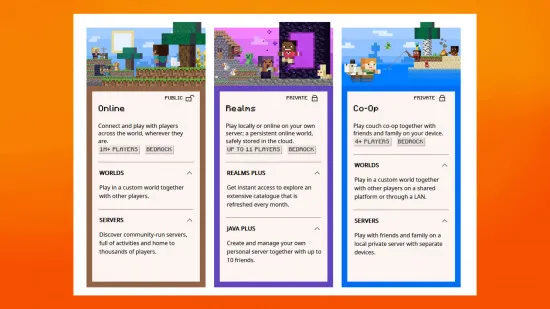
Permission roles matter from day one. Most modern hosting platforms offer three tiers: Owner (full access including billing), Editor (manages content and mods), and Limited (can start/stop the server only). Set these clearly before anyone joins.
When you're adding friends or teammates to help manage the server, be explicit about what they can and can't do. Everyone wanting full access is how servers accidentally get deleted or filled with griefed terrain. The clarity prevents arguments later.
On my server, we keep it simple: I handle Owner responsibilities, one experienced player is Editor, everyone else is Limited access. No one's deleted our world by accident. No one's installed a sketchy mod from a friend's suggestion. The boundaries work.
Mistakes Beginners Make (So You Don't)
Installing fifty mods before testing anything. This is how you end up with unplayable servers. Start with five solid mods, run it for a week, then add more if needed. Testing takes time.
Skipping backups entirely. Mods can corrupt your world. Players can grief. Server hardware fails. Backups aren't optional. Run them daily and actually test that they work, not just that the process completes successfully.
Choosing hosting based purely on price. The cheapest option usually means inadequate specs for modded servers. Modded content needs real computing power. Spend the money upfront and you'll avoid migration headaches later.
Forgetting to tell new players what's installed. They launch Minecraft without the client mods and it crashes immediately. Write a simple onboarding guide for your server, link the exact mod versions, and point people to installation instructions. New players deserve clarity.
Updating mods without testing them first. That new version might break compatibility with another mod you're using. Test updates on a backup first, then roll them out to your main server.
Getting Started This Week
Your first real decision is picking a hosting platform. That's it. Everything else flows from that choice.
Check our Minecraft server list to see what other communities are running. You'll spot patterns in what actually works long-term. Some servers thrive with particular mod combinations while others with identical setups fizzle out. Community matters as much as technical setup.
While you're setting everything up, grab a custom skin from our skin gallery with over 142,000 free options. Or create your own with our skin creator tool if you want something unique.
The technical side sounds more complicated than it actually is. Most modern platforms handle mod installation automatically now. What really determines success is starting small, testing thoroughly before inviting players, and keeping things simple while your community grows.
You've got this. Plenty of beginners have launched modded servers and built real communities. The barrier isn't nearly as high as it seems from the outside looking in.

Lead writer at minecraft.how. Long-time Minecraft player running a small SMP server, testing every build, mod, and seed before writing about it.
Preguntas Frecuentes
¿Qué es un servidor modificado de Minecraft y cómo difiere de uno estándar?
¿Cuáles son los mods básicos recomendados para principiantes?
¿Cuál es el enfoque recomendado para elegir una plataforma de alojamiento?
¿Por qué es importante gestionar permisos desde el inicio?
¿Cuál es el error común al seleccionar mods que debo evitar?
Have a Question or Tip about this Guide?Community Q&A
Ask a question or help other players below. Join the discussion and share your Minecraft tips!
Comentarios
Aún no hay comentarios. ¡Sé el primero en compartir tu opinión!