WorldEdit-BE: Herramientas esenciales para Bedrock
"A Minecraft Bedrock addon port of the famous WorldEdit mod for Minecraft: Java Edition."
SIsilicon/WorldEdit-BE · github.com
If you've ever wanted to reshape a massive Minecraft landscape without spending days block-by-block, WorldEdit-BE is exactly what you need. This Bedrock addon brings the legendary building toolkit from Java Edition to Bedrock, letting you move, copy, and manipulate terrain at scale.
What WorldEdit-BE Does
WorldEdit-BE is a direct port of the famous WorldEdit mod from Minecraft Java Edition, adapted for Bedrock. Instead of placing blocks one at a time, you select entire regions and apply transformations in seconds. Paste a building template somewhere new, flip it around, rotate it, mask out certain blocks, fill areas with patterns, reshape biomes, or undo massive mistakes instantly.
It sounds like overkill for vanilla Bedrock, but if you've ever tried recreating a real city in survival mode, you know exactly why something like this matters. The addon includes both command-based tools for keyboard users and physical items you can equip, which is crucial for console players and mobile users who can't easily type out complex commands. You'll spend less time fiddling with syntax and more time actually building.
Why You'd Want This Addon
Big-scale building is the core reason. Moving 10,000 blocks at once, reshaping a mountain range, or pasting the same structure 50 times with slight variations - WorldEdit-BE saves weeks of tedious block-by-block work. It's not about cheating; it's about respecting your own time.
Collaborative server builds benefit hugely from this. Many Aternos servers and community realms run WorldEdit-BE so builders can work in parallel without stepping on each other's toes. Creative mode feels like an entirely different game when multiple players can use clipboard tools simultaneously. Even single-player builders who prefer creative mode find themselves much more productive with WorldEdit's brush tools. Sculpting terrain feels way more natural when you're painting shapes instead of manually placing voxels.
Getting It Installed
For local worlds, the setup is straightforward:
- Download the.mcaddon file from the GitHub releases page
- Open the file with Minecraft - it'll import the addon automatically
- Create a new world or select an existing one
- Add the behavior pack (the resource pack applies automatically)
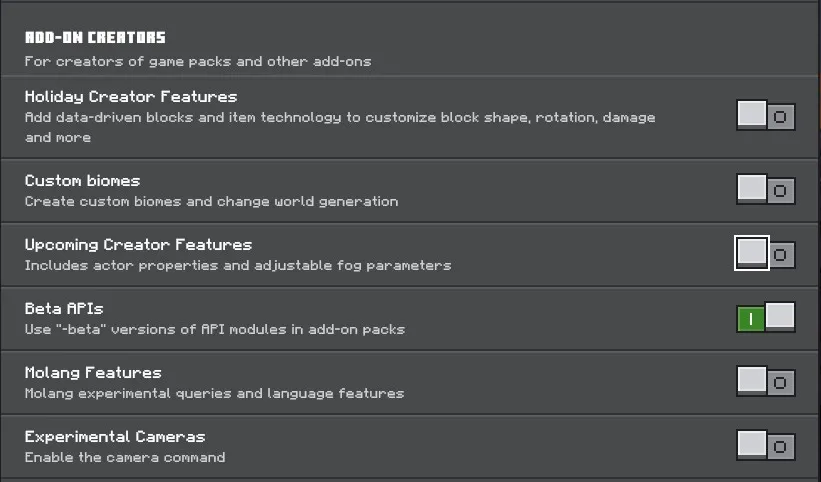
- Enable "Beta APIs" in experimental features (this is mandatory - don't skip it)
Bedrock will show a warning about experimental features potentially breaking your world. That's normal. Make a backup of your world first anyway, but experimental features in Bedrock are generally stable these days.
If you're setting this up on an Aternos server, the process is different. You can't just add the addon to an existing world. Instead, you upload a world with experimental features already enabled, then install the addon separately in the server's packs folder. Aternos has documentation on addon installation and experimental features if you get stuck, but it's a bit more hands-on than the local install.
The latest release (v0.10.4) supports Minecraft 1.21.130. If you hit compatibility issues on Aternos, make sure you're actually running the current version - an older release had a gametest module that broke server compatibility, which has since been removed.
Key Features That Matter
The clipboard system is probably the most useful tool in the entire addon. Select a region using the selection wand, copy it with a command or item, and paste it anywhere. Before pasting, you can rotate, flip, and offset the selection. You can even save clipboard files and import them into other worlds - share your clipboard library with friends or reuse building templates across multiple projects.
Masking is incredibly powerful once you understand it. You can exclude certain blocks from whatever operation you're doing. Want to fill an area with stone but keep all the water blocks untouched? Mask the water, and it'll be skipped. This prevents overwriting important details when you're working on complex terrain.
Brushes are genuinely impressive for terrain work. Instead of selecting regions, you pick a brush shape and size, then hold the button to paint terrain changes across your landscape. It feels like actual sculpting. You can create mountains, valleys, and terrain features way faster than command-based approaches, and it's much more intuitive.
Biome manipulation doesn't sound flashy until you need it. Change what biome occupies a region, which affects mob spawning, ambient particles, grass colors, and weather effects. You can apply biome changes to a selection, or smooth transitions between multiple biomes. This is essential if you're building anything that spans multiple biome types.
Undo and redo are genuinely life-changing when you're editing massive areas. You mess up a 50,000-block edit? One command and you're back. This alone justifies installing the addon.
Gotchas That'll Trap You
Experimental features are mandatory. Full stop.
Without "Beta APIs" enabled, the addon won't work at all. It's not optional, and it's the number one thing new users miss. Bedrock shows a warning when you enable experimental features - that's normal. Back up your world first anyway, though in practice experimental features are pretty stable these days.
The command syntax takes real practice. Unlike the visual UI, you're typing things like //fill 10 pattern:stone if you want to get fancy. The built-in how-to guide (Settings > How to Play while you're in-world) covers the basics, but the official documentation is better if you're learning specific advanced commands.
Some devices work better than others. Keyboard and mouse give you the smoothest experience for precision selection and command entry. Console controllers and mobile touch controls work fine for basic brush work, but they feel clunky for selecting precise regions.
WorldEdit-BE is still chasing Java Edition parity. Not every feature from Java WorldEdit is here yet - the project is actively developed, but some tools and options haven't made the jump to Bedrock. The documentation lists what's planned, but if you're coming from Java Edition with specific expectations, you might find something missing.
Building in Practice
Real talk: this addon shines most when you're working on collaborative servers or massive single-player projects. If you're a casual player who just wants to build a house in survival, you probably don't need it. But if you're the type who wants to create something like a detailed castle, a sprawling city, or a terrain-sculptured landscape, WorldEdit-BE fundamentally changes what's possible.
Creative builders on the community often showcase their work across platforms. Players like ironmouse and joakim2tusen tend to work with tools like this when handling large-scale projects. Even builders with distinctive skins like adderall_abuser and housecz_zero benefit from efficiency tools when they're working on anything ambitious. If you're serious about creative building, you'll eventually want the toolkit that pros use.
One small thing I should correct: I initially thought you needed to be on a server to use clipboard files effectively, but actually you can export and import them in single-player too. That opens up a lot of workflow possibilities.
Similar Projects and Alternatives
If WorldEdit-BE isn't your speed, structure blocks offer a more vanilla approach. They're built into Bedrock, don't require experimental features, and work fine for smaller projects or single structures. Just don't expect the same power - they're more limited and clunkier to use at scale.
Some building-focused addons try to offer similar functionality, but they tend to be less mature or less feature-complete. Most builders who've tried both ultimately come back to WorldEdit because it's just the most complete solution. It's the standard for a reason.

Lead writer at minecraft.how. Long-time Minecraft player running a small SMP server, testing every build, mod, and seed before writing about it.
Preguntas Frecuentes
¿Por qué es útil WorldEdit-BE para grandes proyectos de construcción?
¿Cuál es el proceso para instalar WorldEdit-BE en un servidor Aternos?
¿Qué es 'masking' en WorldEdit-BE y para qué sirve?
¿Por qué es necesario habilitar 'Beta APIs' para usar WorldEdit-BE?
Have a Question or Tip about this Guide?Community Q&A
Ask a question or help other players below. Join the discussion and share your Minecraft tips!
Comentarios
Aún no hay comentarios. ¡Sé el primero en compartir tu opinión!