How to Add Anvil Input GUIs to Your Minecraft Server
AnvilGUI (WesJD/AnvilGUI)
Capture user input in Minecraft through an anvil GUI in under 20 lines of code
Building a Minecraft plugin that needs player input is a common problem. You could ask them via chat, but that floods the chat log. Anyone could build a custom inventory GUI, but that requires textures and extra code. Anvil screens are actually perfect for simple text input, and AnvilGUI is the library that makes them work across every Minecraft version without touching a line of NMS code.
This matters because Minecraft's internals change constantly. Anvil GUIs in version 1.20 are handled completely differently than in 1.21. Most plugin devs either stick to their server version or use reflection hacks to support multiple versions. AnvilGUI does that reflection work for you.
What AnvilGUI Does
AnvilGUI is a wrapper around Minecraft's anvil inventory designed specifically for capturing text from players. Instead of diving into net.minecraft.server (the obfuscated internals that change every patch), you write clean builder-pattern code. The library detects which version you're running and loads the right implementation at runtime.
Here's what that looks like in practice.
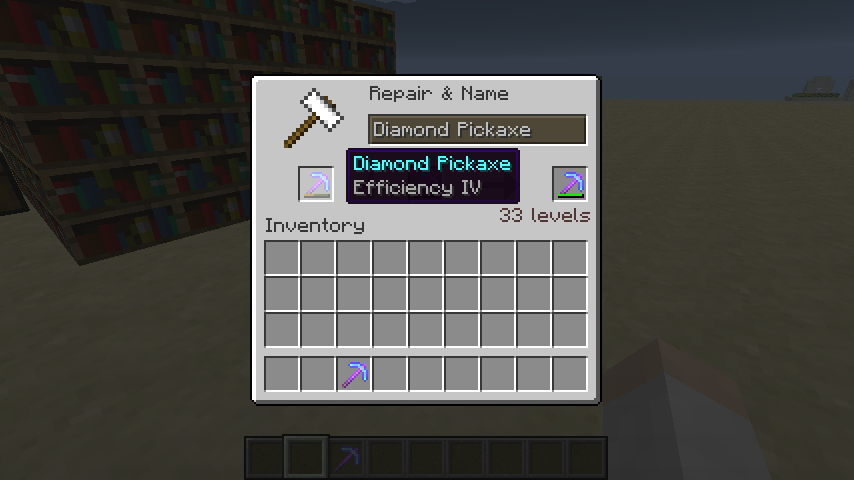
The core workflow is straightforward: player sees an anvil screen with a title and some default text. They type something, click the output slot (the rightmost one), and your code runs. You validate the input, close the screen, or ask them to try again. All with event handlers.
When You'd Use This
Text input from players shows up everywhere in plugin development. Quest systems asking for character names. Custom nickname commands. Auction houses where sellers set prices. Shop systems with player bids. Even coordinate-conversion tools like our Nether Portal Calculator need clean input interfaces.
And here's the thing: anvil GUIs feel native to Minecraft. The interface is already there, players instantly understand it, and it doesn't break immersion with weird dialogs or popup menus. If you were building something like our Minecraft MOTD Creator (which lets players design server messages), an anvil input would slot perfectly into that flow.
Some plugins use chat for input, but that clogs the chat log and looks messy. Others build full custom inventory GUIs, which requires custom textures and way more code. Anvils hit the sweet spot: they're built-in, they feel vanilla, and AnvilGUI abstracts away the version compatibility nightmare.
Installing AnvilGUI
First, add the Maven repository. As of version 1.10.11, the repo moved to a new URL:
<repository>
 <id>mvn-wesjd-net</id>
 <url>https://mvn.wesjd.net/</url>
</repository>
Then add the dependency:
<dependency>
 <groupId>net.wesjd</groupId>
 <artifactId>anvilgui</artifactId>
 <version>1.10.12-SNAPSHOT</version>
 <scope>compile</scope>
</dependency>
The scope being compile means AnvilGUI gets bundled into your final JAR.
Now for the part that trips people up: shading. AnvilGUI is a library, not a standalone plugin, so you need maven-shade-plugin to bundle it into your plugin's JAR. This prevents classpath conflicts if multiple plugins on the same server use AnvilGUI.
<plugin>
 <groupId>org.apache.maven.plugins</groupId>
 <artifactId>maven-shade-plugin</artifactId>
 <version>3.5.0</version>
 <executions>
 <execution>
 <phase>package</phase>
 <goals>
 <goal>shade</goal>
 </goals>
 <configuration>
 <relocations>
 <relocation>
 <pattern>net.wesjd.anvilgui</pattern>
 <shadedPattern>your.plugin.package.anvilgui</shadedPattern>
 </relocation>
 </relocations>
 </configuration>
 </execution>
 </executions>
</plugin>
Replace your.plugin.package with your actual package name. This relocates AnvilGUI into your namespace so it doesn't conflict with other plugins.
How the API Works
Here's a complete example from the project:
new AnvilGUI.Builder().onClose(stateSnapshot -> {
 stateSnapshot.getPlayer().sendMessage("You closed the inventory.");
 }).onClick((slot, stateSnapshot) -> {
 if(slot!= AnvilGUI.Slot.OUTPUT) {
 return Collections.emptyList();
 }

 if(stateSnapshot.getText().equalsIgnoreCase("you")) {
 stateSnapshot.getPlayer().sendMessage("You've magical powers!");
 return Arrays.asList(AnvilGUI.ResponseAction.close());
 } else {
 return Arrays.asList(AnvilGUI.ResponseAction.replaceInputText("Try again"));
 }
 }).preventClose().text("What's the meaning of life?").title("Enter your answer").plugin(plugin).open(player);
The builder pattern chains method calls. Title is the text above the anvil. Text is the default input (pre-filled content). OnClose fires when the player closes without submitting. OnClick fires when they click a slot in the anvil.
The slot parameter tells you what they clicked. There's INPUT (left slot), OUTPUT (right slot where results show), and RESULT (the actual item they'd get if this were a real recipe). You almost always check for OUTPUT since that's the submit button.
StateSnapshot contains the player and whatever text they've typed. You validate it, and return ResponseActions. ResponseAction.close() shuts the screen. ResponseAction.replaceInputText() updates the input field - useful for error messages like "that name's taken" or "try again".
PreventClose() removes the escape key option, forcing players to either submit or click other slots. Use this for critical information you absolutely need from them.
Plugin(plugin) is your plugin instance. It's needed for event registration and version detection under the hood.
One more powerful thing: you can customize almost everything. Longer titles, read-only text, different slot behaviors based on input. The API gives you control.
Common Mistakes and Gotchas
The shading configuration is the biggest one. Skip maven-shade-plugin and your plugin won't even load. You'll get ClassNotFoundException at runtime, and it takes a second to realize why.
Another pattern that confuses people: onClick expects a List<ResponseAction> to return. An empty list (Collections.emptyList()) is valid and just keeps the screen open. The compiler catches missing returns anyway, so this usually isn't an issue in practice.
Input text in the anvil isn't colored or specially formatted. It's just text. Beyond the title and default content, there's not much visual customization available. If you need fancier visuals (custom colors, formatted text), you'd want a different approach.
About version support: AnvilGUI works on recent versions. Actually, it works on older ones too via reflection-based version detection. Check the releases page if you're running something really old, but the short answer is that if your server can load the library, it works.
The library doesn't handle i18n translation for you. If your server supports multiple languages, you're translating the title and text yourself before passing them to AnvilGUI.
Alternatives and When to Use Them
If anvil screens aren't the right fit, you've other options.
Sign GUIs let players write on a sign, then you read it. Simpler in some ways, but it doesn't feel as integrated. Players see a sign instead of an anvil.
Book GUIs use Minecraft's writable book interface. Great for longer text, but overkill for a single input field. It's a heavier interaction.
Full custom inventory GUIs give you maximum control. Buttons, sliders, icons, colors - whatever you want. The tradeoff is more code and custom textures. If you're building something complex, it might be worth it. For simple text input, it's overkill.
Chat input is always technically possible. Just ask the player to respond in chat or use a command. It works, but it spams the chat log and feels janky. Most modern plugins avoid it.
Where I Land On This
AnvilGUI solves a specific problem well: capturing text from players without fighting Minecraft's version-specific code. It's a Java library with MIT licensing, actively maintained, and it's got a solid 542 stars on GitHub. If you're building a plugin that needs player input and an anvil makes sense for your use case, spend ten minutes integrating this. It'll save you from version-compatibility debugging hell down the road.

Lead writer at minecraft.how. Long-time Minecraft player running a small SMP server, testing every build, mod, and seed before writing about it.