Accessibilità in Minecraft 2026 - Tutte le Novità Spiegate
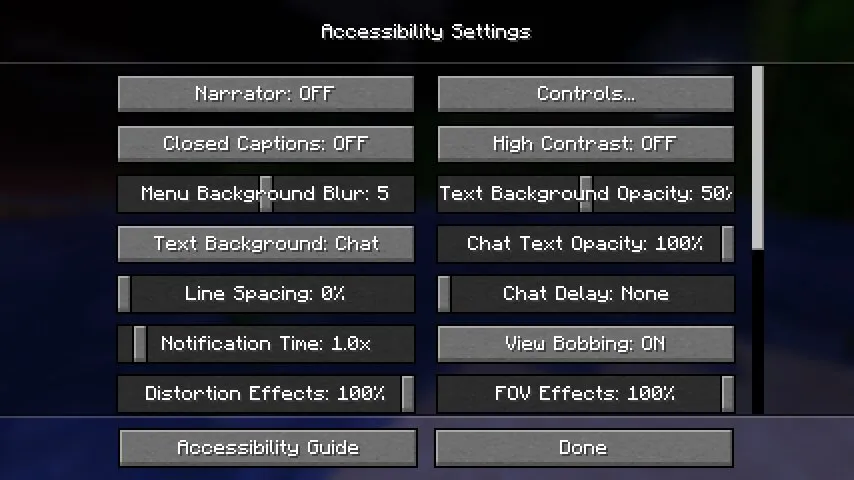
A febbraio 2026, le principali novità di accessibilità di Minecraft arrivano su Bedrock: sottotitoli di gioco che finalmente estendono i sottotitoli oltre Java, e il nuovo strumento "Describe" che identifica blocchi e creature vicine tramite testo e sintesi vocale.
Potrebbe sembrare solo una nota del patch, ma non è così. Questi sono tra gli aggiornamenti di qualità della vita più richiesti dai giocatori Bedrock da anni, soprattutto da chi è sordo, ipoudente, ipovedente, o semplicemente gioca in ambienti rumorosi, su dispositivi portatili, o con il volume basso. La roadmap di Mojang per l'accessibilità nel 2026 continua ad evolversi, ma la direzione è già chiara: Bedrock riceve strumenti che riducono divari storici e rendono le informazioni più leggibili, udibili e reattive.
I tempi sono importanti. Nel 2026, Minecraft sta spingendo gli aggiornamenti visivi su molti fronti. Come riportato da PCGamesN nel suo riassunto del 25 febbraio 2026 su shader e texture pack, la conversazione su Minecraft è piena di illuminazione, chiarezza e presentazione. L'accessibilità si trova proprio accanto a questa discussione. Le immagini migliori sono solo una parte dell'usabilità. I giocatori hanno anche bisogno di feedback migliore, sottotitoli migliori e modi migliori per capire cosa succede intorno a loro.
Funzioni di accessibilità di Minecraft 2026: cosa è cambiato
I maggiori annunci finora confermati sono legati al ciclo di test 2026 di Bedrock. Secondo le note di Mojang per il Minecraft Beta & Preview 26.0.23, pubblicate il 3 dicembre 2025 per la linea 2026, Bedrock ha aggiunto un'impostazione per mostrare i sottotitoli di gioco. A quel punto Mojang ha anche avvertito che la funzione non funzionava ancora come previsto, il che è un utile promemoria che gli strumenti di accessibilità hanno bisogno di cura, non solo di caselle da spuntare.
I sottotitoli di gioco arrivano su Bedrock
I sottotitoli chiusi esistono su Java da anni, ma i giocatori Bedrock su console, dispositivi mobili e Windows aspettano da molto più tempo. L'aggiunta è significativa perché Bedrock è l'edizione che la maggior parte dei giocatori usa globalmente. È anche l'edizione che tocca la gamma più ampia di dispositivi, dimensioni dello schermo, configurazioni audio e metodi di controllo.
Il nuovo strumento Describe amplia la consapevolezza dell'ambiente
L'aggiornamento Beta & Preview 26.10.23 di Mojang, pubblicato l'11 febbraio 2026, ha aggiunto un binding per Describe. Mojang dice che permette ai giocatori di sapere, tramite testo e sintesi vocale, quale blocco o creatura è direttamente di fronte a loro. Funziona con input sia da tastiera che da controller, il che è più importante di quanto sembri. Molte funzioni di accessibilità appaiono prima su PC e impiegano più tempo a sentirsi native su console. Questo sembra progettato per entrambi da subito.
Altrettanto importante è ciò che non è ancora accaduto. A partire dal 28 febbraio 2026, Mojang non ha annunciato una nuova funzione di accessibilità specificamente Java di profilo simile negli snapshot del 2026. Questo non significa che Java sia stata ignorata, solo che Bedrock è dove il momento di accessibilità visibile attualmente risiede.
Funzioni di accessibilità Bedrock nel 2026: perché i sottotitoli di gioco contano
I sottotitoli sono il tipo di funzione che molti giocatori non considerano finché non ne hanno bisogno. Una volta che ne hai bisogno, l'assenza è impossibile da ignorare. Minecraft nasconde molte informazioni critiche nel suono: un sibilo di una Creeper, frecce di scheletri che arrivano vicino, uno zombie fuori dal muro di una grotta, lava che borbotta sotto un pavimento, o semplicemente la direzione del pericolo nell'oscurità. Per i giocatori sordi e ipoudenti, perdere queste informazioni può trasformare la semplice sopravvivenza in una congettura.
Dalla richiesta di parità a una funzione reale
Ecco perché il lancio dei sottotitoli di Bedrock nel 2026 sembra scaduto piuttosto che sperimentale. Il sito Feedback di Mojang ospita da anni richieste di sottotitoli Bedrock, con giocatori che ripetutamente descrivono l'assenza di sottotitoli come un serio divario di accessibilità. Quando Bedrock 26.0 è stato lanciato il 10 febbraio 2026, Mojang ha detto che i nuovi sottotitoli di gioco rimarrebbero in Beta e Preview per un po' mentre il team continuava a lucidare e correggere bug. Un giorno prima, la funzione aveva già superato il suo primo stato ruvido in 26.0.25/26, dove Mojang ha detto che i sottotitoli dovrebbero funzionare come previsto.
Perché i sottotitoli aiutano più di un pubblico
I sottotitoli non sono solo per i giocatori con perdita dell'udito. Aiutano i bambini che giocano con il volume basso, i pendolari su dispositivi portatili, i giocatori che condividono una stanza, i streamer che controllano più fonti audio, e chiunque impari il linguaggio sonoro del gioco. L'audio di Minecraft è pieno di indizi direzionali, e i sottotitoli trasformano questi indizi in informazioni leggibili. Questa utilità diffusa è il motivo per cui i sottotitoli tendono a diventare standard una volta che arrivano. Dopo un po', i giocatori smettono di vederli come optional extra di accessibilità e iniziano a trattarli come interfaccia principale.
Per i proprietari di server e gli host Realm, anche questo conta. Più la sopravvivenza diventa leggibile, meno punitive diventano le sessioni iniziali per i nuovi giocatori, e meno è probabile che le esigenze di accessibilità dividano i gruppi di amici per piattaforma.
Funzione di accessibilità Minecraft "Describe": come funziona il nuovo strumento 2026
Se i sottotitoli di gioco aiutano i giocatori a capire cosa è appena accaduto, Describe ha l'obiettivo di capire cosa è direttamente di fronte a te. Le parole di Mojang sono specifiche: la funzione comunica il blocco o la creatura di fronte al giocatore usando testo e sintesi vocale. Questo la rende uno degli esempi più chiari finora di Minecraft che trasforma il riconoscimento ambientale in feedback accessibile e su richiesta.
Utile per giocatori ipovedenti e decisioni rapide
Nel gioco pratico, Describe potrebbe essere prezioso in spazi stretti, costruzioni affollate, fattorie di mob, villaggi, e terreno buio dove i profili sono difficili da leggere. Un binding del controller è particolarmente notevole perché il pubblico di Bedrock include molti giocatori da divano su console, dove i workaround di accessibilità esterni possono essere meno flessibili che su PC. Dare ai giocatori un pulsante dedicato per l'identificazione ambientale è una mossa di design intelligente.
Potrebbe influenzare più che i menu di accessibilità
Describe suggerisce anche una filosofia di design più ampia. Minecraft ha sempre chiesto ai giocatori di interpretare piccole differenze visive, forme distanti, e indizi sonori rapidamente. Va bene quando la tua configurazione è ideale. È meno bene su un piccolo display mobile, una TV dall'altra parte della stanza, o per giocatori che affrontano limiti di elaborazione visiva. Una funzione che nomina il bersaglio di fronte a te riduce l'attrito senza cambiare l'identità del gioco.
C'è anche un forte angolo educativo. Minecraft è usato nelle scuole di tutto il mondo, e gli strumenti di testo e sintesi vocale possono supportare giocatori più giovani, studenti di lingue, e esigenze di accessibilità in classe. Se Mojang espande Describe oltre blocchi e creature, forse verso oggetti, pericoli, o oggetti interattivi, potrebbe diventare uno degli aggiornamenti di usabilità più significativi che Bedrock abbia visto in anni. Quest'ultimo punto è un'inferenza, non un elemento di roadmap annunciato, ma la base è lì.
Accessibilità di Minecraft nel 2026: perché questo lancio conta per la comunità più ampia
Le storie di accessibilità possono suonare di nicchia finché non guardi come Minecraft è effettivamente giocato nel 2026. Questo è un sandbox globale in esecuzione su telefoni, tablet, laptop, console, dispositivi scolastici, e TV del soggiorno. Il design dell'interfaccia one-size-fits-all non funziona per un gioco con quella portata. Ogni sottotitolo aggiuntivo, prompt di narrazione, menu leggibile, o percorso di input alternativo migliora le probabilità che più persone possano unirsi allo stesso mondo e restarci.
Bedrock è il posto giusto per guadagni di accessibilità importanti
Poiché Bedrock copre il pubblico cross-platform più ampio, ogni miglioramento lì ha un impatto sproporzionato. Una funzione di sottotitoli in Java conta. Una funzione di sottotitoli in Bedrock cambia l'esperienza per giocatori console, giocatori mobile, famiglie, e aule scolastiche tutto in una volta. La stessa logica si applica a Describe, soprattutto perché Mojang supporta esplicitamente sia tastiera che controller.
Accessibilità e aggiornamenti visivi non sono obiettivi in competizione
Alcuni giocatori parlano ancora come se l'accessibilità e la presentazione fossero conversazioni separate. Non lo sono. Il focus di PCGamesN di febbraio 2026 su shader, nebbia, illuminazione, e realismo riflette quanta attenzione i giocatori di Minecraft danno alla leggibilità e all'atmosfera. L'accessibilità pone una domanda correlata: il giocatore può effettivamente percepire le informazioni che il gioco sta inviando? L'illuminazione bella è ottima, ma può anche oscurare i profili, aumentare il rumore visivo, o rendere gli indizi importanti più difficili da individuare. Le buone funzioni di accessibilità aiutano a controbilanciare questo.
Ecco perché il lavoro più recente di Mojang su motivi di minerale, canali audio regolabili, miglioramenti della narrazione, e ora sottotitoli e Describe si adatta bene insieme. Lo studio sta lentamente costruendo un toolkit, non solo cospargendo opzioni isolate. La comunità ne vorrà ancora di più, specialmente controlli di sottotitoli più precisi, opzioni ad alto contrasto, e una parità più profonda tra le edizioni, ma il 2026 sembra già un passo significativo.
Funzioni di accessibilità Minecraft 2026: cosa dovrebbero fare i giocatori ora
Se vuoi provare queste aggiunte presto, Bedrock Preview e Beta sono dove avviene l'azione. Detto questo, le versioni di test non sono mai la stessa cosa di un rilascio completato. Mojang ha già dimostrato questo con i sottotitoli, che sono apparsi prima, sono arrivati con bug, hanno subito miglioramenti nei build preview successivi, e rimangono ancora fuori dal rilascio stabile completo a partire dal 10 febbraio 2026.
Modi migliori per testare i nuovi strumenti
- Controlla se la tua piattaforma supporta Minecraft Preview o Beta, soprattutto su Xbox, PlayStation, Windows, iOS, o Android.
- Attiva i sottotitoli di gioco e gioca a scenari di sopravvivenza familiari - grotte, combattimento notturno, villaggi, e fattorie sono buoni test.
- Collega Describe a un pulsante facile da raggiungere e provalo in spazi affollati dove il disordine visivo di solito causa errori.
- Invia feedback attraverso il sito ufficiale di Feedback di Mojang, specialmente se i sottotitoli sembrano troppo rumorosi, troppo vague, o mancano di eventi audio chiave.
Cosa osservare dopo nel 2026
La domanda più grande è la profondità del rollout. I sottotitoli avranno filtri di categoria, una migliore prioritizzazione, o formattazione più pulita? Describe si espanderà per coprire più informazioni interattive? Java riceverà aggiunte corrispondenti più avanti nel 2026? Mojang non ha ancora confermato queste risposte, quindi qualsiasi certezza oltre gli attuali changelog sarebbe speculazione.
Ancora, il trend è promettente. Il divario di accessibilità di Bedrock è stato uno dei problemi meno glamour ma più persistenti intorno al Minecraft moderno. Nel 2026, Mojang finalmente lo affronta con funzioni che contano durante il gioco reale, non solo nei menu. Questa è la differenza tra un punto elenco di accessibilità e un aggiornamento di accessibilità che i giocatori effettivamente sentono ogni minuto che sopravvivono, costruiscono, ed esplorano.

Lead writer at minecraft.how. Long-time Minecraft player running a small SMP server, testing every build, mod, and seed before writing about it.
Domande frequenti
Quando sono arrivati i sottotitoli di gioco su Minecraft Bedrock?
Che cosa fa lo strumento Describe in Minecraft Bedrock?
I sottotitoli di gioco su Bedrock sono utili solo per i giocatori sordi o ipoudenti?
Lo strumento Describe funziona anche su console, non solo su PC?
Java Edition ha ricevuto aggiornamenti di accessibilità simili nel 2026?
Have a Question or Tip about this Guide?Community Q&A
Ask a question or help other players below. Join the discussion and share your Minecraft tips!
Commenti
Ancora nessun commento. Sii il primo a condividere la tua opinione!