Redstone Comparators: Building Smarter Contraptions
Redstone comparators are unsung heroes of Minecraft redstone. They detect signal strength, compare power levels, and enable contraptions that'd be impossible otherwise. Whether you're building your first automatic door or designing a massive item sorting system, comparators are essential tools every builder needs to master.
What's a Redstone Comparator?
A redstone comparator is a block that measures redstone signal strength. Think of it as a device that constantly asks: "Is this signal stronger than that signal?" It's got three main parts: a back input port, two side input ports, and a front output. The comparator examines the signals flowing in, runs a comparison or subtraction, and decides whether to output power.
Here's the thing nobody mentions until you're already frustrated: comparators have two completely different modes, and they work in opposite ways.
The Two Modes That Change Everything
Every single comparator can operate in comparison mode or subtraction mode. You switch between them by right-clicking the comparator with redstone dust in hand. This toggle is the key to understanding how these blocks actually work.
Comparison mode is the default setting. The comparator checks if the signal entering from the back is stronger than signals from the sides. If the back signal is 10 and one side signal is 5, you get output. If the back signal is 3 and a side signal is 8, no output happens. It's a simple question: is the back input greater than any side input? Yes or no.
This seems straightforward until you realize its limitations. For many contraptions, you need more than just "is it bigger?" You need actual math.
Subtraction mode does exactly what it sounds like. Instead of comparing, the comparator subtracts. It takes the strongest side input and removes it from the back input, then outputs the result. Back signal 10, side signal 3? You get 7 output. Back signal 5, side signal 8? You get nothing (it can't go below 0). This mode unlocks possibilities that comparison mode simply can't handle.
Understanding Signal Strength
Redstone signals operate on a scale from 0 to 15. A power source directly next to a comparator is strength 15. One block away through redstone dust, it becomes 14. Two blocks away, 13. This degrades one level per block traveled, reaching 0 at 16 blocks distance. Comparators are the only redstone components that can detect these precise intermediate levels instead of just "on" or "off."
Why care about this? Containers.
When you place a redstone comparator against a chest, hopper, furnace, cauldron, or any storage block, it outputs a signal proportional to how full that container is. An empty hopper outputs 0. A completely full hopper outputs 15. Three-quarters full? You get roughly 11 or 12. And this is the real magic that makes comparators indispensable. They're literally the only way to detect how much stuff is in a container.
Building Your First Contraptions
Alright, enough theory. Let's actually build something.
Automatic item sorter: This is the classic starter contraption. Place a comparator against the hopper feeding items into your system. Set up redstone repeaters to create a threshold (when the hopper reaches about 80% full). When that threshold is hit, the comparator triggers a signal that routes items to a different location. Set up three or four hoppers with different thresholds, and suddenly you've got automatic item sorting. Players on major servers like CraftMC use these systems constantly, moving thousands of items per minute through massive item networks.
When building complex multi-component systems, precise planning saves hours of troubleshooting. Tools like the Nether Portal Calculator help you work out exact distances and spacing. Redstone contraptions benefit from the same precision: knowing exact block positions between components prevents signal degradation and logic failures.
Automatic furnace system: Hook a comparator to any furnace that's actively smelting. While items cook, the signal increases. When smelting completes and output fills (signal 15), a comparator sends a redstone pulse to an hopper or dropper that unloads the furnace. Chain multiple furnaces together, and you've got industrial-scale smelting running 24/7. Add hoppers with different fullness levels, and you can create priority systems: smelting prioritizes iron over other ores, for example.
Mob farm automation: If you've built a mob grinder that kills hostile mobs when triggered, a comparator watching the output chest prevents overflow. When the collection chest approaches full, the comparator shuts down the farm's killing mechanism temporarily. This prevents wasted mob kills and keeps your collection organized.
Subtraction Mode: Advanced Contraptions
Subtraction mode is where comparators stop being beginner-friendly tools and become genuinely creative enablers.
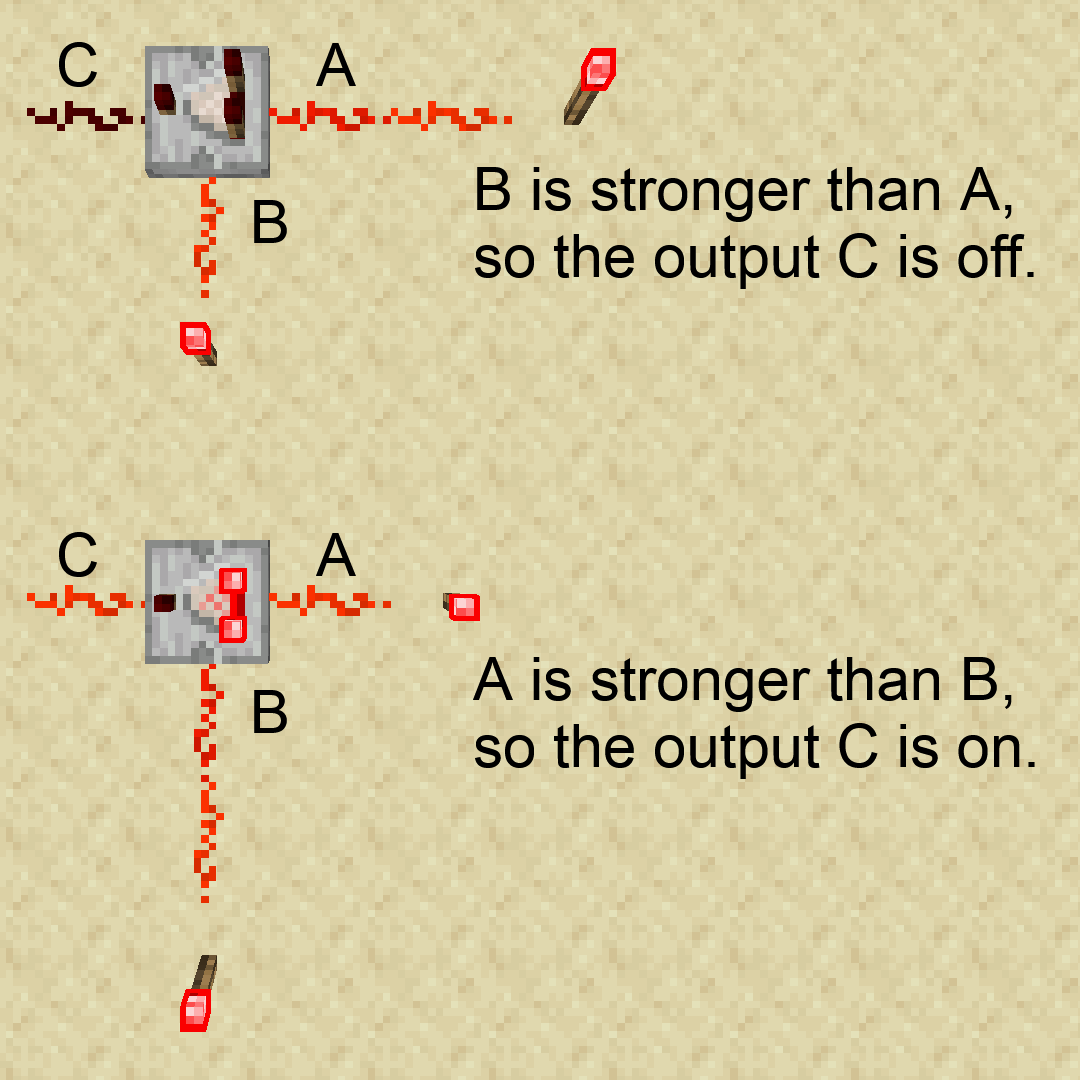
The classic advanced build is a counter that cycles from 0 to 15 repeatedly. You send a constant signal to the back input, then use a feedback loop with repeaters and redstone dust. The signal gradually increases through subtraction mode comparators, reaches 15, resets to 0, and starts over. It's slower than a repeater-based clock, but it's elegant. More it counts, which most simple clocks can't do.
A more practical application: tracking farm production. Use subtraction mode to monitor how much a farm has produced since you last reset the counter. Say you want to disable item flow until your farm produces exactly 8 more stacks of something. Subtraction mode lets you program that threshold precisely. Input the production signal, subtract the target amount, and when the output hits 0, you know you've reached your goal.
Essential Tips for Building With Comparators
Test everything in creative mode first. Full stop.
Redstone contraptions break in weird, unintuitive ways. Losing a hopper full of resources to a logic error you didn't anticipate is genuinely frustrating. Spend an hour in creative mode testing, save yourself a week of regret in survival mode.
Remember that powered comparators lock neighboring comparators. If you place a fully powered comparator next to another comparator, the second one stops working entirely. So this is useful for building certain circuits but absolutely maddening if you didn't expect it. I spent embarrassingly long debugging this on my SMP server before realizing what was happening.
Signal strength degrades over distance. If your contraption spans 20 blocks and relies on a strength-15 signal, you're out of luck. Use redstone repeaters every 15 blocks to reset signal strength back to 15. It's not elegant, but it's necessary.
Since you'll be spending hours in creative mode designing contraptions, you might as well have a character that matches your vibe. Look, the Minecraft Skin Creator lets you design a custom skin in minutes. Your builder persona should reflect your building style, whether that's technical and minimal or decorative and over-the-top.
When Comparators Aren't the Right Choice
Comparators are powerful, but they're not always the answer. Simple on-off doors need only a button and a repeater. Super-fast pulse generators should use repeater clocks instead of comparators; comparators are painfully slow for timing-critical work. If you don't need signal strength measurement or container detection, a comparator just adds unnecessary complexity.
Also important: if you're playing Bedrock Edition instead of Java, comparator behavior differs in subtle ways. Hopper comparators work differently, observer blocks behave slightly differently, and some edge cases don't match Java Edition exactly. Current Java is version 26.1.2, but always check your wiki for your specific version and platform.
The Real Value of Understanding Comparators
Comparators unlock an entirely different tier of automation. Once you understand how signal strength detection works, contraptions that seemed impossible suddenly become obvious. You start seeing applications everywhere: automatic tree farms, item count limiters, redstone timers that reset based on item flow, storage systems that prioritize inventory slots.
Start with a simple automatic sorter. Build it wrong a few times, debug it, fix it, and rebuild. Then move to furnaces, mob farms, and more exotic applications. The learning curve is real, but the payoff is massive. Your Minecraft world stops being a collection of separate machines and becomes an integrated system where everything talks to everything else through redstone signals.

Lead writer at minecraft.how. Long-time Minecraft player running a small SMP server, testing every build, mod, and seed before writing about it.
Domande frequenti
How do I switch between comparison mode and subtraction mode?
Why would I use a comparator on a chest or hopper?
What's the difference between comparators and repeaters?
How far does a redstone signal travel before fading?
Can I use comparators in Bedrock Edition the same way as Java?
Have a Question or Tip about this Guide?Community Q&A
Ask a question or help other players below. Join the discussion and share your Minecraft tips!
Commenti
Ancora nessun commento. Sii il primo a condividere la tua opinione!