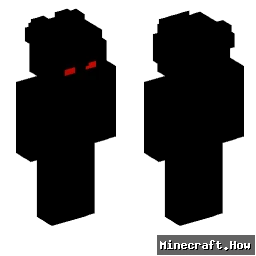
Skin showcase
Watch Page →alfred146 Minecraftスキン
✓ 承認済み
このスキンはあなたのプレイヤーモデルの見た目をalfred146という名前に結びつけたルックに変更します。公開serverまたは自分のシングルプレイのworldで使用できます。ダウンロードはMinecraftランチャーまたはプロフィール設定を通じて適用できる標準的なPNGファイルです。数秒であなたのキャラクターに新しいアイデンティティを与えます。
80
ダウンロード
2.5K
閲覧数
Minecraft profile
ce79d4cf-9aba-425a-af75-b2005f5f5487Model
classic
Views / 30 days
127
Observed names
Dates show when minecraft.how first observed each name.
alfred146—
Skin history
History grows as minecraft.how observes profile changes.

Head command
/give @p minecraft:player_head[profile={name:"alfred146"}]PNG · 64×64
タグ
Minecraftスキンalfred146javaneutral
よくある質問
alfred146 のMinecraftスキンをダウンロードするには:
- 「ダウンロード」ボタンをクリックして、この無料の alfred146 スキンを入手します
- スキンファイル
.pngがデバイスに保存されます - Java版 と 統合版 の両方で動作します
- 完全なインストール手順については以下を参照してください
alfred146 スキンを適用するには:
- Minecraft公式サイトで MojangまたはMicrosoft アカウントにログインします。
- プロフィールの「スキン」セクションに移動します。
- ダウンロードした
.pngファイルをアップロードします。 - Minecraftを起動すると、キャラクターは alfred146 スキンを使用します。
注意: Minecraft Java版 と Minecraft 統合版 では手順が多少異なる場合があります。
はい、alfred146 スキンは Minecraft Java版 と Minecraft 統合版 の両方に対応しています。ただし、スキンの適用方法はバージョンによって多少異なる場合があります。お使いのエディションに合わせて、このページの手順に従ってください。
もちろんです! Minecraftスキンエディター を使って alfred146 スキンを編集できます。ダウンロードした
.png ファイルをエディターで開き、変更を加えて保存してください。その後、編集したスキンをMinecraftプロフィールにアップロードします。alfred146 スキンが機能しない場合は、以下を試してください:
- 正しいファイル形式
.pngをダウンロードしたことを確認してください。 - Minecraftの正しいバージョン(Java版 または 統合版)を使用していることを確認してください。
- スキンファイルが破損していないことを確認してください。必要に応じてスキンを再ダウンロードしてください。
- MojangまたはMicrosoft アカウントからログアウトして再度ログインし、プロフィールを更新してください。