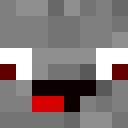
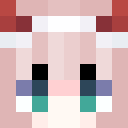
Lockdown Life - Modern Survival Character
✓ 승인됨
The Lockdown Life skin captures the spirit of resilience and adaptability during challenging times. This modern character design features casual, everyday clothing perfect for surviving in isolation or post-apocalyptic scenarios. The skin likely showcases comfortable streetwear elements like a hoodie or jacket, paired with practical pants and sneakers. Subtle details may include a face mask or protective gear, reflecting the lockdown theme. The color palette probably consists of muted, practical tones that blend urban style with survivalist aesthetics. This skin appeals to players who want a relatable, contemporary character that tells a story of perseverance and everyday heroism. Perfect for roleplay servers, modern city builds, or survival gameplay where realism matters. The design strikes a balance between casual comfort and prepared readiness, making it versatile for various Minecraft scenarios from urban exploration to bunker survival.
48
다운로드
3.9K
조회수
0
좋아요
카테고리
모던후디
skins.download_format
이 스킨 공유하기
휴대폰으로 스캔하여 이 스킨을 공유하세요
태그
마인크래프트스킨Lockdown Life - Modern Survival Characterjavaneutral모던후디
자주 묻는 질문
Lockdown Life - Modern Survival Character 마인크래프트 스킨을 다운로드하려면:
- 「다운로드」 버튼을 클릭하여 이 무료 Lockdown Life - Modern Survival Character 스킨을 받으세요
- 스킨 파일
.png이 기기에 저장됩니다 - 자바 에디션과 베드락 에디션 모두에서 작동합니다
- 전체 설치 지침은 아래를 참조하세요
Lockdown Life - Modern Survival Character 스킨을 적용하려면:
- 공식 마인크래프트 웹사이트에서 Mojang 또는 Microsoft 계정으로 로그인하세요.
- 프로필의 「스킨」 섹션으로 이동하세요.
- 다운로드한
.png파일을 업로드하세요. - 마인크래프트를 실행하면 캐릭터가 Lockdown Life - Modern Survival Character 스킨을 사용합니다.
참고: 이 과정은 마인크래프트 자바 에디션과 마인크래프트 베드락 에디션에서 약간 다를 수 있습니다.
예, Lockdown Life - Modern Survival Character 스킨은 마인크래프트 자바 에디션과 마인크래프트 베드락 에디션 모두와 호환됩니다. 그러나 스킨 적용 방법은 두 버전 간에 약간 다를 수 있습니다. 해당 에디션에 대한 이 페이지의 지침을 따르세요.
물론입니다! 마인크래프트 스킨 편집기를 사용하여 Lockdown Life - Modern Survival Character 스킨을 편집할 수 있습니다. 다운로드한
.png 파일을 편집기에서 열고, 변경한 후 파일을 저장하세요. 그런 다음 편집한 스킨을 마인크래프트 프로필에 업로드하세요.Lockdown Life - Modern Survival Character 스킨이 작동하지 않으면 다음을 시도해 보세요:
- 올바른 파일 형식
.png을 다운로드했는지 확인하세요. - 마인크래프트의 올바른 버전(자바 에디션 또는 베드락 에디션)을 사용하는지 확인하세요.
- 스킨 파일이 손상되지 않았는지 확인하세요. 필요하면 스킨을 다시 다운로드하세요.
- Mojang 또는 Microsoft 계정에서 로그아웃한 후 다시 로그인하여 프로필을 새로 고치세요.
Create your own skin
Draw a pixel-perfect Minecraft skin in the browser with our free 3D skin editor.
→ 스킨 생성기