Jak budować realistyczne rafy koralowe w Minecraft
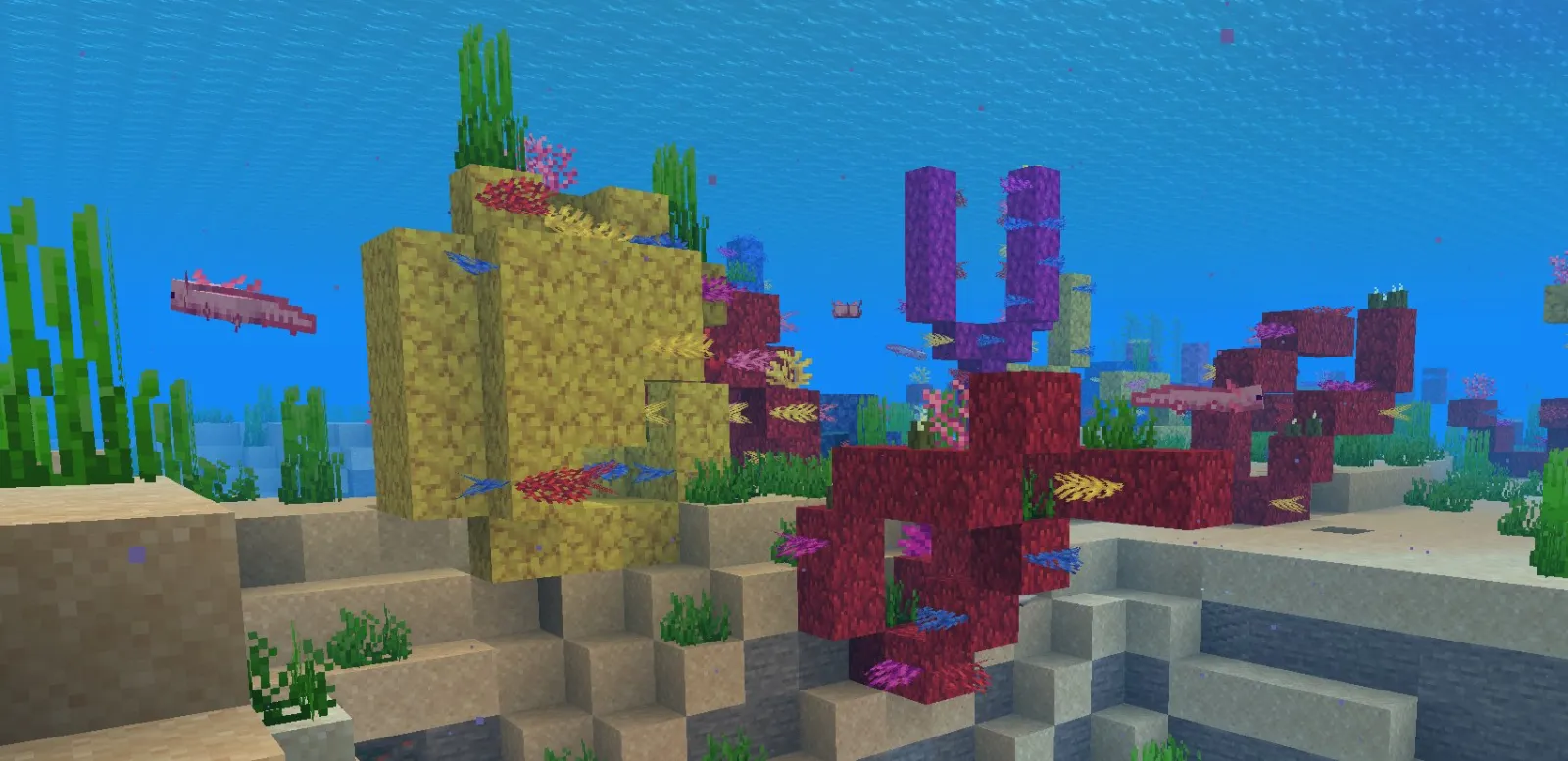
Coral reefs in Minecraft are built using a mix of coral blocks, sea fans, and colorful sea grass placed in creative terrain with water and lighting. Build them in flat ocean areas, layer different coral colors, add fish and kelp, then refine with ambient lighting for depth and atmosphere.
Why Coral Reefs Make Amazing Builds
Honest take: coral reefs are one of the most satisfying builds to tackle in survival or creative mode. Here's the thing, they're visually striking, give you a reason to spend time underwater (which most players skip), and actually fill empty ocean biomes with something worth looking at.
I spent a weekend building one on my SMP server, and it single-handedly drew three players into ocean exploration who'd previously ignored the water entirely.
The nice part is they work at any scale. Small 20x20 reef tucked into a bay? Perfect. Massive sprawling structure taking up half an ocean biome? Also perfect. Unlike some builds that demand specific dimensions to feel right, reefs are forgiving about size.
There's also something meditative about stacking coral blocks in different colors and watching an entire ecosystem come together. No complex redstone, no resource farming beyond the initial coral collection. Just creative blocks and patience.
Choosing Your Blocks and Color Palette
Start with the coral blocks themselves. You've got five main types: brain, bubble, fire, horn, and tube coral. They come in both regular and bleached variants, which gives you far more color range than you'd think. Brain coral is the chunky one, bubble has those little bubble details, fire is spiky, horn is tall and branchy, and tube coral... well, it's tubular.
Don't limit yourself to just live coral blocks.
Sea fans, sea pickles, kelp, seagrass, and sea grass all play huge roles in reef density and visual appeal. Technically sea grass isn't coral, but functionally it fills gaps like nothing else. If you're mixing block types, you'll get way more visual interest than sticking to coral alone.
Color-wise, I usually pick a dominant color (maybe brain coral in orange or purple), then layer complementary accent colors around it. Throw in bleached variants for areas where light hits, creating natural shading. And it sounds complicated, but you're really just thinking: "What colors actually go together?"
One thing I got wrong on my first attempt, actually, was going too heavy on bright reds and oranges. Reefs have a ton of variety, and they look better when you break up hot colors with cooler tones. Mix in some purple bubble coral, some blue sea fans, some lighter pink brain coral. The contrast matters more than you'd think.
Designing the Underwater Terrain
Flat ocean floor is your enemy. Real coral reefs don't grow on completely flat geology; they build on uneven surfaces with ridges, valleys, and varying depths. Start by sculpting your sea floor with sand, gravel, and stone blocks to create actual topography.
This is tedious work but necessary.
Create height variation: some areas should drop 3-4 blocks deeper, others should rise to create shelves. Place your deepest coral in the valleys, shallower pieces on the rises. This guides the eye and makes the whole thing read as organic (or as organic as blocky underwater life gets).
Also consider your reef's surrounding context. What's immediately outside the reef boundary? More sand? Darker stone? Seagrass gradually thinning out? The transition matters. Reefs don't just pop into existence in the middle of nowhere; they fade gradually into regular ocean floor. Build outward from your reef with sparser coral and sea grass, creating a natural gradient into the surrounding seabed.
Populating Your Reef with Life
Coral blocks are the skeleton. Fish, sea turtles, and other sea life are what make it feel alive.
Place tropical fish spawn blocks in clusters throughout your reef, varying depth and placement. Sea turtles tend to hang around sandy areas near the reef edge. Dolphins spawn further out but wander closer to explore.
Here's the reality about mobs: they spawn and despawn based on your distance and lighting, so don't expect your reef to stay "alive" when you're not looking. But while you're around, seeing fish swim through your coral makes the scene work. Add decorative details that suggest life even when creatures aren't rendering: small cave formations that look like hiding spots, tunnels fish could navigate, overhangs providing shelter. A dead-looking reef is just blocks stacked around. A detailed one with micro-variations and depth reads as an ecosystem.
Lighting and Atmospheric Details
Lighting is where most underwater builds fall flat, honestly. Murky darkness isn't atmospheric; it's just dark.
Use sea pickles as your primary light source. They give off soft underwater glow without looking artificial. Place them in clusters (they stack up to four high and glow brighter in groups) at strategic points throughout your reef. Avoid spreading them evenly; cluster them near interesting focal points instead.
Glow squid and sea lanterns work too, though sea lanterns feel sterile for a natural reef. Sea lanterns are technically more correct for underwater, but they read as too modern. Glow squid (added in 1.17) give organic-looking light but don't stay in one spot as easily.
Here's a practical thought: if you're running your own server or setting up for a community build, make sure your reef is discoverable. If you've got a server votifier setup tracking community engagement, putting your reef near popular spawn points drives traffic. And if your server runs across multiple machines or uses varying network configurations, having a free DNS configured properly keeps everyone connecting smoothly to see your work in consistent Minecraft 26.2.
Finish your reef with small touches that compound.
Bone blocks for sand. A few magma blocks scattered below for thermal vents if you're feeling creative. Dark oak wood or blackstone for contrast against the coral. Small details determine whether a reef reads as living or rushed. A thousand tiny variations make all the difference.

Lead writer at minecraft.how. Long-time Minecraft player running a small SMP server, testing every build, mod, and seed before writing about it.
Najczęściej zadawane pytania
Jaki jest podstawowy element budowy rafy koralowej w Minecraft?
Co poza blokami koralowymi jest niezbędne dla realistycznej rafy?
Jak osiągnąć naturalne oświetlenie w rafie?
Czy budowa rafy koralowej jest ograniczona rozmiarem?
Jak dodać głębię i atmosferę do rafy?
Have a Question or Tip about this Guide?Community Q&A
Ask a question or help other players below. Join the discussion and share your Minecraft tips!
Komentarze
Brak komentarzy. Bądź pierwszą osobą, która podzieli się opinią!