How to Change Skins Server-Side With FabricTailor

samolego/FabricTailor
A server-side or singleplayer skin changing mod for fabric.
View on GitHub ↗Ever installed a skin mod that didn't work because half your server lacked it? FabricTailor solves that by working server-side - you change your skin with a command, and other players see it even without the mod installed. It's one of those small tools that removes more friction than you'd expect.
Why Skin Changes Are So Annoying
Minecraft skins seem simple until you try to change them regularly. The default process involves visiting a skin website, uploading a file, waiting for it to sync, then logging back into Minecraft and hoping the Mojang servers cooperate. On multiplayer servers, things get worse. You're stuck with whatever skin uploaded first, or you run into chaos where different players see different skins depending on who has what mod installed.
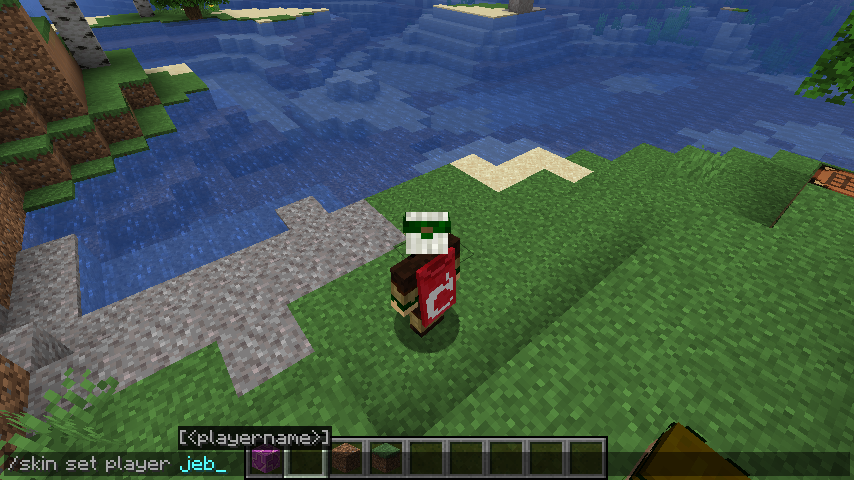
This is where FabricTailor comes in. Instead of juggling websites and uploads, you swap skins using a command inside the game. Your character instantly adopts a new look, and the server keeps that change synchronized for everyone. For players who like switching their appearance frequently - whether for roleplay, community events, or just experimenting - it's genuinely useful.
But here's the thing: it works server-side. But that distinction matters.
What FabricTailor Does
FabricTailor is a Fabric mod written in Java that lets you swap skins using a simple command. You can set a skin from a file, pull one from a URL, or clear it back to your original account skin. The server handles everything, so players without the mod will still see your changes applied. They'll see vanilla Minecraft skins perfectly; they just won't render custom capes or ultra-high-resolution textures if other players are using those.
The project sits at around 120 GitHub stars and handles skin data through two established APIs: MineSkin for uploading and signing custom skins, and ely.by for pulling existing skin values and signatures. These names probably mean something if you've dug into Minecraft's skin system before. If not, just think of them as the infrastructure that makes custom skins actually work across servers.
What's interesting for server admins is the permission system. You can grant or revoke the /skin command entirely, lock it to file uploads only, or restrict it to URL-based skins. This gives you control over what players can do - useful if you want to prevent certain kinds of skins from being set on your server.
Think of it as giving players a character customization tool they access without leaving the game.
Installation and Setup
Installation follows standard Fabric mod procedure. You'll need Fabric Loader and the Fabric API installed, then drop the mod JAR into your mods folder. The latest release is version 2.9.1, built for Minecraft 26.1. Download it from CurseForge or Modrinth - both platforms host it prominently.
For a server installation:
cd /path/to/server

# Download the latest release
wget https://github.com/samolego/FabricTailor/releases/download/2.9.1%2B26.1/fabrictailor-2.9.1.jar

# Move it to your mods folder
mv fabrictailor-2.9.1.jar mods/

# Restart the server./start.sh
If you're running a singleplayer world with Fabric, the process is identical - just drop the mod into your singleplayer mods folder and launch. The mod initializes with default permissions (everyone can use /skin unless you configure otherwise).
Configuration happens through your permission manager. If you're using something like LuckPerms, you can set nodes like fabrictailor.command.skin to control who accesses the command, or fabrictailor.command.skin.set.url to restrict to URL uploads only. The project's GitHub wiki lists all available permission nodes if you need fine-grained control.
No special dependencies or setup beyond dropping it in the mods folder and restarting.
Using the /skin Command
Once installed, the command syntax is straightforward:
/skin set <file|url>
/skin clear
Setting a skin from a file works best if you're managing skins on your server centrally. You'd host a PNG file on your server, then run /skin set file://path/to/skin.png. Setting from a URL pulls directly from external sources - any valid PNG skin file on the internet works.
Clearing your skin reverts you to your original account skin, which is useful if you want to undo a change. The command executes instantly from your game client, assuming you have permission to use it. Where things get interesting is in multiplayer. Your new skin propagates immediately to all connected players. On a larger server, you'll see it reflected in the tablist within seconds. This is what makes the server-side approach valuable - there's no client-side mod requirement, no waiting for skins to sync through Mojang's systems, no inconsistent rendering across different clients.
Server-Side vs Client-Side: Why It Matters
This distinction is core to why FabricTailor stands out. Server-side means the server controls skin display. Players who don't have the mod installed will still see your custom skin. They'll see vanilla skins perfectly, with no missing textures or fallback rendering.
Client-side mods work differently. They enhance your personal view - better graphics, effects, whatever - but other players don't see those enhancements unless they also have the mod. For a skin mod, that's a fundamental problem. You want everyone seeing the same character. Server-side enforcement solves that. The server says "this player has this skin" and all clients receive that data. One tradeoff is that ultra-high-resolution skins and custom capes only render correctly for players who have FabricTailor. Vanilla clients see the standard 64x64 skin texture. It's a reasonable compromise - most players care that everyone's skins are consistent and customizable, not that everyone's getting maximum visual fidelity.
Common Gotchas and What to Know
One thing that trips up new users: don't lock yourself out. If you lose permission to use /skin and you're not an admin, you can't fix it yourself. An operator has to restore your permissions. Plan ahead if you're testing on a public server.
Skin files need to be valid PNG images. The mod doesn't validate format aggressively, so corrupted or malformed uploads will silently fail. Test skins locally before deploying them to your server to avoid confusion.
HD skins and custom capes require players to have the mod installed. If your server mixes clients with and without FabricTailor, vanilla players will see basic skins while modded players see fancy ones. It's not a deal-breaker, but worth knowing. You can read the full breakdown on the project's GitHub wiki.
URL-based skins are convenient but add a network request on every server start. If the URL goes down or changes, skins that depended on it will fail. Self-hosting skin files is more stable for long-running servers.
One quick note: the mod works singleplayer too, if you want to experiment before deploying to a server.
Finding Skins and Alternatives
You can use any Minecraft skin from community collections or texture pack sites. Browse the Minecraft.How skin collection for thousands of community-created options. Many players also create custom skins using online editors, then upload them via FabricTailor's /skin command.
For other skin mods, Reskin and CustomSkinLoader are older Fabric options that still see maintenance, but they require client-side installation on all players' machines - which defeats the purpose if you want server-wide consistency. Forge users won't find FabricTailor useful since it's Fabric-specific.
For server admins specifically, FabricTailor's server-side approach makes it stand out. You're not dependent on every player installing a mod. If you want a tool that works for singleplayer and servers alike and lets you maintain consistent skins across your community, this delivers that without friction.
If you're already running a Fabric server and need skin flexibility, FabricTailor is honestly the cleanest solution.
Getting Started
FabricTailor fills a legitimate gap in Minecraft's out-of-the-box customization options. It's a focused project - 120 GitHub stars reflects that - but it solves a real problem for servers that care about character customization and consistency. Setup takes minutes. Usage is intuitive. Documentation is solid.
If you're managing a Fabric server or want skin flexibility in singleplayer, it's worth testing. Head to the GitHub releases page, download version 2.9.1, and try it in a test world first. Once you've used /skin set to swap appearances without leaving the game, you'll understand why server-side skin management matters.
While you're exploring Minecraft tools, the Nether Portal Calculator is handy for coordinating travel between dimensions on survival servers - might as well have everything you need in one place.
samolego/FabricTailor - LGPL-3.0, ★120 Open the FabricTailor repo ↗