Legendary Java Minecraft with Geyser and Floodgate: Run a Cross-Edition Server in Docker
Legendary-Java-Minecraft-Geyser-Floodgate (TheRemote/Legendary-Java-Minecraft-Geyser-Floodgate)
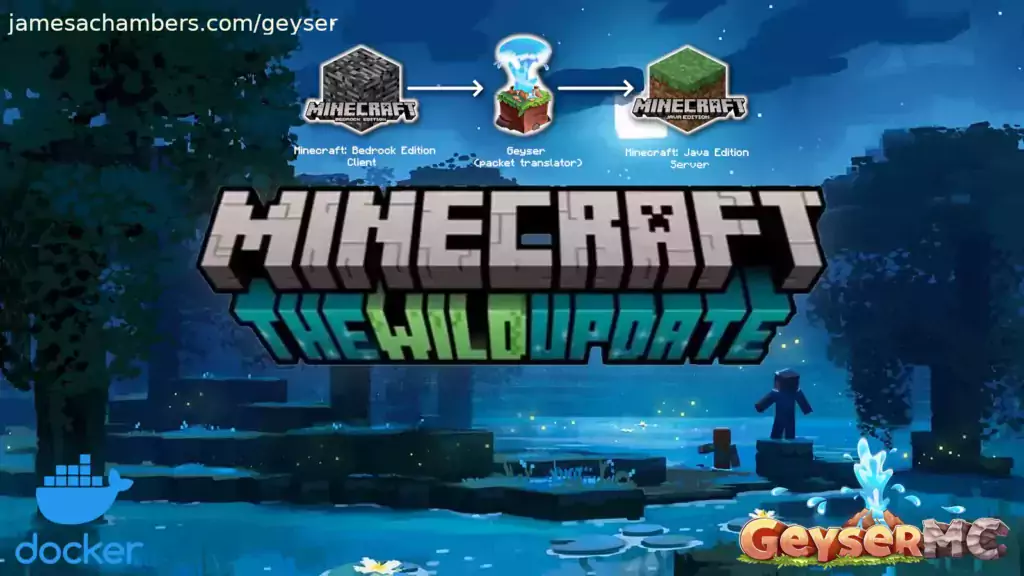
Legendary Java Minecraft + Geyser + Floodgate + Paper Dedicated Server for Docker allowing Bedrock players to connect to a Java server
You've got a Java Minecraft server running, but your friends on console or mobile (Bedrock Edition) can't join. That's the core problem this project solves. TheRemote's Legendary container spins up a pre-configured Paper server with Geyser and Floodgate baked in, letting Bedrock and Java players share the same world without workarounds or manual setup.
What This Does
This is a Docker container that launches a production-ready Minecraft Java server. But unlike most server setups, it includes two crucial proxies: Geyser translates Bedrock Edition protocol to Java protocol, and Floodgate lets Bedrock players authenticate using their existing Microsoft account. No extra admin panel, no username sync nightmares.
You get Paper under the hood (the high-performance server fork trusted by big servers worldwide), full Bukkit/Spigot plugin compatibility, automatic backups on restart, and it works on Linux boxes, Kubernetes clusters, or even a Raspberry Pi if you're feeling experimental.
Why This Matters: The Bedrock Problem
Here's the friction: Java Edition is PC and Mac. Bedrock Edition is Nintendo Switch, PlayStation, Xbox, mobile, and Windows 10/11. Want them on the same server? Normally you'd run a completely separate Bedrock server, or run some janky workaround. Geyser solves this by sitting between Bedrock clients and your Java server, translating on the fly.
Floodgate is the elegant part. Instead of making Bedrock players create a separate account on your server, they connect with their existing Bedrock credentials. It's a surprisingly smooth experience compared to the alternatives.
And yes, this matters. If you've got family or friends spread across Switch, PlayStation, and PC, or you're running a community server where not everyone has Java Edition, this saves you from maintaining two separate servers.
Getting It Running on Docker
You'll need Docker installed. That's it for prerequisites. First, create a named volume to store your server data (worlds, player data, config files):
docker volume create minecraft-dataNow launch the server with the default ports (Java on 25565, Bedrock on 19132):
docker run -it -v minecraft-data:/minecraft -p 25565:25565 -p 19132:19132/udp -p 19132:19132 --restart unless-stopped 05jchambers/legendary-minecraft-geyser-floodgate:latestThe container pulls down the latest Paper build automatically, installs OpenJDK, and configures Geyser and Floodgate. On first boot it'll compile some config files. Grab a coffee. Ten minutes later, your server is live on both protocols.
Want custom ports? Use environment variables. This example moves Java to 12345 and Bedrock to 54321:
docker run -it -v minecraft-data:/minecraft -p 12345:12345 -e Port=12345 -p 54321:54321/udp -p 54321:54321 -e BedrockPort=54321 --restart unless-stopped 05jchambers/legendary-minecraft-geyser-floodgate:latestOr pin a specific Minecraft version (say 1.20.4):
docker run -it -v minecraft-data:/minecraft -p 25565:25565 -p 19132:19132/udp -p 19132:19132 -e Version=1.20.4 --restart unless-stopped 05jchambers/legendary-minecraft-geyser-floodgate:latestKey Features That Matter
Paper, not Vanilla. Paper is a fork of Spigot that optimizes server tick speed without breaking vanilla mechanics. You'll see actual FPS improvements, smoother mob behavior, and less lag on builds that would choke vanilla. This matters if you've got more than a handful of players or complex redstone contraptions.
Plugin ecosystem access. Want WorldEdit, LiteBans, dynmap, or custom plugins? Paper runs them all. Geyser doesn't interfere. You can load anything the Spigot community has built in the last decade.
Automatic backups on restart. Minecraft backups go into a `backups` folder in your volume. On container restart, it snapshots the world. Look, but this is genuinely helpful if you're testing plugins or dealing with player grief.
Cross-platform in one process. Most solutions for Bedrock + Java involve running two separate servers, two separate worlds, and a pain-point for syncing bans or player data. This runs one world, one set of plugins, one admin experience. Your Bedrock friends literally see the same builds your Java friends made.
Updates on launch. When you restart the container, it checks Paper's API for a newer build and updates automatically. No manual version hunting.
What You Need to Know Before Installing
Memory. The container defaults to some reasonable limits, but a busy server with plugins burns RAM fast. If you're running it on a regular machine, allocate at least 2-3 GB. A Raspberry Pi will struggle with more than 5-10 players unless you tune the world carefully (render distance matters more on pi than on a real server).
Bedrock client quirks exist. Bedrock players can't use some Java-only features (custom enchants from Command Blocks sometimes act weird, certain NBT tags won't render). These are rare enough that most vanilla survival servers just work, but if you're running heavy custom mechanics, test with a Bedrock account first.
Port forwarding is your job. If you're hosting this behind a router, you need to forward 25565 (TCP) and 19132 (both TCP and UDP) to your machine. Every router is different, but it's the same process as hosting a normal Minecraft server.
The Paper config lives inside the container. If you want to tweak spawn-limits or mob-cap, you'll need to either edit the config file inside the volume (it gets mounted at `/minecraft`), or pass environment variables for common settings. Read the README for the full list of supported env vars.
Actually, one more thing: Floodgate adds a prefix to Bedrock player usernames by default (something like `*.Bedrock Username`). You can configure this in the geyser config, but out of the box it helps you distinguish them. Useful if you ever need admin actions that affect one platform specifically.
Running This on Kubernetes or Raspberry Pi
If you're into Kubernetes, the same Docker image works as a standard deployment. Mount a persistent volume for `/minecraft`, expose ports, and you're set. One admission: Geyser under heavy load benefits from tuned JVM parameters, so if you're scaling to hundreds of players, you'll want to customize the Java flags.
Raspberry Pi is the other extreme. It'll run on Pi 4 or newer. Performance is... fine for small survival servers or creative mode. Five players doing light mining? No problem. Fifteen players with active farms and nether portal activity? Expect some lag. The Pi's CPU is the bottleneck, not Docker.
Alternatives and How This Compares
**Geyser Standalone + Separate Java Server.** You could run Geyser as a proxy in front of your existing Java server (even a vanilla one). It works, but it means maintaining a separate process, and Geyser would need its own resource overhead. This container bundles them together and handles lifecycle management, so it's simpler.
**Bedrock Server + Geyser Reverse.** Running a native Bedrock server and proxying Java players to it is technically possible but rarely done well. Bedrock server is less flexible for plugins, fewer admin tools, smaller community. Not recommended unless you specifically want Bedrock edition features.
**Manual Installation.** You could install Paper, compile Geyser, configure Floodgate, and run it all manually. It works. But you're managing dependency hell, JVM versions, and config sync yourself. Docker isolates all that. The script handles it.
This setup wins if you want "one container, one world, both editions, minimal config." The tradeoff is less low-level control compared to a manual install, but honestly, you don't need it for most servers.
One Last Thing
The creator (James Chambers) maintains this aggressively. Issues get responses, the container stays up-to-date with recent Paper and Geyser releases. There's a blog post and an active community if you get stuck. The MIT license means you can fork it, modify it, and run it anywhere without worrying about licensing drama.
If you're looking to decorate your server, you might also explore Minecraft skin customization or create party invitations with our text formatting tools.

Lead writer at minecraft.how. Long-time Minecraft player running a small SMP server, testing every build, mod, and seed before writing about it.