Pakku: The Modpack Manager That Actually Works
"A multiplatform modpack manager for Minecraft: Java Edition. Create modpacks for CurseForge, Modrinth or both simultaneously."
juraj-hrivnak/Pakku · github.com
Building modpacks for Minecraft is exhausting when done manually. You're juggling mod dependencies, maintaining compatibility across versions, and if you're serious about distribution, you're essentially creating the same pack twice (once for CurseForge, once for Modrinth). Pakku cuts through all that mess.
What's Pakku, Really?
Pakku is a command-line modpack manager that borrows its philosophy from package managers like npm or Cargo. You define your modpack once, and Pakku handles the rest: dependency resolution, version management, and simultaneous export to CurseForge, Modrinth, or both.
Built in Kotlin and released under EUPL-1.2, it's got 121 GitHub stars and a solid foundation. The core idea is simple but powerful: treat your modpack like a software project. Version control it. Collaborate on it. Export it as finished packages without manual duplication.
Why You'd Want This
Let me be honest: you don't need Pakku to make a modpack. People have been doing it for years. But there's a difference between "possible" and "practical."
If you're running a private server with a custom modpack, you're probably managing mods manually right now. A new mod releases, you update it, you hope nothing breaks, you distribute the new version to your players. It works. But it's slow and error-prone.
Pakku shines when you're managing more than five or six mods, especially if you want your modpack available on multiple platforms simultaneously, you're collaborating with other people on development, you need version history and rollback capability, or you're running a server that evolves frequently. One key advantage: dependency management. Add a mod that requires three others, and Pakku figures out the dependency tree. You get the mods you asked for plus everything they need without manual hunting.
Getting It Running
Pakku runs anywhere Java 11+ is installed. Grab the latest release from GitHub:
# Download and extract (v1.3.3 is the latest)
wget https://github.com/juraj-hrivnak/Pakku/releases/download/v1.3.3/Pakku-1.3.3.tar
tar -xf Pakku-1.3.3.tar
cd Pakku-1.3.3

# Check available commands./pakku --help
That's it. You're ready to go.
The Core Workflow
Starting a new modpack is straightforward:
pakku init my-awesome-pack
cd my-awesome-pack
This creates a config file. Set your Minecraft version and pick your platforms (CurseForge, Modrinth, or both).
Adding mods is where Pakku flexes its real strength:
pakku add mod-namePakku searches your configured platforms, resolves dependencies automatically, and adds the mod to your project. It's like npm install, but for Minecraft mods.
When you're ready to release, export everything:
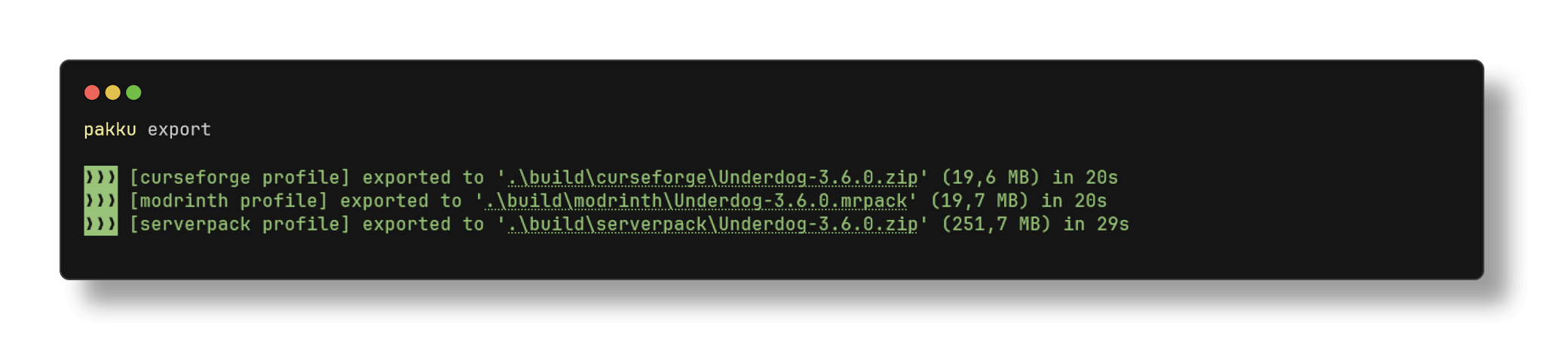
pakku exportOne command. Both formats. Zero manual fiddling.
You can also inspect what's in your pack, update individual mods, sync with your game folder, or diff between versions. Actually, the diff command is nice if you're trying to figure out what changed between releases of your own pack.
What Stands Out
The multiplatform approach is genuinely rare. Most tools lock you into CurseForge or Modrinth. With Pakku, you describe your pack once and deploy to both simultaneously. That's significant if your players are scattered across different launchers.
Version control integration comes built in. Your modpack becomes a Git repository by default, meaning you can track changes, collaborate on branches, and roll back if something breaks. This is transformative if you're working with other people.
CI/CD automation is another strength. If you're using GitHub Actions or similar, you can wire up automatic exports. Update a mod, push the commit, and your new package builds itself. That's the kind of workflow you'd expect from modern software development, adapted for Minecraft modpacks.
The import functionality deserves mention too. Take an existing modpack from CurseForge or Modrinth, run `pakku import`, and you get a new Pakku project with everything already configured. You're not starting from scratch even if you've already got something going.
Real-World Scenarios
Imagine maintaining a custom modpack for your server and wanting it on both CurseForge and Modrinth. Manually keeping both in sync is tedious and you'll eventually forget to update one. With Pakku, you update your config once, run export, and done.
Or you're working with friends on a collaborative pack. Without version control, coordination is messy: "did you update this mod?" "which version are we using?" With Pakku as a Git repo, everyone's on the same page.
If your pack adds new blocks or mechanics to explore, tools like the Minecraft Block Search can help you create documentation for your players about what's available. And if you're setting up custom commands or welcome messages for your server, the Minecraft Text Generator helps you format those cleanly.
Common Gotchas and Tips
Dependency resolution only works as well as the metadata provided by CurseForge or Modrinth. If a mod declares its dependencies incorrectly (and some do), Pakku will reflect that mistake. Always test your exported pack in your launcher before going live.
The latest release (v1.3.3) fixed an issue with Modrinth project file exports, which shows the project is actively maintained. Updates are steady but not disruptive - the command structure remains stable across versions.
One thing that tripped me up initially: make sure your config actually lists the platforms you want. If you're exporting to Modrinth, Modrinth needs to be in there. It sounds obvious, but easy to miss when you're switching between platforms.
How This Compares to Alternatives
Manual methods work but don't scale. Five mods are manageable; fifty mods across two platforms is tedious and error-prone.
MultiMC and similar launchers are excellent for playing modpacks, but they're client-side focused. They don't help you build and maintain a pack from the creator's perspective. Pakku fills that specific gap.
Some modpack creators use custom scripts or spreadsheets. They work, but you lose collaboration, version control, and CI/CD integration entirely. Pakku occupies a unique niche: it's specifically designed for modpack development workflows.
Getting Started
The official documentation is solid and worth reading through. There's also a Discord community if you get stuck (the maintainer is responsive and helpful).
Start with a test pack. Add three or four mods, export it, and test it in your launcher. Get a feel for the workflow before scaling up to a real project. The learning curve is gentle and the payoff is real.
If you're doing any serious modpack work, it's worth trying.
Visit juraj-hrivnak/Pakku on GitHub ↗
Lead writer at minecraft.how. Long-time Minecraft player running a small SMP server, testing every build, mod, and seed before writing about it.