LiquidLauncher - Minecraft专用客户端启动器完全指南
"The official Minecraft launcher for LiquidBounce"
CCBlueX/LiquidLauncher · github.com
If you're already running LiquidBounce and tired of managing installations manually, LiquidLauncher exists to streamline that process. It's a dedicated launcher written in Rust that handles version management, configuration, and launch options in one place instead of juggling terminal commands or scattered files. But before you install anything, there's something important you need to know about using modified clients online.
What LiquidLauncher Does
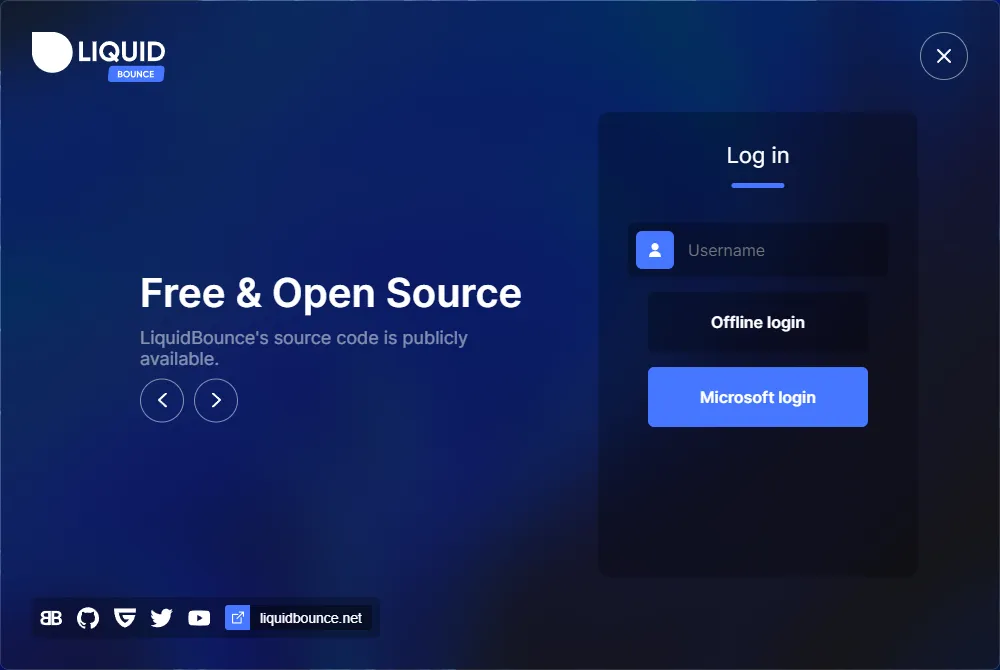
LiquidLauncher is the official launcher for LiquidBounce, a Minecraft client that adds quality-of-life features and gameplay modifications. Think of it as a management tool: it handles downloading the right versions, keeping your installation organized, and launching the client without you having to fuss with build processes or file paths.
The project is written in Rust and uses Tauri, a lightweight framework for building desktop applications. You get a graphical interface instead of command-line wrestling, which sounds simple but actually matters when you're juggling multiple versions or testing different configurations.
Why You'd Want It (and When You Shouldn't)
Here's where I need to be direct: LiquidBounce is a modified client. On most multiplayer servers, especially ones running anti-cheat systems like Hypixel, Badlion, or Mineplex, using LiquidBounce or any launcher for modified clients is explicitly prohibited. You'll get caught, you'll get banned, and that's not a hypothetical.
So what's the legitimate use case? Single-player survival worlds, personal testing, private servers with friends who've explicitly allowed modified clients, or experimental gameplay where mods make sense. If you're playing on a vanilla server or any public competitive server, stick with vanilla Minecraft or an approved launcher.
That said, for people who do play with LiquidBounce in appropriate contexts, LiquidLauncher actually streamlines things. The latest version (v0.5.0) introduced full macOS ARM support, better API performance for users with connectivity issues, and reduced resource usage by ditching persistent WebView processes. It also now includes an onboarding dialog for new users, which beats staring at a blank window wondering what to do next.
How to Install It
LiquidLauncher works on Windows, macOS, and Linux. The official project site has pre-built installers you can download directly, but if you want to compile it yourself (maybe to verify the code or customize something), here's what the README recommends:
git clone --recurse-submodules https://github.com/CCBlueX/LiquidLauncher
cd LiquidLauncher
bun install && bun run build
That assumes you've already installed Rust, Node.js, and Bun. If you haven't, the project points you toward official installation docs, which is the right approach - don't take instructions from random blog posts for toolchain setup. After building, you can either run it in development mode with bun run tauri dev or create a production binary with bun run tauri build.
For most people, downloading a pre-built release is the move. Visit the GitHub releases page, grab the installer for your operating system (AppImage for Linux, DMG for Mac, MSI for Windows), and run it. The first-launch wizard walks you through basic setup.
Key Features That Matter
The v0.5.0 release brought several real improvements. A UI now displays subsystem information when you're selecting additional mods, so you're not guessing whether a mod is compatible with your setup. Here's the thing, they also replaced the old launcher metadata system with Piston-Meta, which speeds up the initial setup since metadata retrieval is now more efficient.
Something I found genuinely useful: automatic retry logic for file downloads. If your connection hiccups mid-installation, it doesn't torpedo the whole process. It'll retry, and if it still fails, you actually get contextual help instead of just an error code.
The launcher also now handles client synchronization by piping account data through command-line arguments, which means if you're logged into LiquidBounce in the launcher, that login state carries through to the actual client. No more double-authenticating. And they've made the version text neutral, acknowledging that LiquidBounce supports multiple Minecraft versions instead of being locked to a single one.
Multi-Platform Support (And What Works)
Windows and Linux users have had working launchers for years. But macOS support was historically rough, especially on Apple Silicon (M1/M2/M3 chips). The v0.5.0 release finally fixed full ARM64 support for those Macs. If you've been putting off trying LiquidBounce because your MacBook Air seemed incompatible, it's worth another look.
One thing worth noting: LiquidLauncher replaced its WebView handling to only create WebView instances when needed, which sounds minor until you check your system resources. If you've run older versions and thought the launcher was eating RAM, that's actually fixed now.
The Anti-Cheat Problem (Important)
I mentioned this earlier, but it bears repeating because it's the biggest gotcha new users hit. Using LiquidBounce on a server without explicit permission is indistinguishable from cheating - because it's cheating, from the server's perspective. Anti-cheat systems like Hypixel's or big servers' internal detection will flag modified clients immediately.
This isn't LiquidLauncher's fault. It's just the reality of modified clients. If you're going to use LiquidBounce at all, only do it on:
- Single-player worlds (no risk, obviously)
- Private servers where everyone agreed modifications are okay
- Servers explicitly built for modded clients or PvP testing
- Development/testing environments
Everything else = ban incoming. I can't be clearer about that.
Keeping Your Installation Clean
If you want to remove LiquidLauncher and go back to vanilla Minecraft, it's straightforward. The launcher doesn't modify your core Minecraft installation files if you've kept them separate (which is the default). Uninstall the launcher app itself through your system settings, and the associated LiquidBounce files stay in their own directory. Delete that directory if you want a complete wipe.
The fact that it's clean removal matters. You're not hunting through obscure AppData folders (well, on Windows you technically might, but the launcher contains everything in one place) or worrying about leftover registry entries. It's self-contained.
Open Source, GPL-3.0, and What That Means
LiquidLauncher is published under the GPL-3.0 license on GitHub, which means the source code is public. You can inspect it, compile it yourself, and modify it for personal use. If you redistribute your modified version, you're legally obligated to share your modifications under the same license.
For a project like this, that transparency is valuable. It means security researchers and community members can audit the code, which helps catch issues early. The result doesn't guarantee safety (open source is good for transparency, not automatically for security), but it's better than closed-source alternatives where you're trusting blindly.
The project sits at 271 GitHub stars, which puts it in the middle ground - popular enough that it gets regular maintenance, not so massive that finding help is impossible but not trivial either. The maintainers are active (v0.5.0 was recent, not some five-year-old release), and they've got community spaces on forums, Guilded, and YouTube.
Contributing and Getting Help
Found a bug? There's an issues tracker on GitHub. Want to contribute? The project accepts pull requests. One code is Rust, so if you're not familiar with the language, contributing might be a learning curve, but the maintainers seem responsive to community input.
The project also publishes regular blog updates and news on LiquidBounce.net, and v0.5.0 specifically added replacement news feeds showing recent posts from the main LiquidBounce blog instead of in-launcher announcements. So you stay in the loop without the launcher being a news aggregator.
Before You Download Anything
Make sure you're downloading from the official GitHub repository. There are knockoffs and sketchy redistributes out there. Always grab releases directly from https://github.com/CCBlueX/LiquidLauncher.
Also, if you're on a restricted network (corporate, school, family-managed devices), LiquidLauncher might trigger flags since it's a launcher for a modified client. That's not a flaw in LiquidLauncher - it's a policy decision by whoever manages the network. Worth knowing upfront so you don't waste time troubleshooting something that's blocked by policy.
LiquidLauncher is a solid tool if you're already deep enough into LiquidBounce to want cleaner management. But it's absolutely not a casual download if you're just curious about Minecraft clients. Know what you're getting into, respect server rules, and you'll be fine.
CCBlueX/LiquidLauncher - GPL-3.0, ★271
Lead writer at minecraft.how. Long-time Minecraft player running a small SMP server, testing every build, mod, and seed before writing about it.
常见问题解答
LiquidLauncher 支持哪些操作系统?
用 LiquidLauncher 上 Hypixel 会怎样?
怎么安装 LiquidLauncher?
v0.5.0 版本有什么新功能?
LiquidLauncher 能管理多个 Minecraft 版本吗?
怎么卸载 LiquidLauncher 回到原版 Minecraft?
Have a Question or Tip about this Guide?Community Q&A
Ask a question or help other players below. Join the discussion and share your Minecraft tips!